Brand: ZTE
Category: Cell Phone
Document Type:
Language: EN
Brand: ZTE
Category: Cell Phone
Document Type:
Language: EN
Uploaded: Aug. 9, 2025, 11:59 p.m.
Manual Publish Date: 2020-07-31
No specific warranty period found in the provided text.
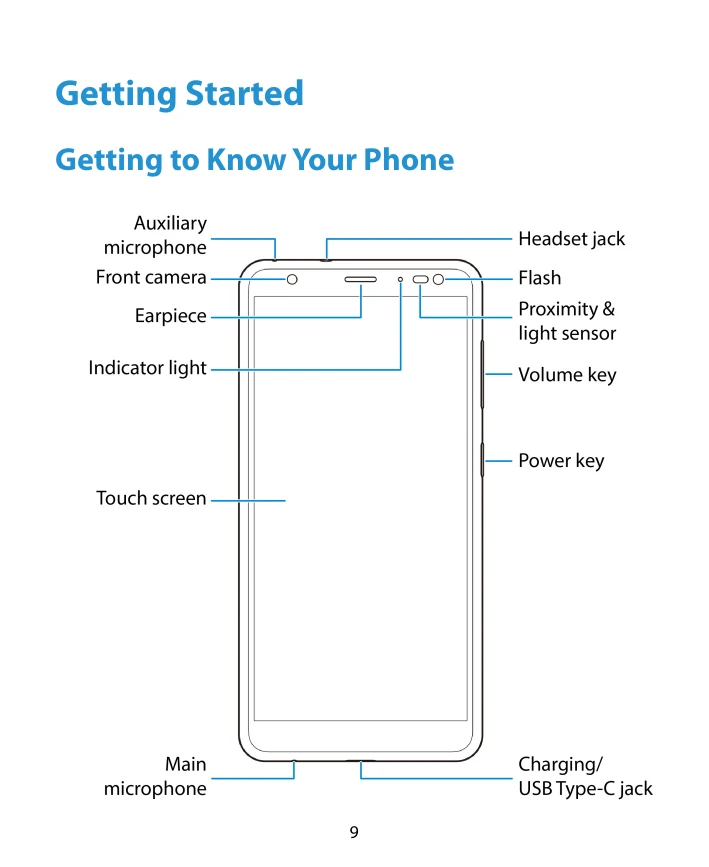
Getting to Know Your Phone: Familiarize yourself with the physical buttons and ports of your ZTE Z2, including the power key, volume keys, headset jack, charging port, front and back cameras, earpiece, speaker, and microphone.
Installing SIM and microSDXC Cards: Learn how to safely remove the battery cover, insert a nano-SIM card and an optional microSDXC card into their respective slots.
Charging the Battery: Understand how to connect the charger to your phone and a power outlet. It's recommended to fully charge the battery before first use.
Powering On/Off: Press and hold the power key to turn your phone on or off. A quick press and hold opens the power options menu.
Locking/Unlocking: Press the power key to quickly lock the screen and keys. Swipe up on the screen or use the fingerprint sensor to unlock.
Home Screen: The home screen is your starting point for apps and functions. You can customize it by adding shortcuts, widgets, and folders.
| Phone does not turn on even when charging. | Battery is extremely low. | Try again after charging for at least 20 minutes. If the issue persists, contact customer service. |
|---|---|---|
| Harmful interference to radio or television reception. |
|
|