Brand: ZTE
Category: Cell Phone
Document Type:
Language: EN
Brand: ZTE
Category: Cell Phone
Document Type:
Language: EN
Uploaded: Aug. 9, 2025, 11:59 p.m.
Manual Publish Date: 2015-07-31
Copyright © 2015 ZTE CORPORATION. All rights reserved.
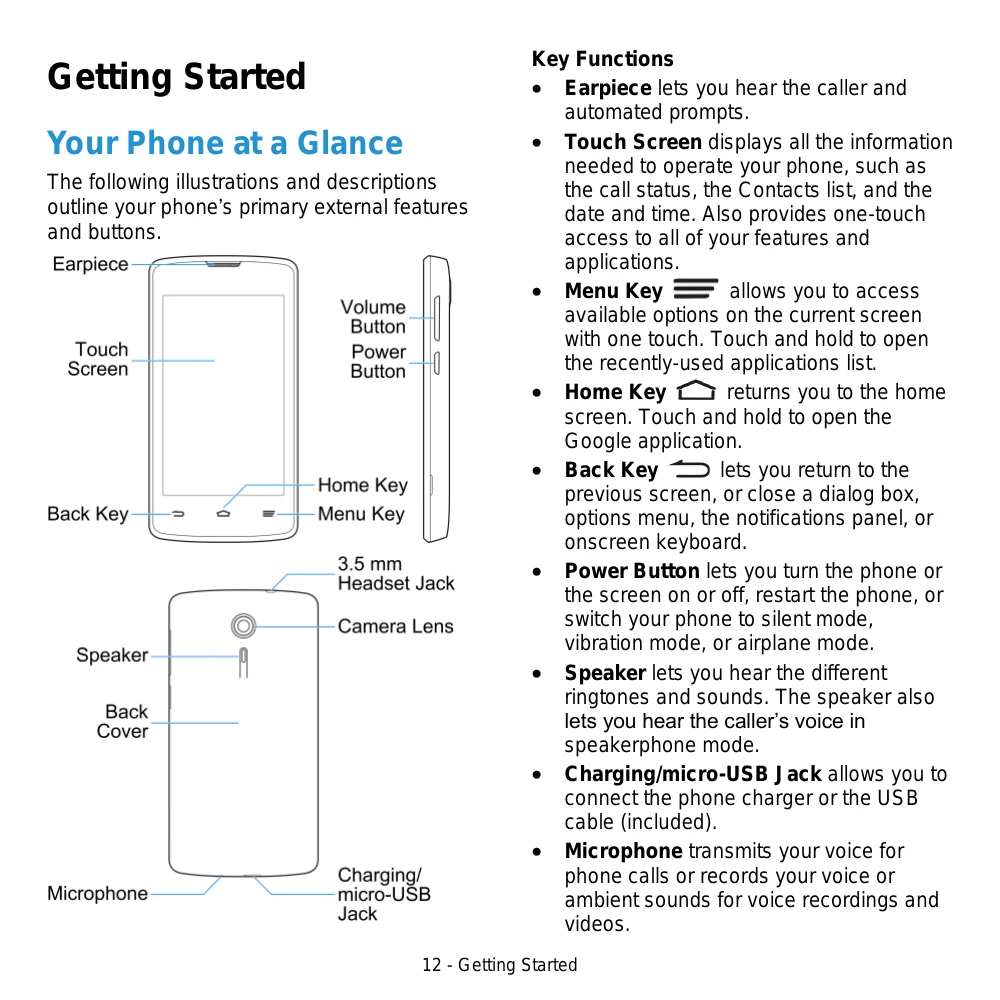
Turning Your Phone On/Off: Press and hold the Power Button to turn the phone on. To turn it off, press and hold the Power Button, then select 'Power off' and 'OK'.
Screen On/Off: Briefly press the Power Button to turn the screen off. Press it again to turn it on. If the screen is locked, you'll need to unlock it by touching and holding the screen or a shortcut icon.
Touch Screen Navigation: Interact with your phone using touch gestures like Touch (tap), Touch and Hold, Swipe or Slide, Drag, Flick, and Pinch and Spread for zooming.
Home Screen: The starting point for apps and functions. Swipe left or right to access extended screens. You can customize it by adding shortcuts, widgets, and folders.
Status Bar: Located at the top, it displays icons for 3G data, signal strength, Bluetooth, Wi-Fi, battery status, notifications, and more.
| Header 1 | Header 2 | Header 3 | Header 4 |
|---|---|---|---|
| Data 1a | Data 1b | Data 1c | Data 1d |
| Data 2a | Data 2b | Data 2c | Data 2d |
| Data 3a | Data 3b | Data 3c | Data 3d |