Manual for Imperial

Manual for Imperial

Brand: ZTE

Category: Cell Phone

Document Type:

Language: EN
Uploaded: Aug. 10, 2025, midnight

Manual Publish Date: 2013.4.20

Warranty Information

Refer to chapter For Your Safety for information to use your phone safely.

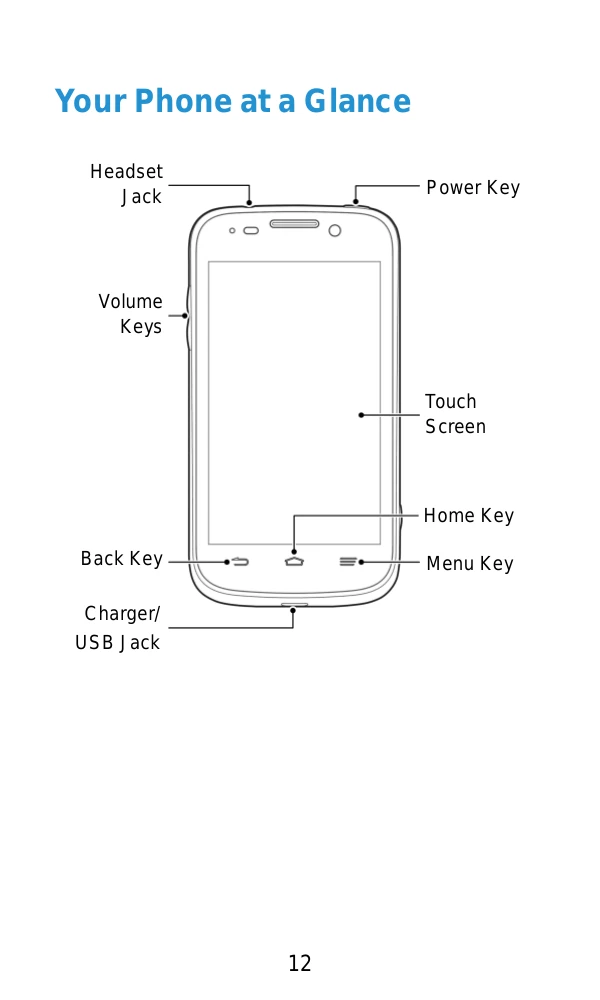
  • Getting Started: Learn about your phone's overview, keys, SIM/microSD/battery installation, charging, and powering on/off.
  • Personalizing: Customize system language, date/time format, ringtones, volumes, and wallpapers.
  • Knowing the Basics: Monitor phone status, manage notifications, shortcuts, folders, and input text.
  • Connecting: Connect to networks (mobile, Wi-Fi, Bluetooth) and devices (computer, virtual private networks).
  • Phone Calls: Make, answer, and manage calls, including call logs and settings.
  • People: Manage contacts, profiles, and groups.
  • Accounts: Add and configure accounts for email and synchronization.
  • Email & Messaging: Set up and use email accounts (including Gmail) and send text/multimedia messages.
  • Calendar: View and create events.
  • Google Talk & Google+: Use communication and social features.
  • Browser: Navigate the web, download files, and manage bookmarks.
  • Maps/Navigation/Latitude: Get location-based services.
  • Camera: Capture photos and record videos.
  • Gallery: Organize and view pictures and videos.
  • Music: Play music and manage playlists.
  • Sound Recorder: Record and play voice memos.
  • More Apps: Access additional applications like Alarm, Calculator, Chrome, File Manager, etc.
  • Settings: Configure general, network, device, personal, account, and system settings.
  • For Your Safety: Important safety information regarding RF energy, FCC compliance, hearing aid compatibility, distraction, electrical safety, battery handling, interference, and explosive environments.
Privacy Policy