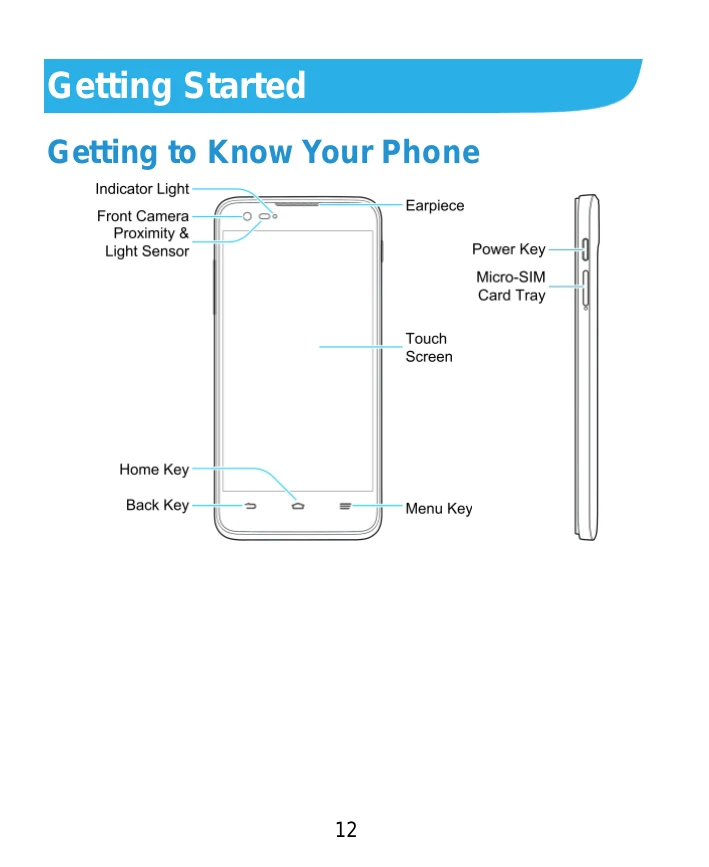
Getting to Know Your Phone: Familiarize yourself with the device's indicators, camera, sensors, keys, and screen.
Knowing the Keys: Learn the functions of the Power Key, Home Key, Menu Key, Back Key, and Volume Key.
Installing the micro-SIM Card: Insert the SIM card tray correctly.
Charging the Battery: Connect the approved charger to the charging jack. Use only ZTE-approved accessories.
Powering On/Off: Press and hold the Power Key to turn the phone on or off.
Restarting the Phone: Press and hold the Power Key for about 8 seconds if the phone freezes.
Setting Up for the First Time: Follow on-screen prompts to select language, sign in to accounts, and configure settings.
Locking/Unlocking the Screen and Keys: Press the Power Key to lock. Press the Power Key and touch/hold the screen to unlock, or use pattern/PIN/password if set.
Using the Touch Screen: Learn touch gestures like touch, touch and hold, swipe, drag, pinch, and rotate.
Getting to Know the Home Screen: Understand the layout including status bar, widgets, wallpaper, shortcuts, and favorite shortcuts.