Brand: Zenza Bronica
Category: Cameras
Document Type:
Language: EN
Brand: Zenza Bronica
Category: Cameras
Document Type:
Language: EN
Uploaded: Aug. 9, 2025, 11:44 p.m.
None
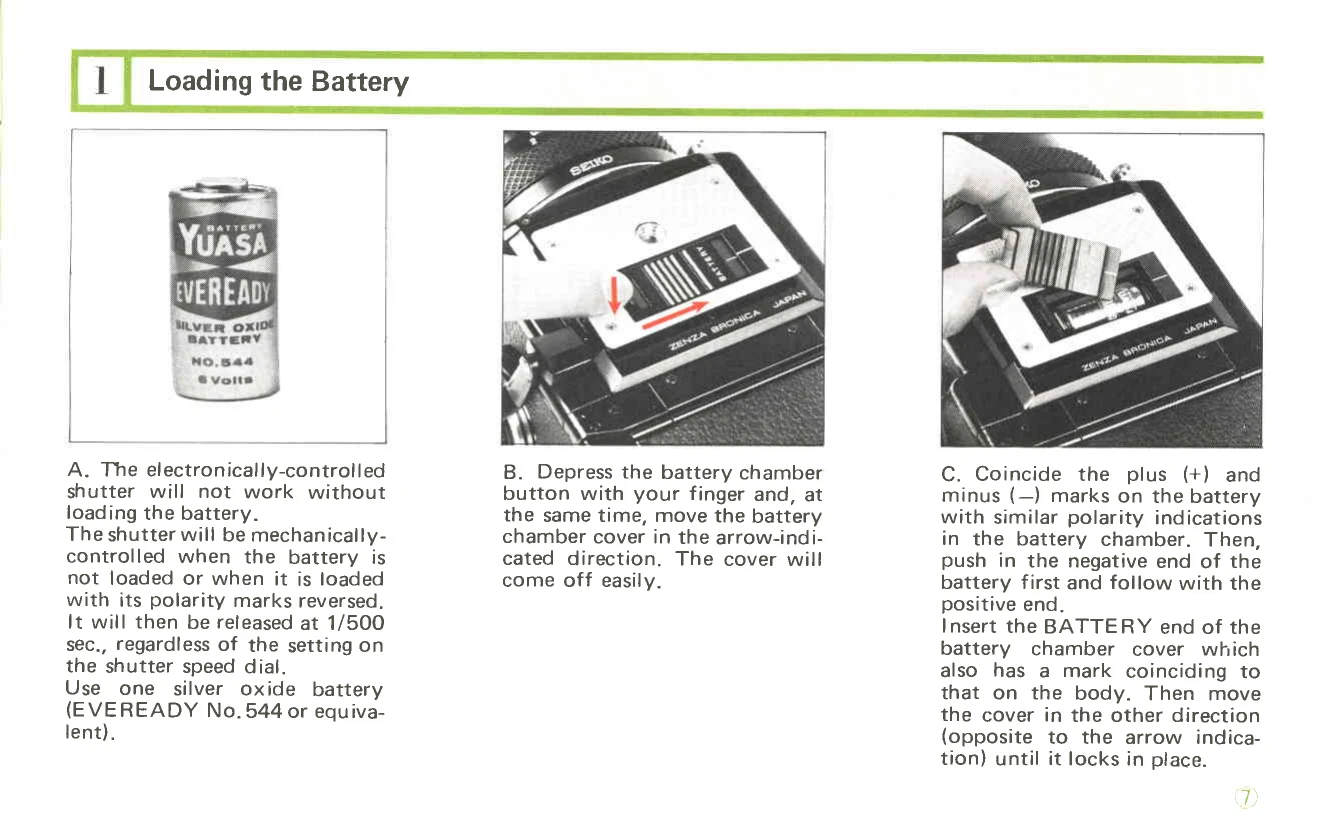
Loading the Battery: Insert a 6-volt silver oxide battery, ensuring correct polarity. The electronically-controlled shutter requires a battery; otherwise, it operates mechanically at 1/500 sec.
Battery Checking: Press the battery check button. A green LED indicates a properly loaded battery with sufficient power.
Film Loading: Open the back cover by releasing the safety lock. Insert the film spool into the correct holder and wind the film across the pressure plate to the take-up spool, ensuring it is securely engaged. Advance the film with the winding crank until the exposure counter shows '1'.
Setting Shutter Speed: Use the shutter speed dial. Numbers 1-8S indicate full seconds, and 2-500 indicate fractions of a second. Red numbers are 1 sec. and longer; white numbers are fractions of a second.
Time Exposures: Use the time exposure lever on the lens. Unlock it by unscrewing the setscrew. Shift the lever to 'T' to open the shutter, which closes when the lever is shifted back to 'A'.
Exchanging Lenses: The shutter must be cocked. Release the lens by rotating the release button 45° clockwise, depressing it, and then rotating the lens clockwise. To attach, align red dots on the lens and body, insert, and rotate counter-clockwise until it clicks.
Focusing: Rotate the focusing ring while observing the split-image rangefinder spot or matte surface on the focusing screen.