Manual for Contaflex super

Manual for Contaflex super

Brand: Zeiss Ikon

Category: Cameras

Document Type:

Language: EN
Uploaded: Aug. 9, 2025, 11:59 p.m.

Warranty Information

No warranty information is available in the provided document.

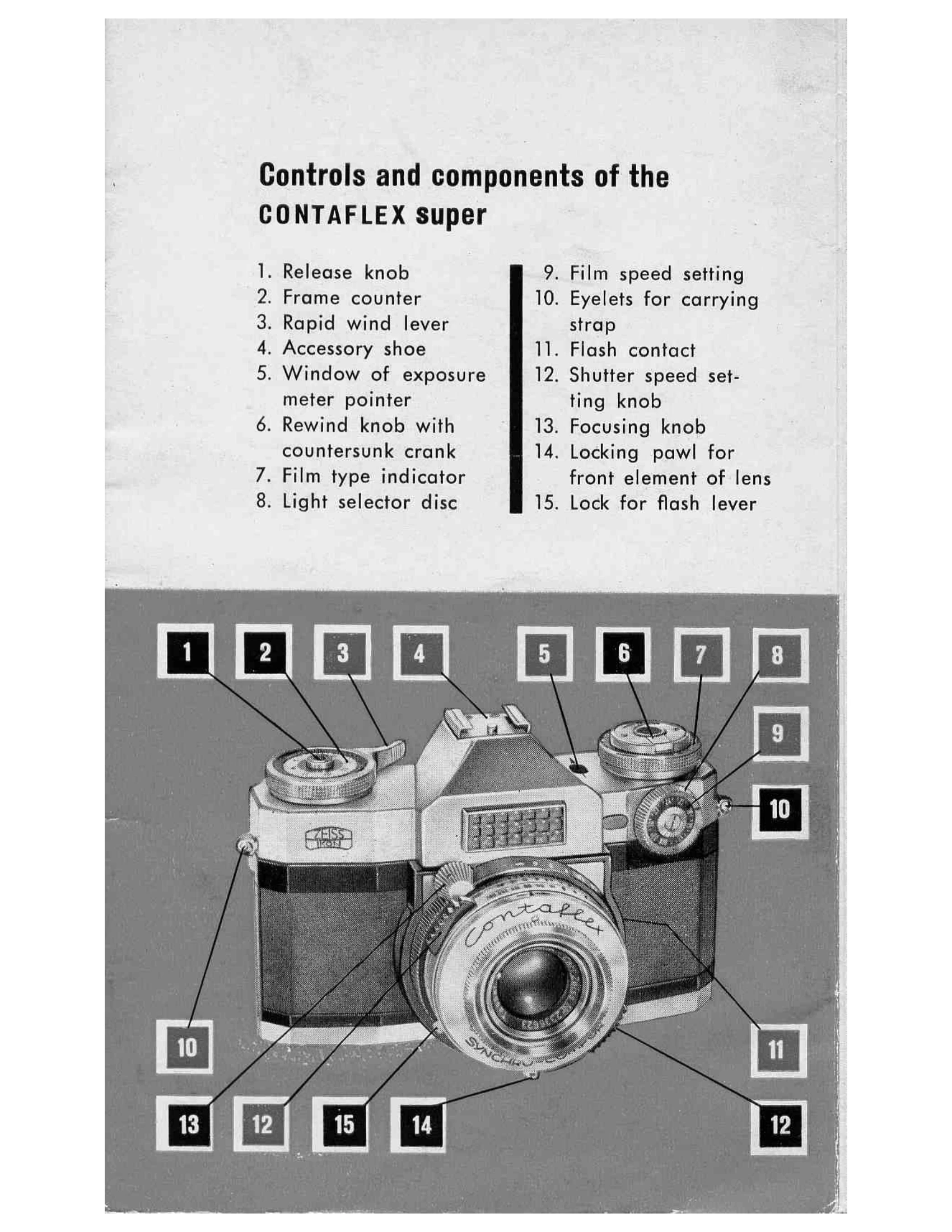
Loading and Unloading: Open the camera back using the locking keys. Insert the film cartridge and secure the film leader to the take-up spool. Wind the film to engage the sprockets. Close the back and wind the film leader using the rapid wind lever twice, releasing the shutter each time. Check the rewind knob for rotation to confirm film advance. Set the film speed on the indicator. For unloading, set the rewind knob to 'R' and rewind the film fully before opening the back.

Setting Distance: Use the split-image rangefinder in the viewfinder. Align the two halves of the image by adjusting the focusing knob. A sharp, undistorted image indicates correct focus. Alternatively, use the fine screen ring for focusing.

Measuring Light: Use the automatic exposure control. Point the camera at the subject and observe the pointer in the viewfinder. Adjust aperture/shutter speed until the pointer aligns with the mark. The shutter speed ring has scales for fractions of a second and full seconds, including 'B' for extended exposures.

Troubleshooting and error codes

Problem Cause Remedy
Shutter does not operate Shutter not tensioned Tension shutter using rapid wind lever
Film does not advance Film not loaded correctly Reload film, ensuring perforation engages sprocket
Exposure incorrect Incorrect film speed setting Set film speed according to film packaging
Blurry images Incorrect focus Use rangefinder or fine screen to focus
Privacy Policy