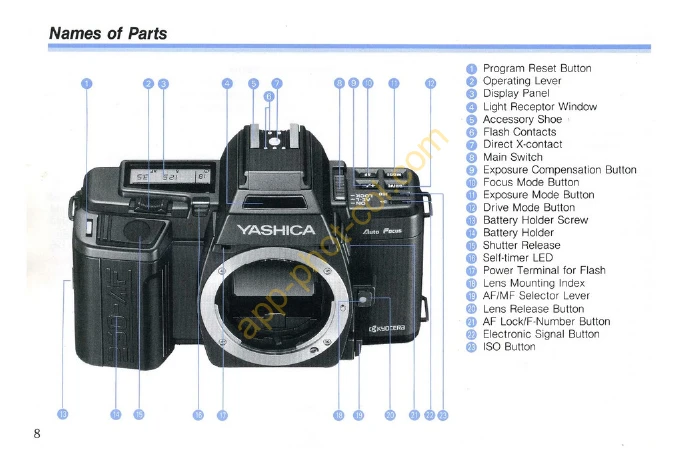
Mounting the Lens: First, remove the lens cap and body cap. Align the red dot on the lens rear with the red dot on the camera's Lens Release Button. Push in and turn clockwise until it clicks. To dismount, press the Lens Release Button and turn counterclockwise.
Loading the Battery: Loosen the Battery Holder Screw with a coin and remove the Battery Holder. Insert the lithium battery correctly and lock it in place.
Main Switch: The switch has three positions: LOCK (off), AE-L (on, fixed exposure), and ON (on, center-weighted metering).
Loading the Film: Set Main Switch to ON, open the Camera Back. Insert the film cassette, align the perforated end with the spool, and push it in. Close the Camera Back. Engage perforations with sprocket teeth and ensure film is flat. Close Camera Back.
Taking Pictures: Set drive mode, focusing mode, and exposure mode. Move the Operating Lever to the left or right while pressing the mode button until the desired mode appears. The display will show settings for 8 seconds.