Manual for YHT-1840

Manual for YHT-1840

Brand: YAMAHA

Category: Audio/Video

Document Type: Manual

Language: EN
Uploaded: Nov. 21, 2025, 7:04 p.m.

Manual Publish Date: 2017-03-01

Warranty Information

Refer to the relevant owner's manuals for full instructions and precautions regarding your Yamaha Home Theater Package.

Part A: Speakers and Antenna

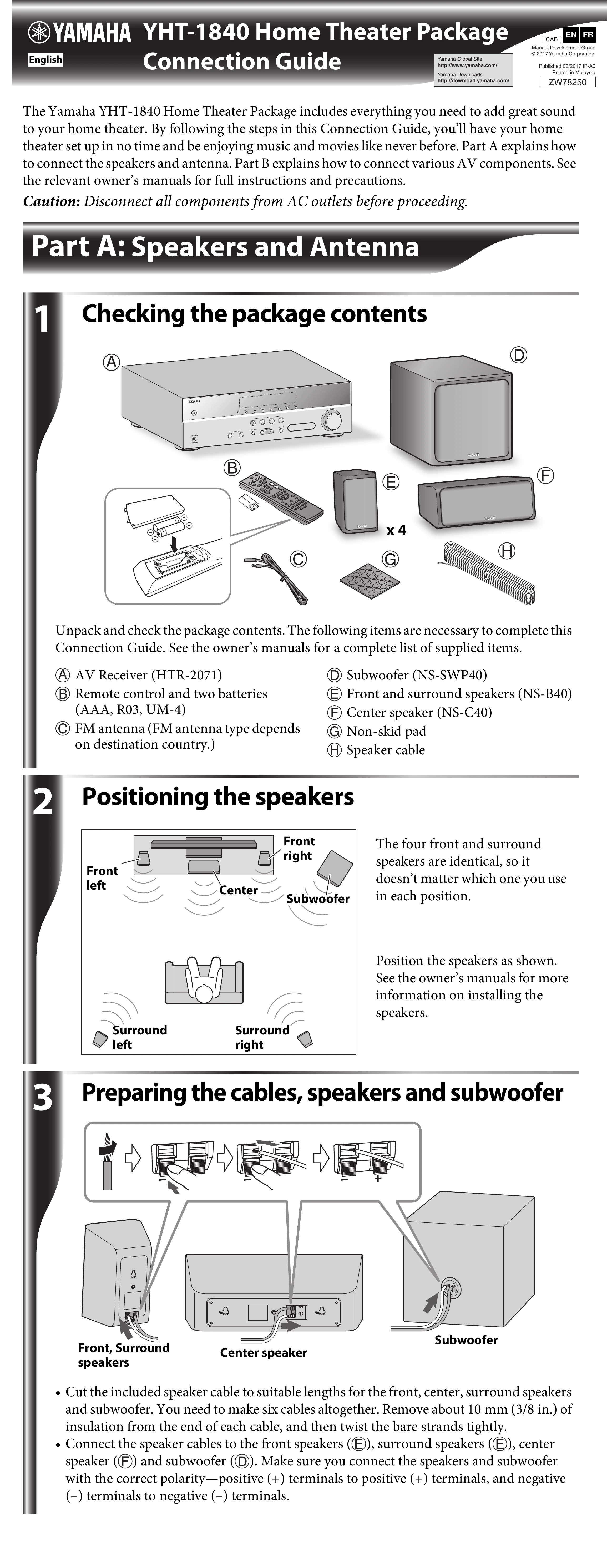
  1. Check Package Contents: Unpack and verify all components listed, including AV Receiver, remote, batteries, FM antenna, subwoofer, speakers, and speaker cable.
  2. Position Speakers: Place front, center, surround speakers, and subwoofer according to the diagram. Note that front and surround speakers are identical.
  3. Prepare Cables: Cut speaker cables to appropriate lengths, strip insulation, and twist strands. Connect speaker cables to speakers and subwoofer, ensuring correct polarity (+ to +, - to -).
  4. Connect Front Speakers: Connect front speaker cables to the AV Receiver's FRONT speaker terminals, observing polarity.
  5. Connect Center and Surround Speakers: Connect center and surround speaker cables to the AV Receiver's SURROUND CENTER and SURROUND L/R terminals, observing polarity.
  6. Connect Subwoofer: Connect subwoofer cable to the AV Receiver's SUBWOOFER terminal, observing polarity.
  7. Connect Antenna: Connect the FM antenna to the AV Receiver's FM ANTENNA input.

Part B: AV Components

  1. Connect HDMI Components: If applicable, connect TV, BD/DVD players, or set-top boxes to the AV Receiver using HDMI cables. Connect AV Receiver's HDMI OUT to TV's HDMI IN. Connect source devices to AV Receiver's HDMI IN (BD/DVD) and other HDMI IN jacks.
  2. Connect TV for Audio Output: Connect TV audio output (e.g., optical) to AV Receiver's audio input to listen to TV sound through the system. Select the appropriate input source on the AV Receiver. Note ARC support as an alternative.
  3. Connect AC Power: Set VOLTAGE SELECTOR (if applicable) BEFORE plugging into AC outlet. Connect AV Receiver and other components to AC outlets.
  4. Playback: Turn on components, use input selection keys to choose source, play component or select radio, and adjust volume.
Privacy Policy