Brand: YAMAHA
Category: Audio/Video
Document Type: Manual
Language: EN
Brand: YAMAHA
Category: Audio/Video
Document Type: Manual
Language: EN
Uploaded: Nov. 21, 2025, 8:53 p.m.
This product comes with a 2-year limited warranty for the EEA and Switzerland.
| Problem | Cause | Remedy | Page |
|---|---|---|---|
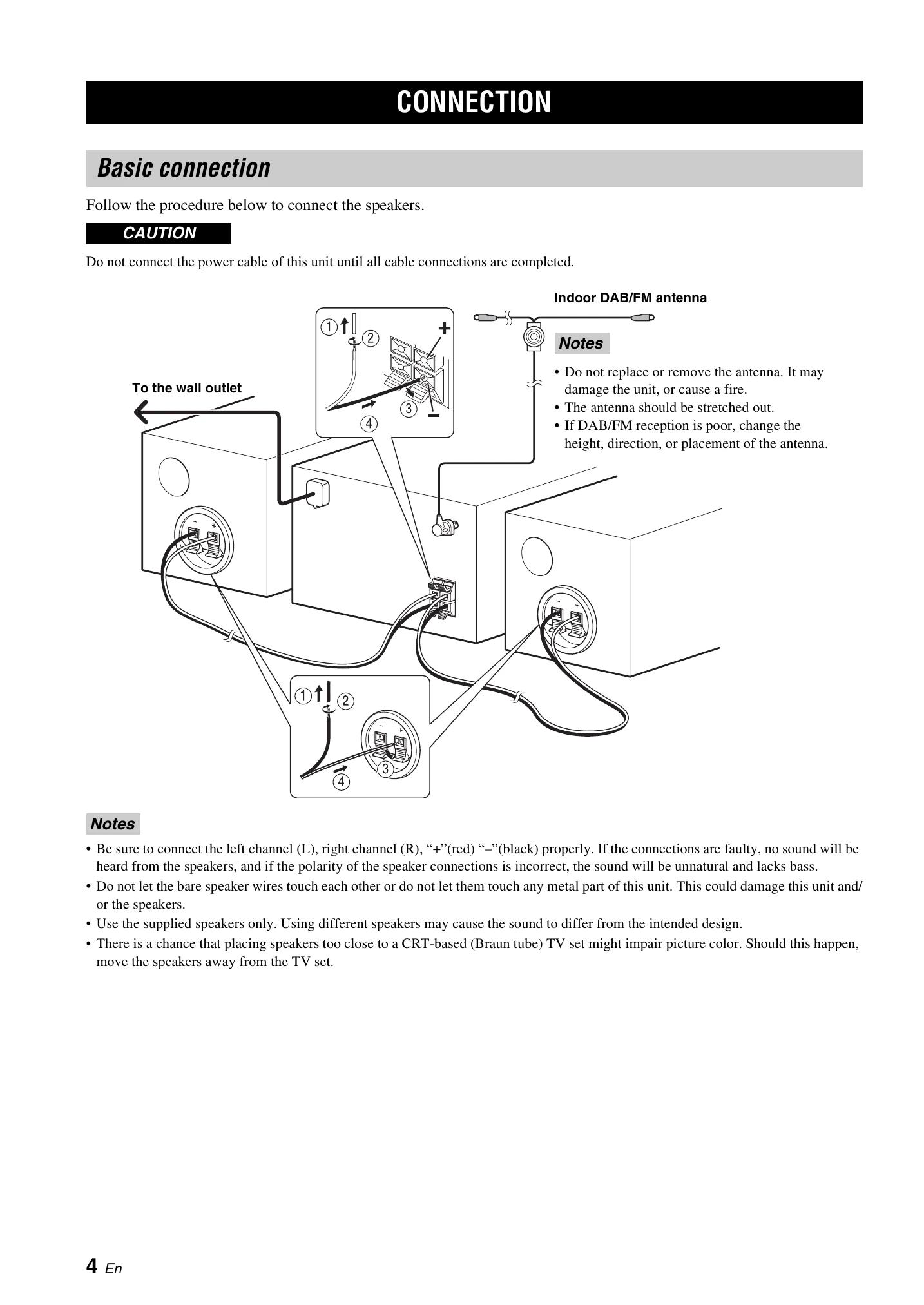
| This unit fails to turn on or enters the standby mode soon after the power is turned on. | The power cable is not connected or the plug is not completely inserted. | Connect the power cable firmly. | 4 |
| This unit has been exposed to a strong external electric shock (such as lightning or strong static electricity). | Set this unit to the standby mode, disconnect the power cable, plug it back in after 30 seconds and then use it normally. | — | |
| The unit does not operate properly. | No appropriate input source has been selected. | Select an appropriate input source with INPUT on the front panel (or the source buttons on the remote control). | — |
| No sound. | Speaker connections are not secure. | Secure the connections. | 4 |
| The mute function may be on. | Cancel the mute function. | 6 | |
| The volume is turned down. | Turn up the volume. | 3 | |
| Signals this unit cannot reproduce are being input from a source component, such as a CD-ROM. | Play a source whose signals can be reproduced by this unit. | — | |
| The power is suddenly turned off. | The sleep timer may be set. | This is not malfunction. Turn on the unit and play the source again. | — |
| The unit is left turned on for 1 hour without playback or any other operation being performed. | — | ||
| The power was turned on by the timer and elapsed specified running time. | — | ||
| MCR-140: The iPod selected as the input source is disconnected from the transmitter, or does not output sound for a certain period. | — | ||
| The clock setting has been cleared. | The power cable has been disconnected. | Connect the power cable, and set the clock again. | — |
| Sound is heard from the speaker on one side only. | Incorrect cable connections. | Connect the cables properly. If the problem persists, the cables may be defective. | 4 |
| There is noise interference from digital or radio frequency equipment. | This unit is too close to the digital or high-frequency equipment. | Move this unit farther away from such equipment. | — |