Brand: YAMAHA
Category: Audio/Video
Document Type: Manual
Language: EN
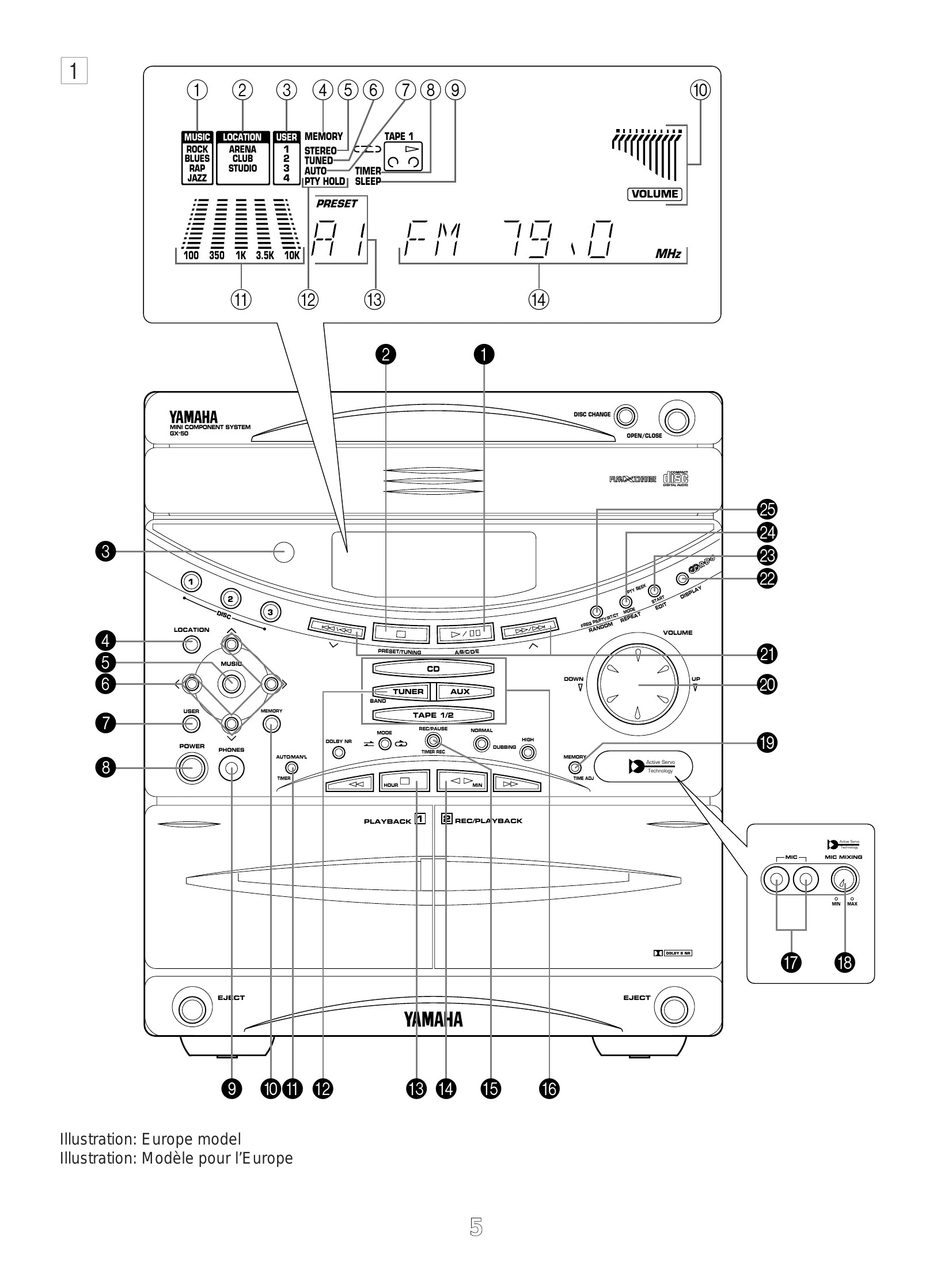
Brand: YAMAHA
Category: Audio/Video
Document Type: Manual
Language: EN
Uploaded: Nov. 21, 2025, 6:01 p.m.
This manual does not contain specific warranty information.
| SYMPTOM | CAUSE | REMEDY |
| No power even if the POWER switch is pressed. | AC supply lead is not plugged in. | Plug in the AC supply lead. |
| No sound from one speaker | Loose speaker connections. | Connect properly. |
| No sound from speakers. | Internal protection circuit is functioning. | Unplug the AC supply lead from the wall AC outlet, and then plug in again. |
| Excessive static in FM broadcasts. | Interference from starting motor of nearby car. | Position the FM antenna as high and as far away from nearby roads as possible. Connect using a coaxial cable. |
| Noise increases during stereo broadcasts. | Interference from thermostat of nearby electrical appliance. | Check antenna connections. |
| Stereo broadcasts are noisy and STEREO indicator blinks and off. | Antenna input is too weak due to obstructions or excessive distance from broadcasting station. | Install a multi-element type FM antenna if possible. |
| Cannot select preset stations. | Insufficient antenna input. | Install an antenna appropriate for the electric field strength of your area. |
| Buzzing or static during AM (LW or MW) broadcasts. | Preset memory has been erased. | Reprogram memory presets. |
| AM (LW or MW) broadcast sensitivity is poor. | Interference from source such as lightning, flourescent lights, electric motors or thermostat of nearby electrical appliance. | Problem is difficult to eliminate but can be lessened by grounding MW/LW (AM) loop antenna. |
| Can't set timer. | TV or microprocessor is being used nearby. | Move away from TV or microprocessor. |
| This unit will not operate properly. | Radio signal is weak or antenna is not properly connected. | Properly connect MW/LW (AM) loop antenna. |
| Current time is not set. | Set current time. | |
| The internal microcomputer has been frozen by an external electric shock (lightning, excessive static electricity, etc.) or power supply with low voltage. | Unplug the AC supply lead from the wall AC outlet, and then plug in again after about one minute. | |
| Play will not begin even if disc is loaded. | Disc is upside down. | Load disc label side up. |
| No sound. | Disc is dirty. | Clean disc. |
| Sound stops suddenly (always at same spot). | Input selector setting is incorrect. | Press the CD input selector button. |
| Disc is dirty. | Clean disc. | |
| Volume is set too high. | Lower volume. | |
| Tape won't move during playback or recording. | Slack tape wrapped around pinch roller. | Take up slack with a pencil before using. |
| Can't record. | Erasure prevention tab is broken off. | Replace tape or cover erasure prevention hole with cellophane tape. |
| Sound is distorted or fades out. | Head is dirty. | Clean heads. |
| Poor sound quality. | Head has become magnetized. | Demagnetize heads with head eraser. |
| Tape is worn. | Replace tape. | |
| Tape encoded with Dolby NR is played back with this unit's Dolby NR system off. | Press the Dolby NR button to turn it on. | |
| Stereo balance is poor. | Head is dirty. | Clean heads. |
| Excessive noise. | Head has become magnetized. | Demagnetize heads with head eraser. |
| Tape is worn. | Replace tape. | |
| Tape travel stops in middle of playback or recording. | Slack tape coming out of cassette shell. | Take up slack by turning reels with a pencil. |
| Tape is creased or torn. | Replace with new tape. | |
| Endless tape is being used. | Don't use endless tapes. | |
| Can't find the beginning of desired selections on tape. | Silent gaps between selections are too short. | The function of searching for the beginning of desired selections won't operate unless the silent gaps between selections are at least four seconds long. |
| Remote control doesn't work. | Batteries are dead. | Replace batteries. |
| Remote control is too far away or is being used at incorrect angle. | Use within 6 m and 60° radius. | |
| TV functions strangely when the remote control is used. | Direct sunlight or lighting (of an inverter type of flourescent lamp etc.) is striking the remote control sensor of the main unit. | Change position of the main unit. |
| Remote control is being used near TV set with a remote control sensor. | Relocate this unit away from the TV or cover TV's remote control sensor. |