Brand: Xiaomi
Category: Audio
Document Type: Manual
Language: EN
Brand: Xiaomi
Category: Audio
Document Type: Manual
Language: EN
Uploaded: April 20, 2026, 7:30 p.m.
Xiaomi offers specific consumer warranty benefits in addition to legal warranties, with details available on their official website.
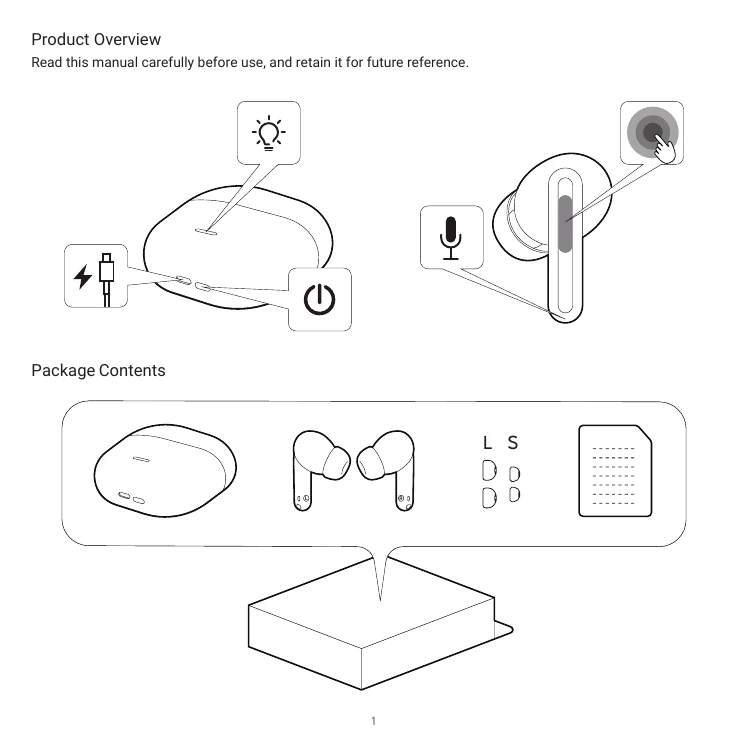
Read this manual carefully before use, and retain it for future reference.
Includes charging case, earbuds, and ear tips.
Peel off protective film, place earbuds in case, close and reopen lid for Bluetooth pairing.
Insert earbuds correctly into ears for optimal fit and sound.
Connect charging cable to case. Packaging does not include a cable.
Earbuds turn on automatically when opening the case. They turn off and enter sleep mode when placed back in the case and the lid is closed.
Open case lid, hold function key for 2 seconds until light flashes for pairing mode. Activate device's Bluetooth to connect.
Open case lid, press and hold function key for 10 seconds until light flashes three times.
Double tap to answer/end calls or play/pause music. Triple tap to cancel/reject calls or skip tracks. Press and hold for 2 seconds to toggle Transparency, Noise cancellation, or Off.
Scan QR code to download Xiaomi Earbuds app for more features. Follow app instructions.