Manual for PACF29CO W

Manual for PACF29CO W

Brand: Whirlpool logo Whirlpool

Category: Air Conditioner

Document Type: Manual

Language: EN
Uploaded: Nov. 21, 2025, 6:40 p.m.

Warranty Information

Refer to the warranty booklet for details on warranty information.

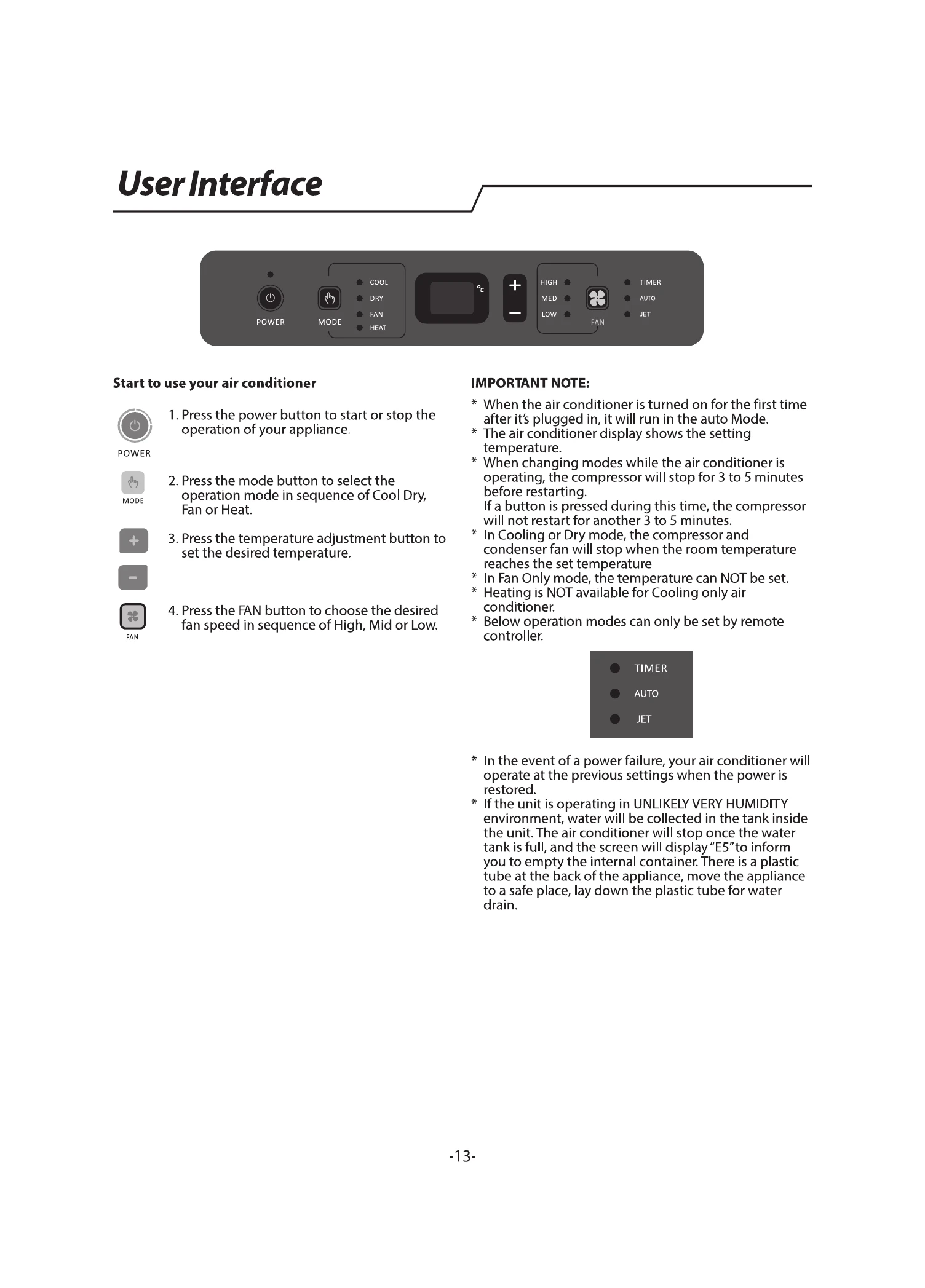
User Interface:

  1. Press the POWER button to start or stop the operation.
  2. Press the MODE button to select Cool Dry, Fan, or Heat.
  3. Use the temperature adjustment buttons (+/-) to set the desired temperature.
  4. Press the FAN button to select fan speed: High, Mid, or Low.

Important Notes:

  • On first startup, the unit runs in Auto Mode.
  • The display shows the set temperature.
  • Compressor stops for 3-5 minutes when changing modes.
  • In Cooling or Dry mode, the compressor stops when the set temperature is reached.
  • In Fan Only mode, temperature cannot be set.
  • Heating is not available for cooling-only models.
  • Certain operation modes can only be set via remote control.
  • After a power failure, the unit resumes previous settings.
  • If the water tank is full, the unit stops and displays "E5". Drain the tank using the plastic tube at the back.

Troubleshooting and error codes

TroubleAnalysis
Air conditioner does not operate
  • Check power cord is plugged in and outlet is grounded.
  • Check household fuse or reset circuit breaker.
  • Ensure the ON/OFF button is pressed.
  • Check for local power failure.
Air conditioner blows fuses or trips circuit breakers
  • Ensure correct capacity time-delay fuse or circuit breaker is used.
  • Too many appliances on the same circuit; unplug or relocate others.
  • Restarting too soon after turning off; wait at least 3 minutes.
  • Wait 3 minutes after changing modes before restarting.
Air conditioner seems to run too much
  • Keep doors and windows closed.
  • In cooling mode: consider room occupancy, heat-producing appliances, and room size. Unit is for supplemental cooling.
  • In heating mode: consider room temperature. Unit is for supplemental heating.
Air conditioner runs for a short time only, but room is not cool or hot
  • Set temperature is too close to room temperature. Adjust set temperature.
  • Refer to "Operating mode description".
Display error code
  • E5: Water full in the unit; drain water as per "Draining the air conditioner".
  • E1/E2/E3/E6/E7/EA: Contact customer service.
Air conditioner runs, but does not cool/hot
  • Filter is dirty or obstructed; clean the filter.
  • Air outlet is blocked; clear the outlet.
  • Setting temperature is incompatible (too high for cooling, too low for heating).
Air conditioner cycles on and off too much
  • Room size may be too large for the unit's capacity; consider supplemental cooling/heating.
  • Filter is dirty or obstructed; clean the filter.
  • Excessive heat/moisture in the room (cooling mode); use exhaust fans, avoid heat-producing appliances.
  • Room temperature is too high for heating mode.
  • Louvers are blocked; ensure clear airflow.
  • Outside temperature is below 18°C (cooling mode).
Privacy Policy