Brand: TOSHIBA
Category: Television
Document Type: Manual
Language: EN
Brand: TOSHIBA
Category: Television
Document Type: Manual
Language: EN
Uploaded: Nov. 21, 2025, 7:13 p.m.
Manual Publish Date: 2005-09-01
No warranty information is available in the provided pages.
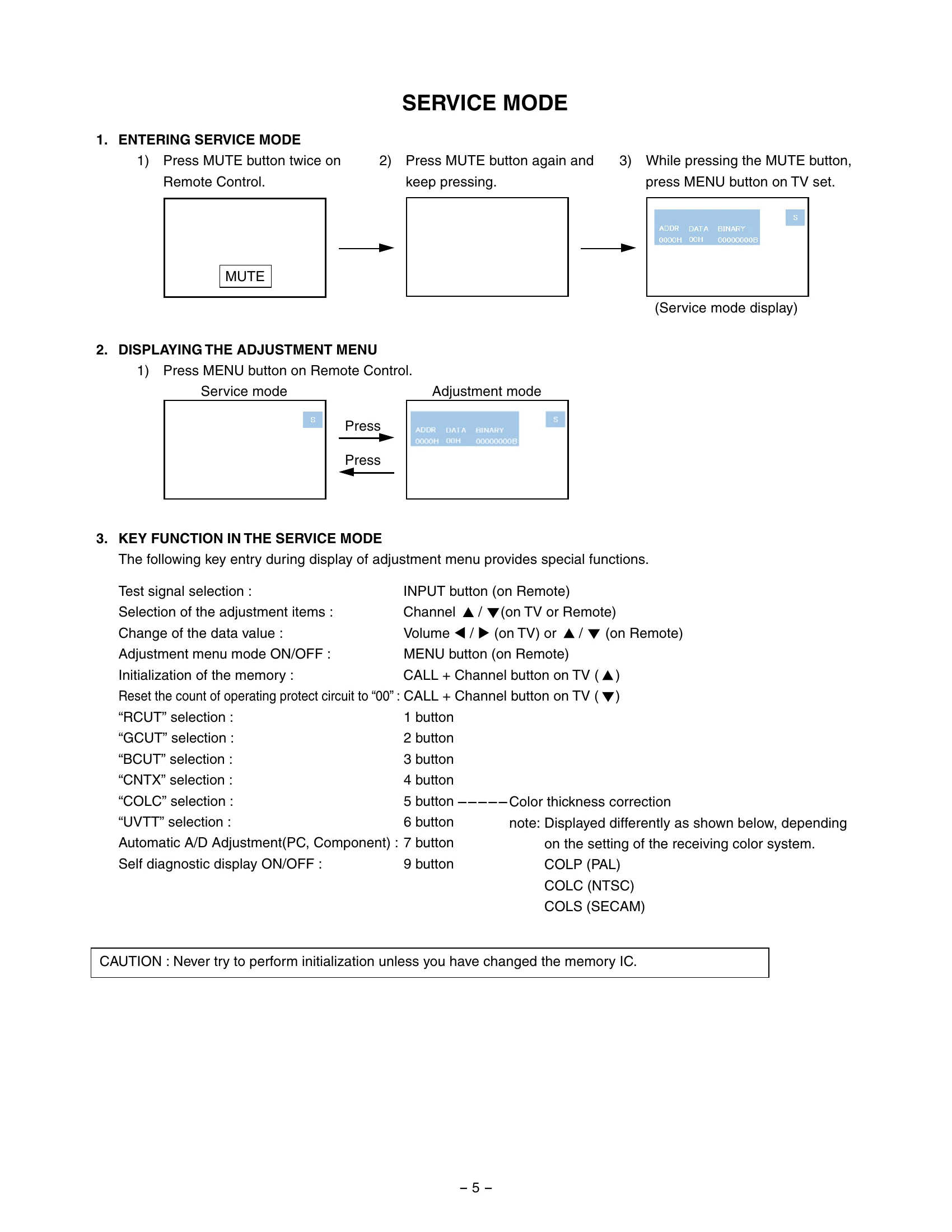
The Service Mode allows for advanced adjustments and diagnostics. To enter, press the MUTE button twice on the remote control, then press it again and hold it while pressing the MENU button on the TV set. The service mode display will show.
Press the MENU button on the remote to display the adjustment menu. Use CHANNEL buttons to select adjustment items and VOLUME buttons to change data values (00H to FFH). The CALL button combined with CHANNEL button on the TV initializes memory data after EEPROM replacement.
Press '9' on the remote to initiate Self Diagnostic. Press '9' twice for Version Check mode. Press '9' thrice for Status Check mode.
The INPUT button on the remote cycles through built-in test patterns like Red raster, Green raster, Blue raster, and All White.
| Item | Possible Cause | Solution |
|---|---|---|
| Self Diagnostic Output | Firmware Version | Indicates microprocessor version (e.g., DPC85_0100). |
| Time | Total hours the TV has been on (Unit: H). | |
| Bus line | 'OK' is normal. 'SCL-GND', 'SDA-GND', 'SCL-SDA' (Red indication) means short circuit. | |
| Bus cont | 'OK' is normal. NG (Red indication) with semiconductor name indicates abnormality. | |
| Block Status (V1-V6) | Indicates status of Video 1-3 inputs, ColorStream 1-2 IN, and HDMI A/V IN. NG (Red indication) is abnormal. | |
| Version Check | MAIN MPU | Version information of microprocessor (e.g., DPC85_0100(U15)). |
| EEPROM | Version information of EEPROM (1 byte data). | |
| SUB MPU | Version information of SUB MPU (1 byte data). | |
| OPTION | Option information (six 1-byte data). | |
| HDMI ID | HDMI ID information (4 byte data). | |
| PDP Panel Vendor | Displays Panel Vendor and Screen Size (e.g., LG-42). | |
| Status Check | MAIN | Main source information (RF position number or Input Source like EXT1). |
| MAIN FORMAT | Displays Video and PC format information (e.g., 480i). | |
| SCREEN SIZE | Displays screen size options (Theater Wide 1-3, FULL, NATURAL). | |
| OTHER STATUS | Other status information (three 2-byte data). |