Brand: TOSHIBA
Category: Telephone
Document Type: Manual
Language: EN
Brand: TOSHIBA
Category: Telephone
Document Type: Manual
Language: EN
Uploaded: Nov. 21, 2025, 6:40 p.m.
Toshiba provides a limited warranty for the phone's defective software within the warranty period.
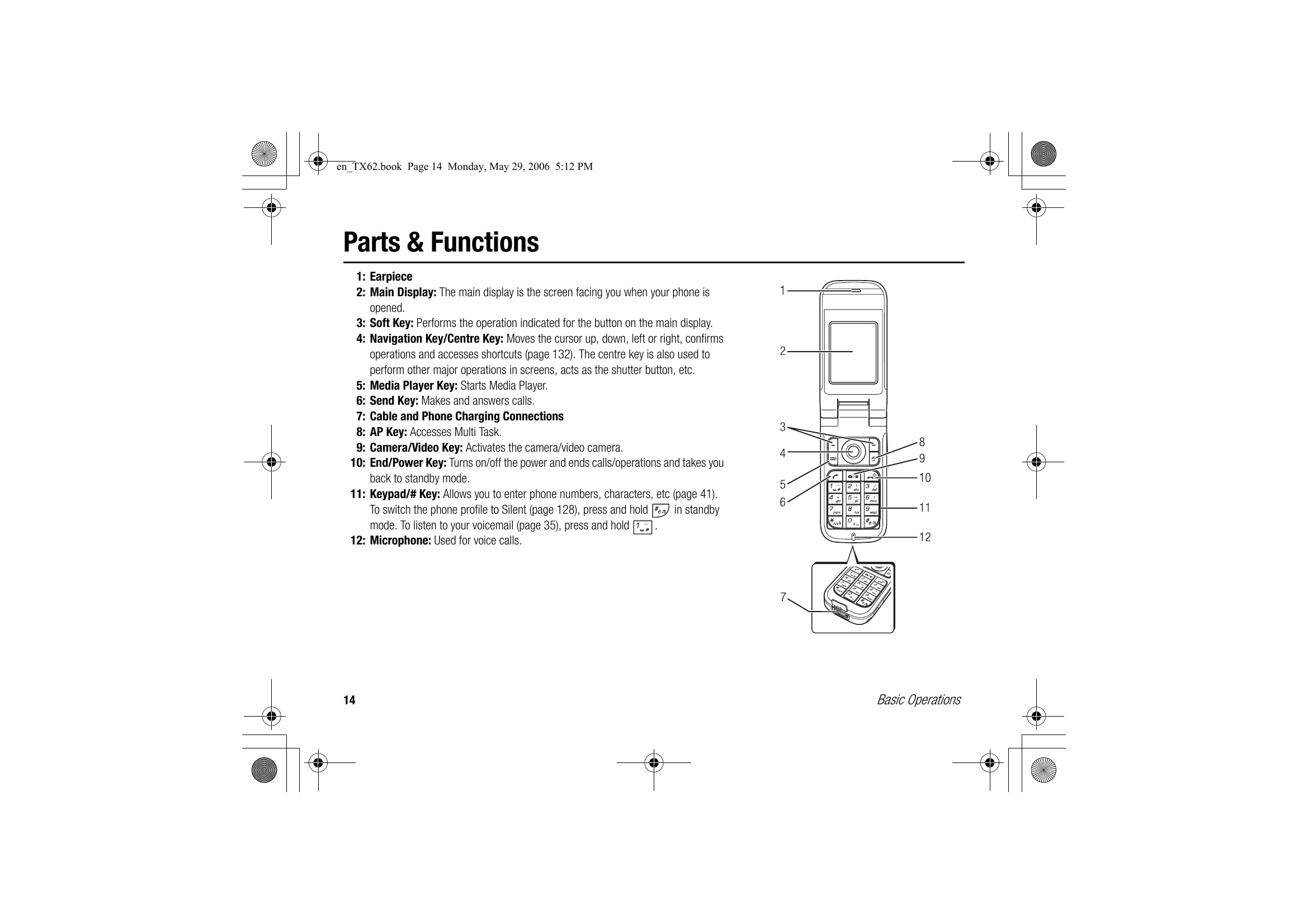
This chapter explains the basic operations and functions of your phone.
| Problem | Possible Causes and Remedies |
|---|---|
| Cannot turn the power on. | • Make sure the battery pack is inserted correctly (page 24). • Make sure the battery is charged (page 25). |
| Cannot charge the battery. | • Make sure the battery pack is inserted correctly (page 24). • Make sure the connectors or contacts of the AC adapter and battery pack are not dirty (page 25). |
| Cannot make or receive voice and video calls. | • If the 🖲 indicator appears on the display, move to a location where a signal can reach your phone or that is in the service area. • If the ⦒ indicator appears on the display, cancel flight mode (page 134). • A video call can only be made or received in areas with 3G-network coverage. Make sure the 3G / 3G indicator for indicating you are in an area with 3G-network coverage appears on the display in standby mode. • If a PIN code is incorrectly entered three times in a row, the PIN lock is set and a call cannot be made because access to the SIM card is blocked. Enter the PUK code to cancel the PIN lock (page 22). • If the ⦒ indicator appears on the display, enter your security code (page 22) to cancel the phone lock (page 139). • Make sure your phone is not set to reject calls (page 139) or divert calls (page 36). |
| Cannot use the Web. | • If the ⦒ indicator appears on the display, cancel flight mode (page 134). • Check your subscription status. Contact your service provider. • The network settings may be incorrect. Check the network settings (page 142). For details on the network settings, contact your service provider. |
| Cannot use SMS and MMS. | • If the ⦒ indicator appears on the display, cancel flight mode (page 134). • If the 🗄 indicator appears on the display, delete messages no longer required (page 100). • Check your subscription status. Contact your service provider. • Make sure the service centre number (page 104) is correct. For details on the service centre number, contact your service provider. |