Manual for SX-2800

Manual for SX-2800

Brand: TOSHIBA

Category: Telephone

Document Type: Manual

Language: EN
Uploaded: Nov. 21, 2025, 8:06 p.m.

Warranty Information

Limited one-year warranty for parts and labor against defects.

  • Making a Call: Key in the phone number and press TALK.
  • Answering a Call: Press TALK when the phone rings.
  • Call Waiting: Press FLASH to switch to a waiting call. Press FLASH again to return to the original call.
  • Changing Ringer Volume: Press VOL/RING during standby mode.
  • Changing Speaker Volume: Press VOL/RING during a call.
  • 3 Number Redial: Press REDIAL to cycle through last three numbers, then TALK to dial.
  • Paging Handset: Press PAGE to locate the handset.
  • Interference: Press CH to select a different channel.

Troubleshooting and error codes

PROBLEM SOLUTION
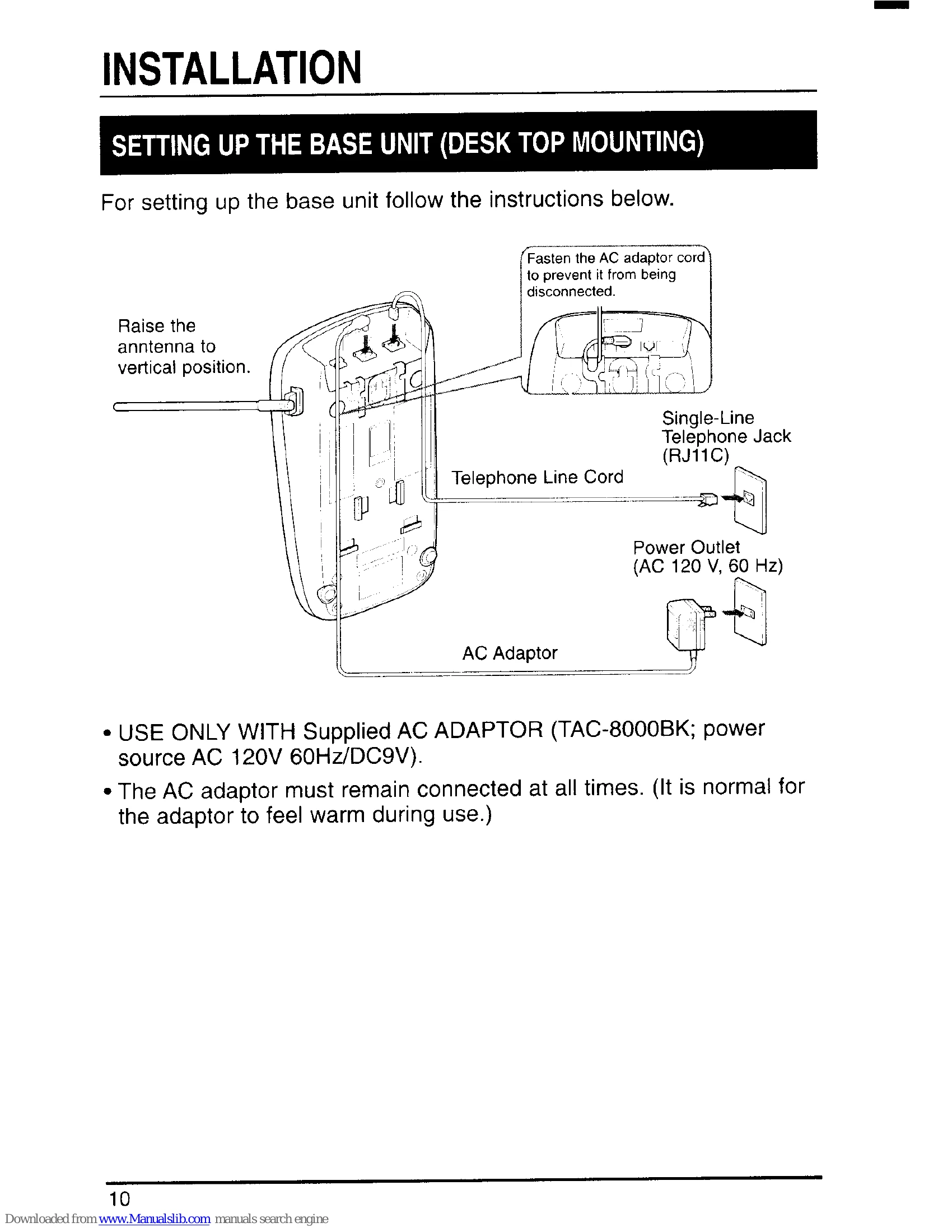
No dialtone. No calls come in. • AC adaptor disconnected. Plug in AC adapter.
  • Battery is low. Place handset on base to recharge.
  • Telephone line cord disconnected. Check both ends.
  • Previous call not disconnected. Press TALK.
  • Trouble with telephone line. Check extension.
  • Outlet controlled by wall switch. Relocate to another outlet.
  • Digital security code changed. Disconnect power, remove handset, restore power, place handset on base for 3 seconds.
  • Handset too far from base unit. Bring handset near base unit.
Noise or interference.
  • Handset too far from base. Bring handset near base.
  • Battery is low. Place handset on base to recharge.
  • Base unit in high interference area. Relocate.
  • Interference from TV/appliances. Press CH to select channel or relocate base.
  • Line noise. Check with another telephone.
  • Volume control too high. Reduce volume.
  • Base antenna not vertical. Lift antenna.
Battery pack goes low quickly.
  • Battery not fully charged initially. Charge for 12-16 hours continuously.
  • Battery is several years old. Replace with new battery.
The handset battery pack does not charge.
  • Battery not installed correctly. Install correctly.
  • Charging contacts dirty. Clean with dry cloth.
  • Battery is several years old. Replace with new battery.
The unit operates abnormally. • Phone needs reset. Disconnect AC adaptor, reconnect after a few seconds.
"Low battery" blinks on the display. The operation is stopped. • Battery is low. Recharge the battery.
When the handset is returned to the base unit with the volume level set at Loud, a momentary squeal or howling sound may sometimes be heard. • This is normal. Change volume to High, Medium, or Low before returning handset to base.
The phone does not display the Caller ID/Caller ID on Call Waiting data.
  • Must subscribe to Caller ID/Call Waiting services. Check with local telephone company.
  • Answered call before Caller ID data received. Let phone ring twice before answering.
Privacy Policy