Brand: TOSHIBA
Category: DVD Player
Document Type: Manual
Language: EN
Brand: TOSHIBA
Category: DVD Player
Document Type: Manual
Language: EN
Uploaded: Nov. 21, 2025, 6:41 p.m.
Manual Publish Date: 2010-01-01
This manual contains important safety instructions and operational guidelines for the TOSHIBA SD1010KB DVD Player.
This manual covers the setup, operation, and troubleshooting of your TOSHIBA SD1010KB DVD Player.
| No power | -Check if the AC power cord is properly connected. -Press the I/ON/STANDBY on the front of the DVD player to turn on the power. |
| No picture | -Refer to your TV's manual for correct Video In channel selection. Change the TV channel until you see the DVD screen. -Check if the TV is switched on. |
| Distorted picture | -Sometimes a small amount of picture distortion may appear depending on the disc being played back. This is not malfunction. |
| Picture clipped | -May be caused by View Mode Setting (see page 19). Set to Original for normal viewing. |
| Completely distorted picture or black/white picture with DVD. | -Connect DVD Player directly to the TV. -Make sure the disc is compatible with the DVD player. -Ensure that the DVD Player's setting is set to match that of the disc and your TV. |
| No sound / distorted sound | -Adjust the volume. -Check that the speakers are connected correctly. |
| No audio at digital output | -Check the digital connections. -Check if your receiver can decode MPEG-2 or DTS and if not, please make sure the digital output is set to PCM. -Check if the audio format of the selected audio language matches your receiver capabilities. |
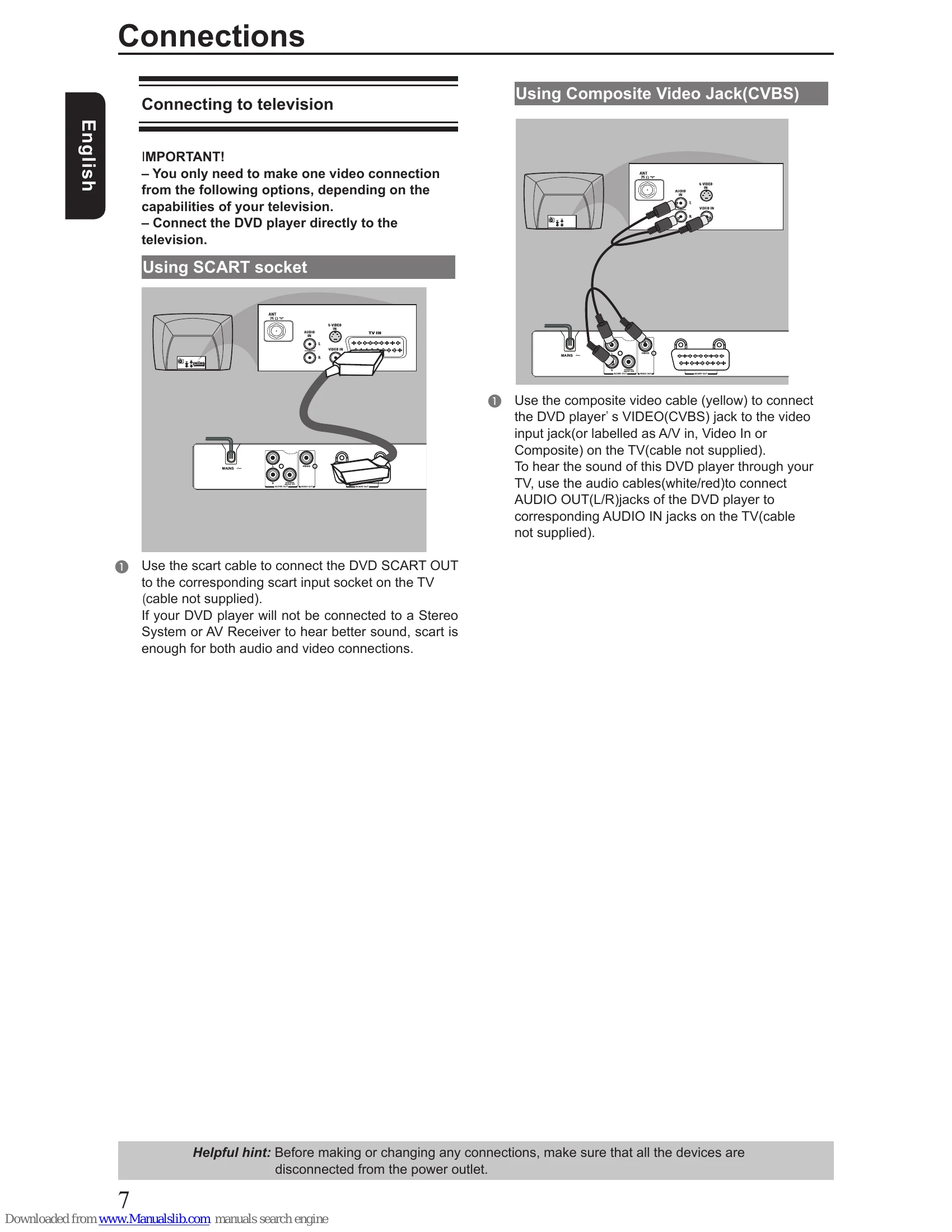
| No sound and picture | -Check that the cable is connected to the correct device (See Connecting to television). |
| Disc cannot be played | -The DVD±R/RW must be finalized and in Video mode format. -Ensure the disc label is facing up. -Check if the disc is defective by trying another disc. -Wrong region code. |
| Picture freezes momentarily during playback | -Check the disc for fingerprint/scratches and clean with a soft cloth wiping from centre to edge. |
| No return to start-up screen when disc is removed | -Reset the unit by switching the player off, then on again. |
| The player does not respond to the Remote Control | -Aim the Remote Control directly at the sensor on the front of the player. -Reduce the distance to the player. -Replace the batteries in Remote Control. -Re-insert the batteries with their polarities(+/- signs)as indicated. |
| Buttons do not work | -To completely reset the player, unplug the AC cord from AC outlet for 5-10 seconds. |
| Player does not respond to some operating commands during playback. | -Operations may not be permitted by the disc. Refer to the instructions of the disc jacket. |
| DVD Player cannot read CDs / DVDs | -Use a commonly available cleaning CD/DVD to clean the lens before sending the DVD Player for repair. |
| Menu items cannot be selected | -Press STOP twice before selecting system setup menu. -Depending on the disc availability, some menu items cannot be selected. |