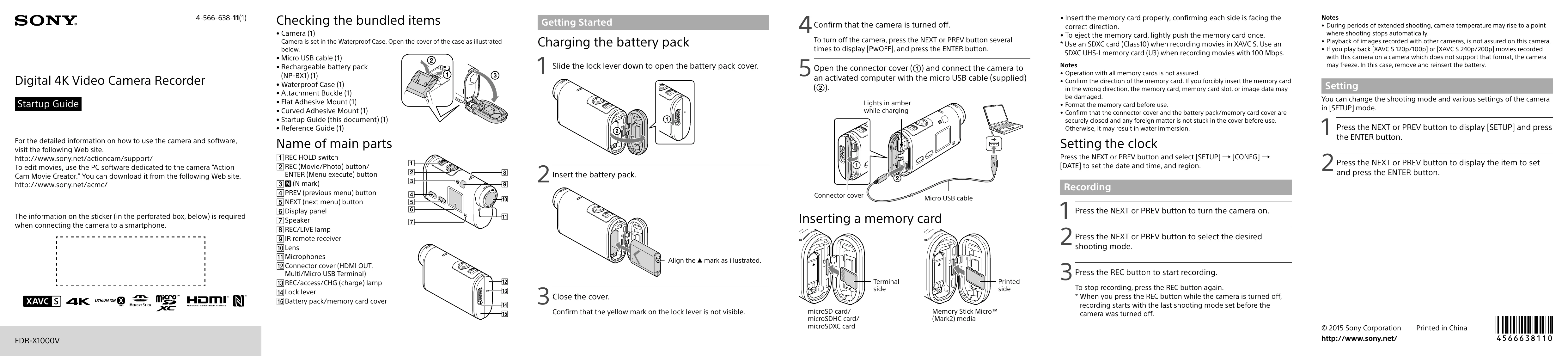
Checking the bundled items: Verify all included accessories are present.
Getting Started - Charging the battery pack: Open the battery cover, insert the battery pack, and close the cover. Connect the camera to a computer via USB to charge.
Inserting a memory card: Properly insert the memory card (microSD or Memory Stick Micro) into the slot.
Setting the clock: Access the SETUP menu to set the date, time, and region.
Recording: Turn on the camera, select a shooting mode, and press the REC button to start/stop recording.
Setting: Use the SETUP mode to change shooting modes and various camera settings.
Connecting to a separately sold Live-View Remote: Turn on the remote, select SETUP > CONFG > Wi-Fi > ON, and then select the camera's SSID.
Connecting to the smartphone: Install PlayMemories Mobile, turn on the camera's Wi-Fi, select the shooting mode, and connect via Wi-Fi or NFC.