Manual for KV-2199XDK

Manual for KV-2199XDK

Brand: SONY

Category: TV

Document Type: Manual

Language: EN
Uploaded: Nov. 21, 2025, 7:37 p.m.

Using Your New TV

Getting Started

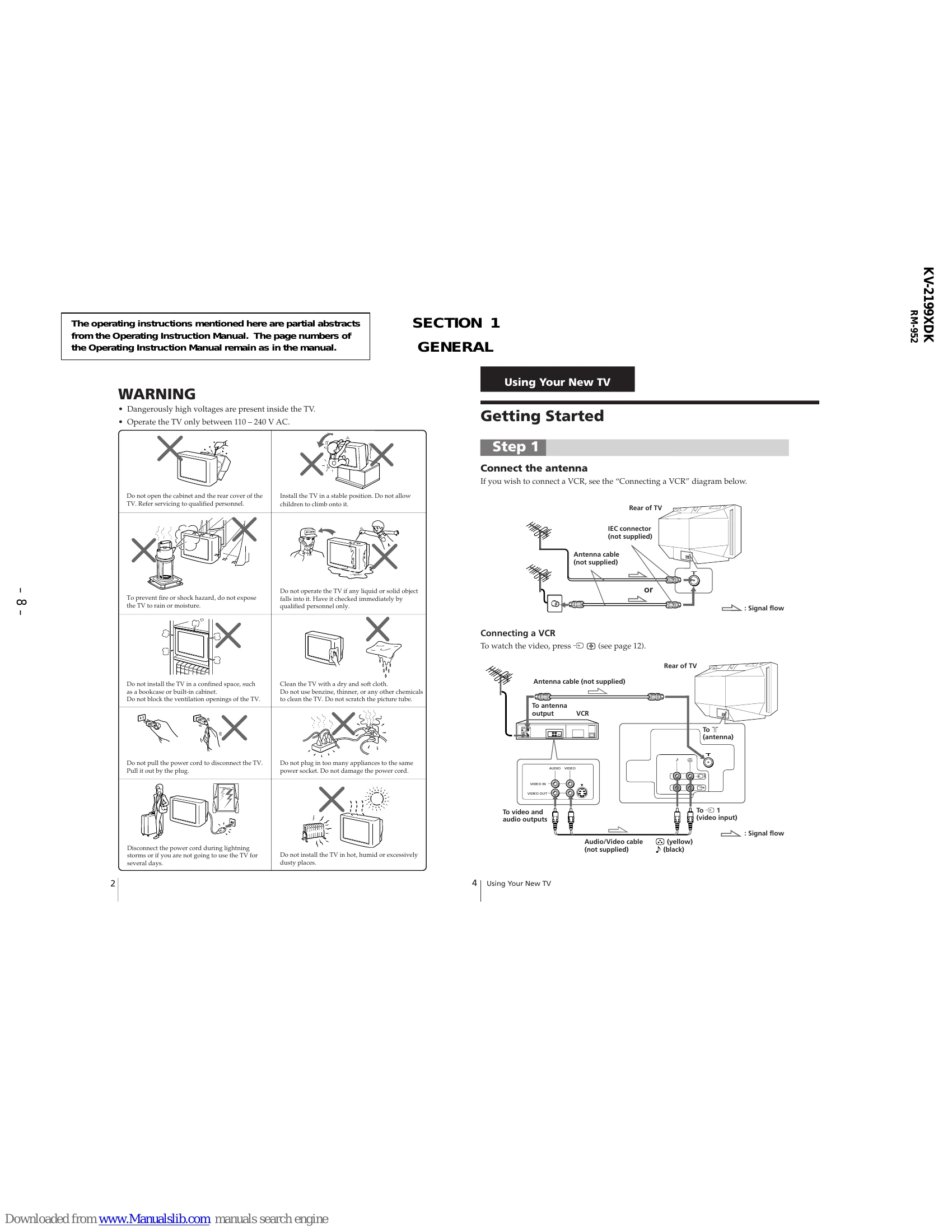
Step 1: Connect the antenna

Connect the antenna to the TV's IEC connector. If connecting a VCR, follow the provided diagram for connecting the VCR to the TV and antenna.

Step 2: Insert the batteries into the remote

Insert the batteries into the remote control. Do not mix old and new batteries.

Step 3: Preset the channels automatically

Press the power button to turn on the TV. Then, press 'AUTO PROGR.' to automatically scan and store TV channels. The TV system will indicate 'B/G' or 'D/K'. Tips are provided for stopping or adjusting the channel presetting.

Now You Are Ready...

Refer to page 11 for instructions on watching your TV.

Troubleshooting and error codes

SymptomSolutionsPossible cause
Snowy picture
  • Check the antenna cable and connection on the TV, VCR and on the wall. (page 4)
  • Press SELECT until "MANUAL PROGRAM" appears on the screen then preset the channel again. (page 9)
  • Check the antenna type (VHF/UHF). Contact a Sony dealer for advice.
  • Adjust the antenna direction. Contact a Sony dealer for advice.
  • Try using a booster.
  • Turn off or disconnect the booster if it is in use.
  • Connection is loose or the cable is damaged.
  • Channel presetting is inappropriate or incomplete.
  • The antenna type is inappropriate.
  • The antenna direction is inappropriate.
  • Signal transmission is low.
  • Broadcast signals are too strong.
Distorted picture
  • If the sound of some channels are noisy, select the channel, then select the appropriate TV system (TV SYS). (page 10)
The TV system setting is inappropriate.
No picture
  • Check the power cord, antenna and the VCR connections.
  • Press ▲ (power).
  • Press ▲ (main power) on the TV to turn off the TV for about five seconds, then turn it on again.
  • The power cord, antenna or VCR is not connected.
  • The TV is not turned on.
Good picture / No sound
  • Press + to increase the volume level.
  • Press ☖ to cancel the muting.
  • The volume level is too low.
  • The sound is muted.
Double images or "ghosts"
  • Do not use a hair dryer or other equipment near the TV.
  • Adjust the antenna direction for minimum interference. Contact a Sony dealer for advice.
  • Use a highly directional antenna.
  • Use the fine tuning (FINE) function. (page 10)
  • Adjust the antenna direction. Contact a Sony dealer for advice.
  • Turn off or disconnect the booster if it is in use.
  • There is local interference from cars, neon signs, hair dryers, power generators, etc.
  • Broadcast signals are reflected by nearby mountains or buildings.
  • The antenna direction is inappropriate.
  • Use of a booster is inappropriate.
No color
  • Press SELECT until "COLOR" appears on the screen, then press + or - to adjust the color level. (page 15)
  • Press SELECT until "COL SYS" appears on the screen, then check the color system setting (usually set this to "AUTO"). (page 10).
  • Adjust the antenna direction. Contact a Sony dealer for advice.
  • The color level setting is too low.
  • The color system setting is inappropriate.
  • The antenna direction is inappropriate.
Abnormal color patches
  • Keep external speakers or other electrical equipment away from the TV.
  • Do not move the TV while the TV is turned on. Press ▲ (main power) on the TV to turn off the TV for about five minutes, then turn it on again.
The magnetic disturbance from external speakers or other equipment, or the direction of the earth's magnetic field may affect the TV.
Privacy Policy