Brand: SONY
Category: Computer
Document Type: Manual
Language: EN
Brand: SONY
Category: Computer
Document Type: Manual
Language: EN
Uploaded: Nov. 21, 2025, 8:12 p.m.
Manual Publish Date: 2008-05-01
This manual guides users through the setup and operation of their VAIO computer. Key operations include:
| Indicator | Functions |
|---|---|
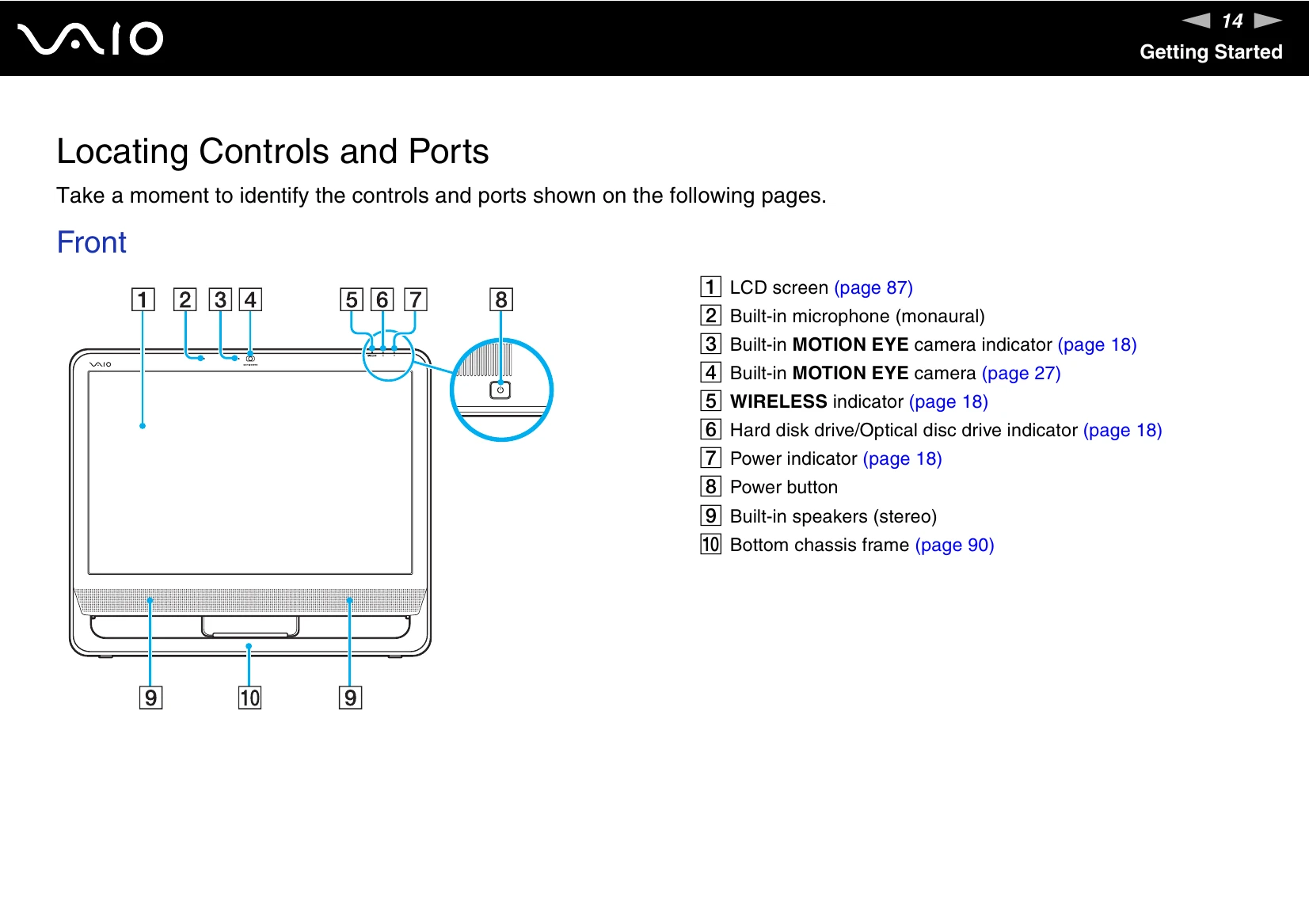
| Power 1 | Illuminates in green when the computer is on, illuminates in orange while the computer is in Sleep mode, and turns off when the computer is off. |
| Built-in MOTION EYE camera | Illuminates while the built-in MOTION EYE camera is in use. |
| Media Access | Illuminates when data is read from or written to a memory card. (Do not place the computer into Sleep mode or turn it off when this indicator is lit.) When the indicator is unlit, the memory card is not in use. |
| Hard disk drive/Optical disc drive | Illuminates when the drive is reading or writing data. Do not place the computer into Sleep mode or turn it off when this indicator is lit. |
| WIRELESS | Illuminates when the WIRELESS switch is turned on, provided that one or more wireless options are enabled in the VAIO Smart Network window. |