Manual for HVR-Z1E/Z1P

Manual for HVR-Z1E/Z1P

Brand: SONY

Category: Camcorder

Document Type: Manual

Language: EN
Uploaded: Aug. 10, 2025, 12:23 a.m.

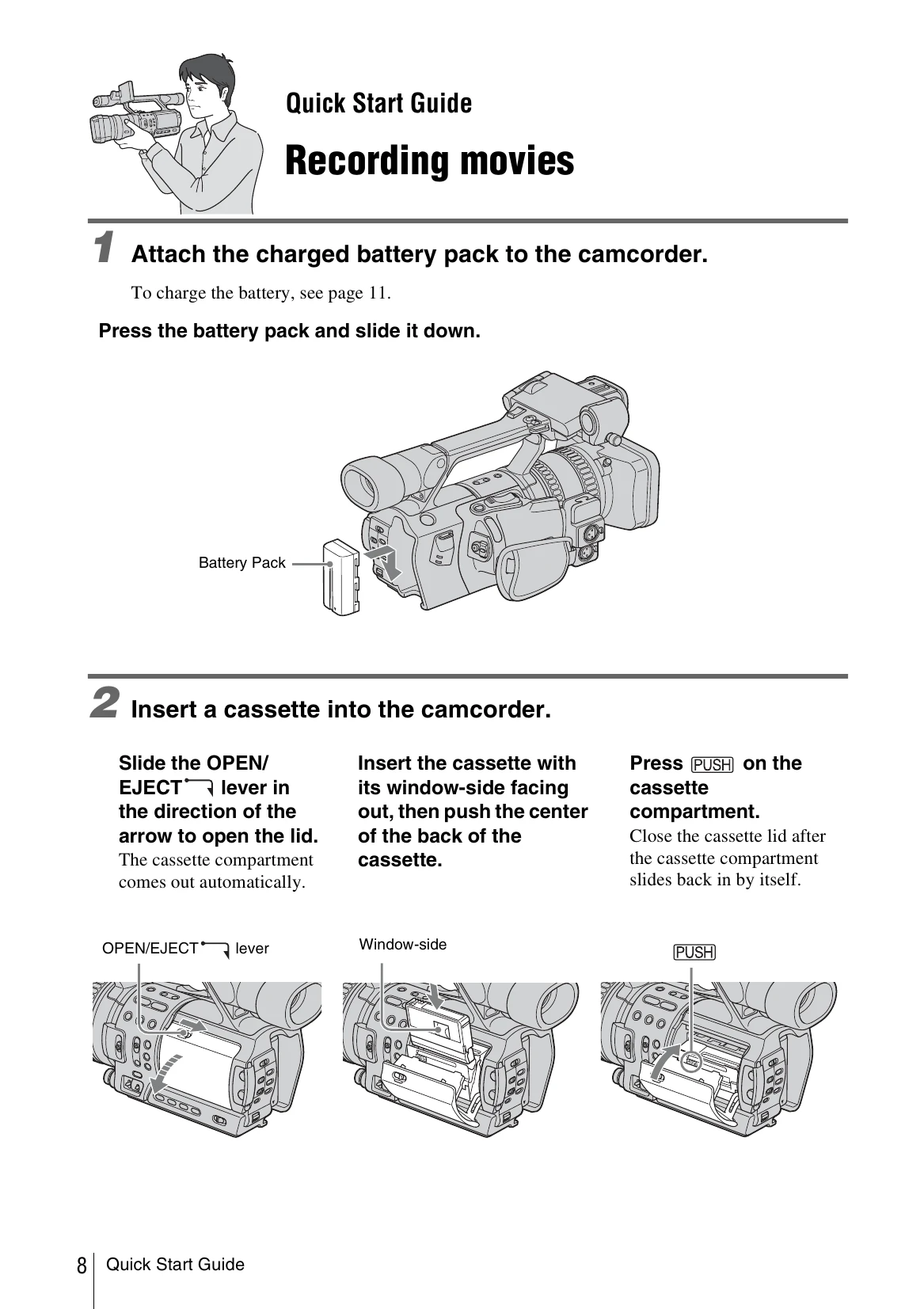
Quick Start Guide: Recording Movies

  1. Attach the charged battery pack to the camcorder.
  2. Insert a cassette into the camcorder by sliding the OPEN/EJECT lever and pushing the cassette into the compartment.
  3. Start recording by opening the shutter, adjusting the LCD panel, setting the POWER switch to CAMERA while pressing the green button, and then pressing REC START/STOP.
  4. View recorded pictures by setting the POWER switch to VCR and pressing the playback controls.

Getting Started: Checking Supplied Items

Ensure all supplied items are present, including the AC Adaptor/charger, mains lead, connecting cord, lens hood, large eyecup, wireless remote commander, A/V connecting cable, component video cable, shoe adaptor, rechargeable battery pack, R6 batteries, cleaning cassette, shoulder strap, and operating instructions.

Privacy Policy