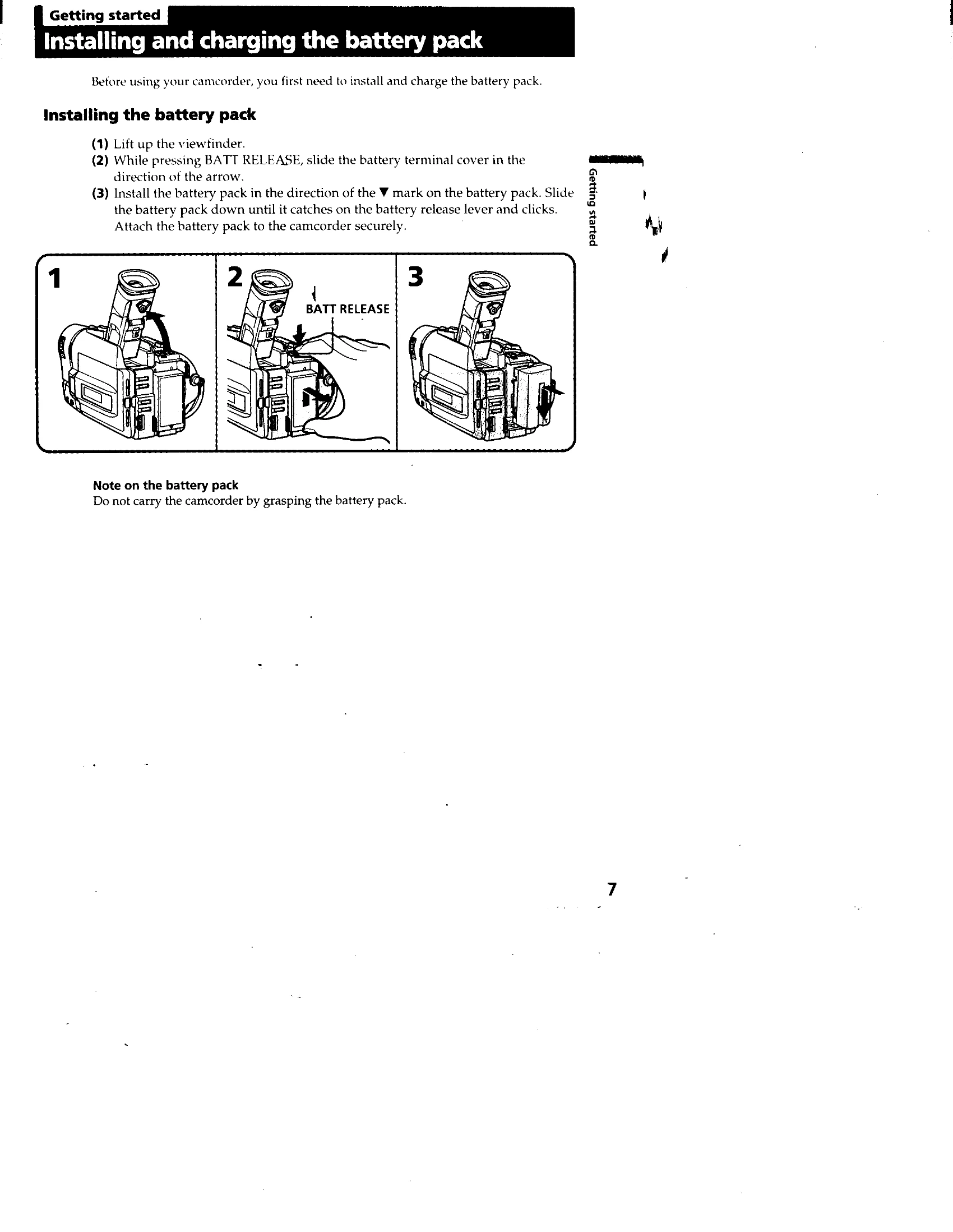
Install and Charge Battery: Lift viewfinder, slide battery cover, attach battery pack securely. Charge by connecting AC power adapter to DC IN jack and wall outlet. Slide POWER switch to OFF. "FULL" appears when fully charged.
Insert Cassette: Press EJECT, slide in direction of arrow. Insert cassette with window facing out. Close compartment by pressing PUSH.
Basic Operations
Camera Recording: Set POWER switch to CAMERA, turn STANDBY to STANDBY, press START/STOP. "REC" indicator appears.
Stopping Recording: Press START/STOP for momentary stop. Turn STANDBY to LOCK and set POWER to OFF to finish.
Using Zoom: Use power zoom lever to change subject size. Move lever slightly for slow zoom, further for fast zoom.
Selecting START/STOP Mode: Choose from Normal mode (:Recording starts/stops with START/STOP), ANTI GROUND SHOOTING (records only while START/STOP is pressed), or 5SEC (records for 5 seconds).
Shooting with LCD Screen: Open LCD panel, adjust angle. Adjust brightness with LCD BRIGHT. Close LCD for longer battery life.