Manual for DCR-HC20

Manual for DCR-HC20

Brand: SONY

Category: Camcorder

Document Type: Manual

Language: EN
Uploaded: Aug. 10, 2025, 12:15 a.m.

Manual Publish Date: 2004-01-01

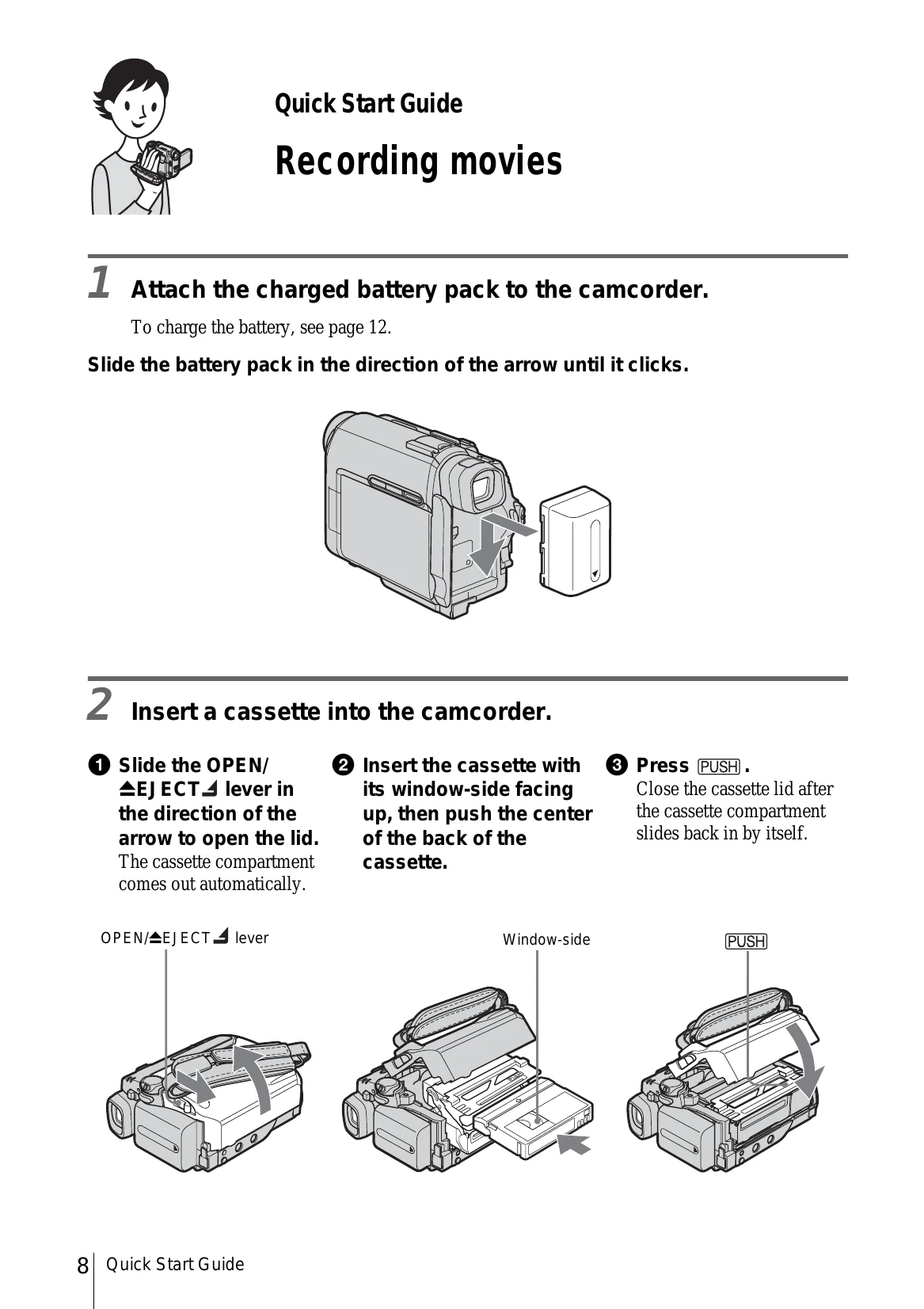
Quick Start Guide: Recording Movies

  1. Attach the charged battery pack.
  2. Insert a cassette into the camcorder.
  3. Set the LENS COVER to OPEN, open the LCD panel, and slide the POWER switch to turn on the camcorder (CAMERA lamp lights up). Press REC START/STOP to begin recording.
  4. Press REC START/STOP again to stop recording.
  5. To view recorded pictures, slide the POWER switch until the PLAY/EDIT lamp lights up, then use the controls to play back the video.

Easy Handycam Operation

Press the EASY button to simplify recording and playback functions, making it easier for first-time users.

Privacy Policy