Manual for CCD-V1

Manual for CCD-V1

Brand: SONY

Category: Camcorder

Document Type: Manual

Language: EN
Uploaded: Aug. 10, 2025, 12:21 a.m.

Manual Publish Date: 1986-01-01

Basic Operation

Camera Operation:

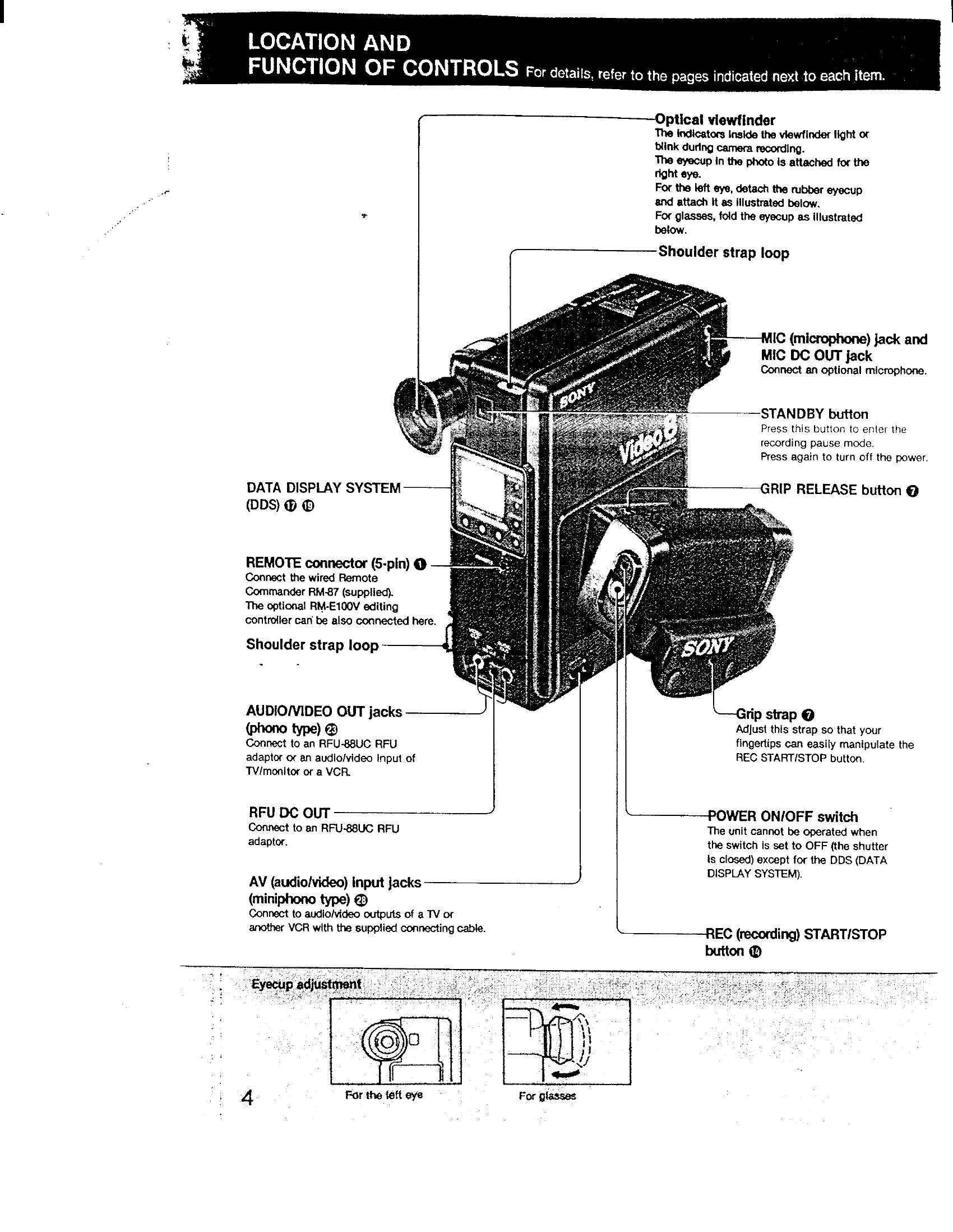
  • Adjust white balance and focus.
  • Insert a battery pack or AC pack.
  • Set the POWER switch to ON.
  • Insert a cassette.
  • Press REC START/STOP to begin recording.
  • Use the DATE/TIME buttons to record date or time.

Using the Remote Commander:

  • Connect the Remote Commander to the REMOTE jack.
  • Press POWER, then STANDBY for recording pause.
  • Press REC START/STOP (or two buttons simultaneously for frame-by-frame) to start recording.

Playback:

  • Connect to a TV or VCR using the AV output jacks.
  • Use the tape transport buttons (PLAY, REW, FF, STOP, PAUSE) on the unit or remote.

Counter Usage:

  • Use the COUNTER switch to select indication (0:00:00 or 0000).
  • Press RESET to set the counter. Press MEMORY to mark a point.
Privacy Policy