Manual for SSB 50 A1

Manual for SSB 50 A1

Brand: SilverCrest

Category: Electronics

Document Type: Manual

Language: EN
Uploaded: Nov. 21, 2025, 6:17 p.m.

Manual Publish Date: 2018-04

Warranty Information

This product comes with a 3-year warranty from the date of purchase.

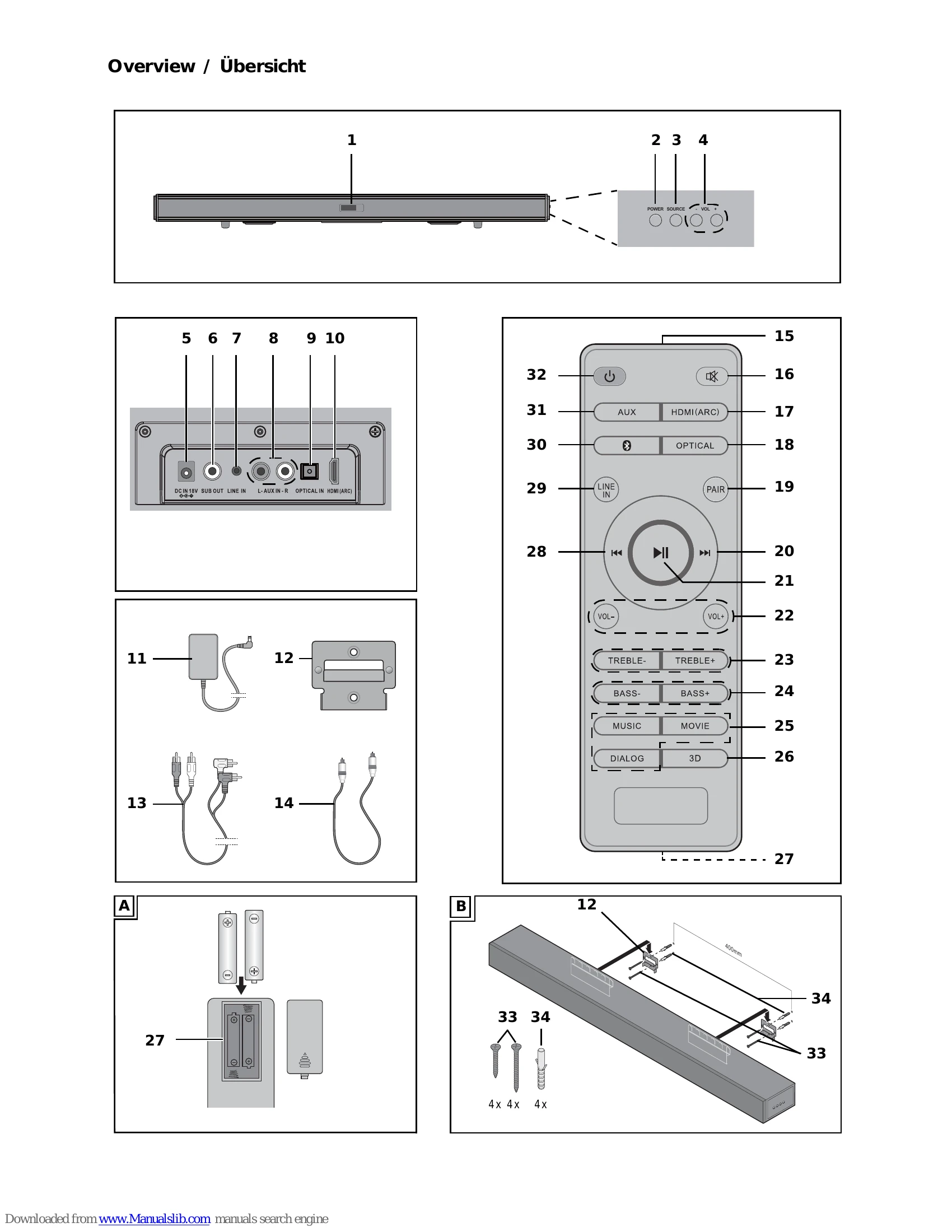
The soundbar can be operated using the remote control or the buttons on the device.

Basic Functions:

  • Power: Press the Power button to turn the device on/off.
  • Source Selection: Use the SOURCE button or the dedicated input buttons (AUX, LINE IN, HDMI, OPTICAL, Bluetooth) to select the desired input.
  • Volume Control: Use the VOL +/- buttons to adjust the volume. Mute the sound by pressing the mute button.
  • Sound Settings: Adjust Treble and Bass using the TREBLE +/- and BASS +/- buttons. Select preset sound modes (MUSIC, MOVIE, DIALOG) using the corresponding buttons. Toggle the 3D effect with the 3D button.
  • Bluetooth Operation: Press the Bluetooth button to switch to Bluetooth mode. Pair your device by pressing the PAIR button if needed. Use playback controls (play/pause, skip) to manage music.

The device automatically switches to standby mode after 20 minutes of inactivity or no signal.

Troubleshooting and error codes

Fault Possible causes / Action
No function
  • Is the power supply ensured? Is the display showing "--"?
  • For HDMI ARC connection, ensure the HDMI cable and connected device are ARC-enabled. If not, switch to a different connection type or replace the TV.
  • Replace old HDMI cable with a new ARC-enabled cable.
  • Is the correct audio signal selected on the playback device (e.g., TV)? Select PCM 2.0 (or PCM stereo) as the audio output.
No Bluetooth® connection
  • Is the Bluetooth® function active on the audio device?
  • Is the device switched off?
  • Does a Bluetooth® connection to another device exist? Press the PAIR button until "bt" flashes rapidly, then create a new connection.
No music playback
  • Is the volume too low on the audio device?
  • Have you selected the correct connection?
  • Is the volume too low or switched off?
Interferences during operation
  • If interferences occur, remove any mobile phones, tablets, or other radio-equipped devices from the vicinity of the soundbar.
Soundbar switches itself off
  • This device has an automatic shutdown mechanism to save energy. It switches to standby mode if no or a very weak signal is received for approx. 20 minutes and no controls have been used.
Privacy Policy