Brand: SilverCrest
Category: Audio
Document Type: Manual
Language: EN
Brand: SilverCrest
Category: Audio
Document Type: Manual
Language: EN
Uploaded: Nov. 21, 2025, 7:29 p.m.
Offers a 3-year warranty from the purchase date, covering material or manufacturing defects.
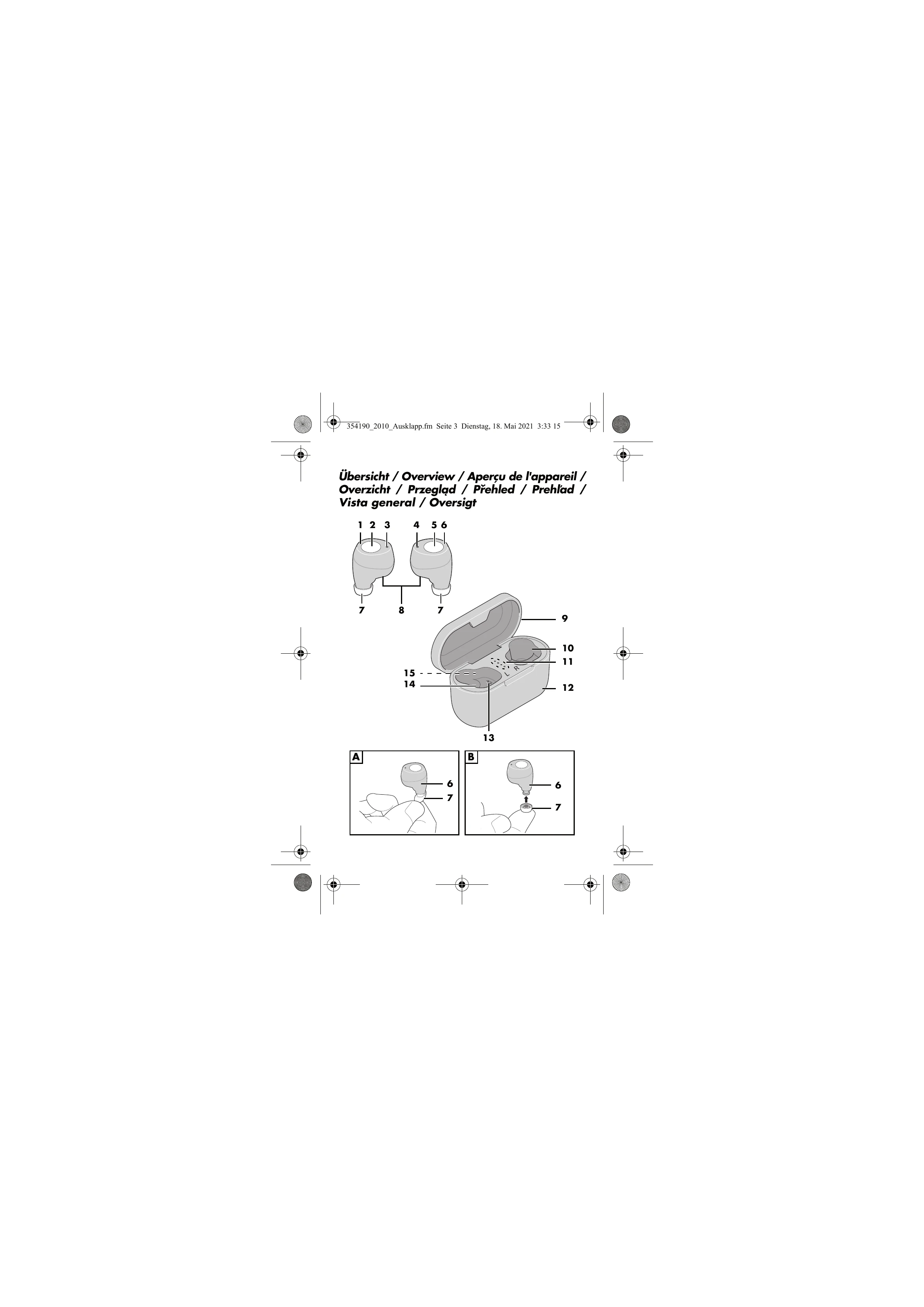
1. Overview: Familiarize yourself with the components of the earbuds and charging case as shown in the diagrams. Key parts include earbuds (1, 6), multifunction buttons (2, 5), LEDs (3, 4), ear tips (7), charging contacts (8, 13), charging case lid (9), charging bays (10, 14), charging case LEDs (11), charging case (12), and USB-C port (15). The package also includes a USB charging cable (16).
2. Charging: Fully charge both the earbuds (1/6) and the charging case (12) before first use. The charging case has 4 LEDs (11) indicating battery status. Earbuds charge when placed in the case.
3. Powering On/Off: Earbuds turn on automatically when removed from the case. To turn them on manually, press and hold the multifunction buttons (2/5) for approx. 5 seconds. They turn off automatically when placed back in the case or after 5 minutes of inactivity. To turn them off manually outside the case, press and hold a multifunction button for approx. 5 seconds.
4. Connecting to a Device: Remove earbuds from the case; they will pair with each other. The right earbud's LED (4) will flash, indicating it's ready to pair with your playback device (smartphone, MP3 player). Search for "STWSK 3 A1" on your device's Bluetooth list and connect. A white LED and an audible signal confirm connection.
5. Playing Music: Start music playback on your connected device.
6. Controls: Use the multifunction buttons (2/5) to play/pause music, skip tracks, go to the beginning of a track, or play the previous track.
7. Phone Calls: Accept/end calls with a single press of a multifunction button. Reject calls with a longer press. Redial the last number with a double press.
8. Cleaning and Storage: Clean with a soft, dry cloth. Store earbuds in the charging case. Charge batteries before long-term storage.
| Fault | Possible Causes / Actions |
|---|---|
| No Sound | - Is the player on, started, and set to the correct function? Turn up the volume. - Is Bluetooth enabled on the player? - Are the player and earbuds connected via Bluetooth? - Are the earbuds' batteries flat? |
| Poor Sound Quality | - Are there interfering objects between the player and earbuds (e.g., reinforced concrete walls, other wireless devices)? - Have you moved too far from the player? Max range is approx. 10 meters. - Are there interfering devices near the player? Reposition the player if necessary. |
| Functions Not Possible | Many functions are not supported by all mobile phones. |
| No Connection to Player | If no connection is established, follow the instructions in the "No connection to player" chapter on page 226. |