Brand: SilverCrest
Category: Audio
Document Type: Manual
Language: EN
Brand: SilverCrest
Category: Audio
Document Type: Manual
Language: EN
Uploaded: Nov. 21, 2025, 9:14 p.m.
This device has a 3-year warranty from the date of purchase, covering material or manufacturing defects.
| Error | Possible Cause | Remedy |
|---|---|---|
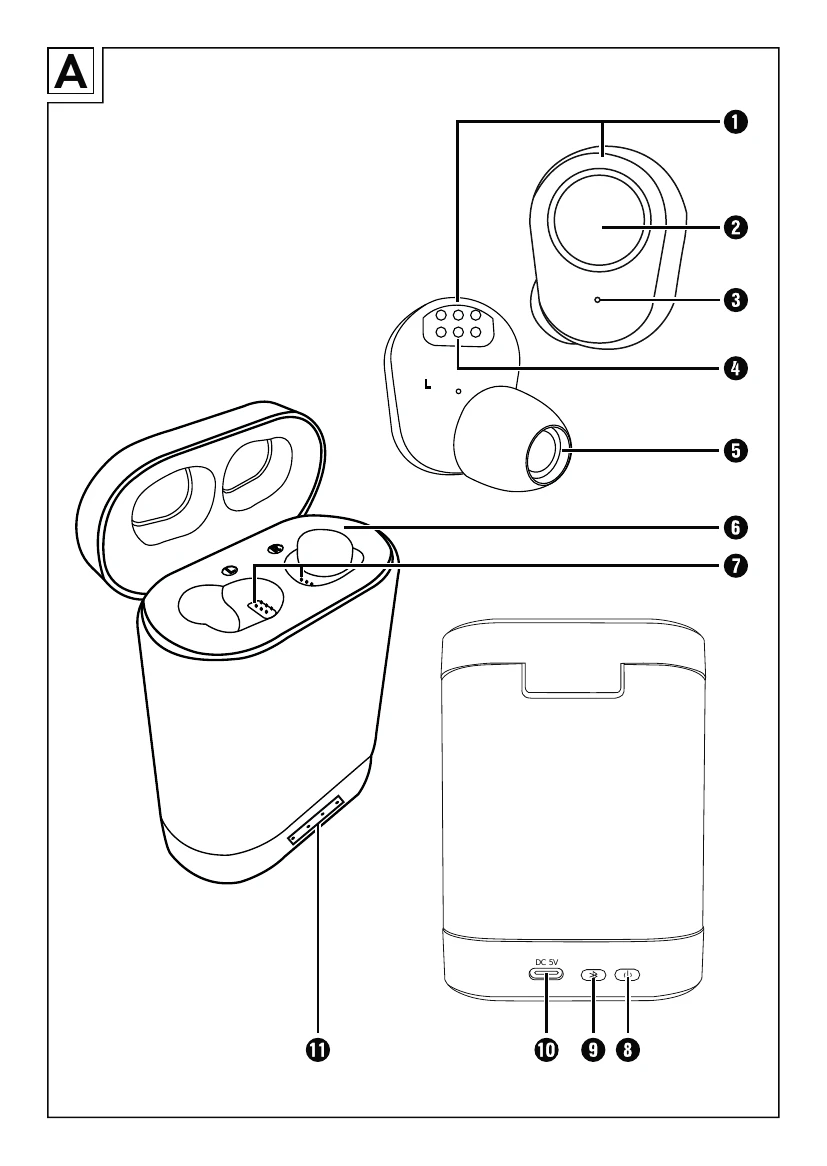
| The headphones 1 / speaker box 6 cannot be powered on. | The headphones 1 / speaker box 6 are not charged. | Charge the headphones 1 / speaker box 6 (see section Charging headphones/Charging speaker box). |
| No sound is produced. | Bluetooth® playback device not activated. | Activate the playback device. |
| No sound is produced. | Playback device is muted. | Deactivate the mute function on the playback device. |
| You only hear sound from one headphone 1. | The stereo balance control on the playback device has been shifted. | Adjust the stereo balance control according to your preferences. |
| You only hear sound from one headphone 1. | One headphone 1 is not charged. | Charge the headphone 1 (see section Charging headphones). |
| You only hear sound from one headphone 1. | One headphone 1 is not activated. | Activate the headphone 1 (see section Manual activation/deactivation of headphones). |