Manual for SKSO 16 A1

Manual for SKSO 16 A1

Brand: SILVER CREST

Category: Audio

Document Type: Manual

Language: EN
Uploaded: Nov. 21, 2025, 6:04 p.m.

Manual Publish Date: 2022-12-01

Warranty Information

This device comes with a 3-year warranty from the date of purchase, covering material or manufacturing defects.

Operation

7.1 Switching headphones on/off

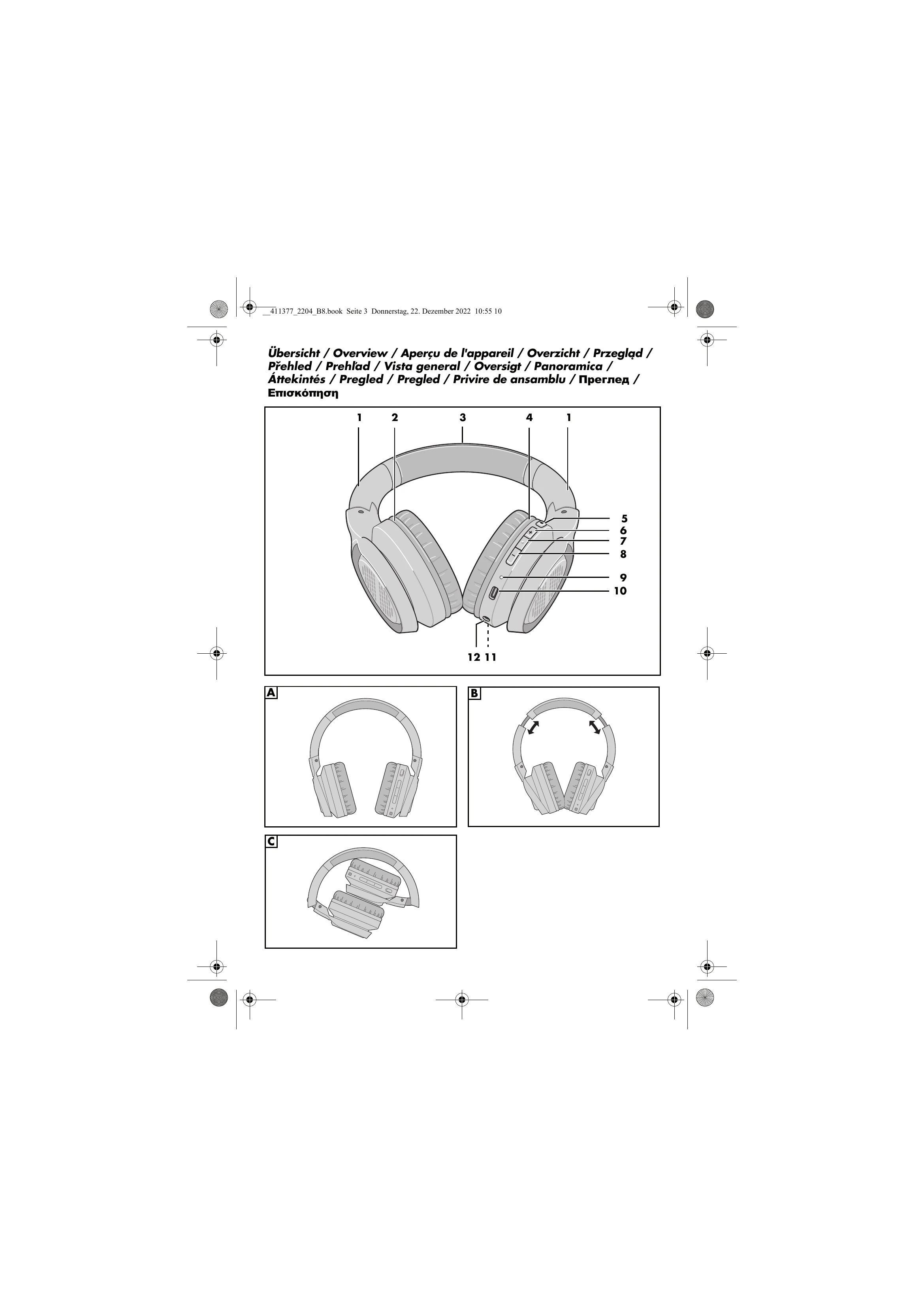
Press and hold the button 7 for approx. 5 seconds until an acoustic signal sounds. The LED 9 will flash red/blue to indicate pairing mode. The headphones automatically switch off after approx. 5 minutes without a connection or when the battery is too low.

7.2 Establishing a Bluetooth connection

Turn on the headphones. The device will attempt to connect to the last paired device. On your audio device (e.g., smartphone), activate Bluetooth and select "Sound On-Ear BT". If prompted for a password, enter "0000". The LED 9 will flash blue regularly once connected. Press play on your audio device to start playback.

7.8 Playing music back using the cable

Connect one end of the 3.5 mm jack cable (13) to the audio source and the other end to the headphone jack (12). Turn on the audio device and start playback. Volume and playback are controlled by the audio device.

8. Transport

Fold the headphones by sliding the earcups (2, 4) inwards (Fig. B) and then folding them towards the headband (Fig. C).

9. Cleaning

Disconnect all cables. Protect the device from water. Do not use abrasive cleaning agents. Clean with a soft, slightly damp cloth if necessary.

10. Storing if not in use

Store in a dry place away from heat. Charge the battery before long-term storage to maintain capacity. Avoid deep discharge.

Troubleshooting and error codes

Problem Possible causes / Measures
No sound - Is the playback device switched on, started, and set to the correct function? Increase volume if necessary.
- Is Bluetooth activated on the playback device?
- Are the playback device and headphones connected via Bluetooth?
- Is the headphone battery empty?
Poor sound quality - Are there any objects between the playback device and headphones (e.g., reinforced concrete walls or other wireless devices) causing interference?
- Have you moved too far from the playback device? The maximum range (without interfering objects) is approx. 10 meters.
- Are there interfering devices near the playback device? Change the location of the playback device if necessary.
Functions not possible - Not all functions are supported by all mobile phones.
No connection to the playback device - If a connection cannot be established, follow the instructions in the "No connection to the audio device" section on page 24.
Privacy Policy