Brand: SIEMENS
Category: Vacuum Cleaner
Document Type: Manual
Language: EN
Brand: SIEMENS
Category: Vacuum Cleaner
Document Type: Manual
Language: EN
Uploaded: Nov. 21, 2025, 7:12 p.m.
Manual Publish Date: 2021-01-01
The appliance has a 24-month guarantee period from the date of purchase.
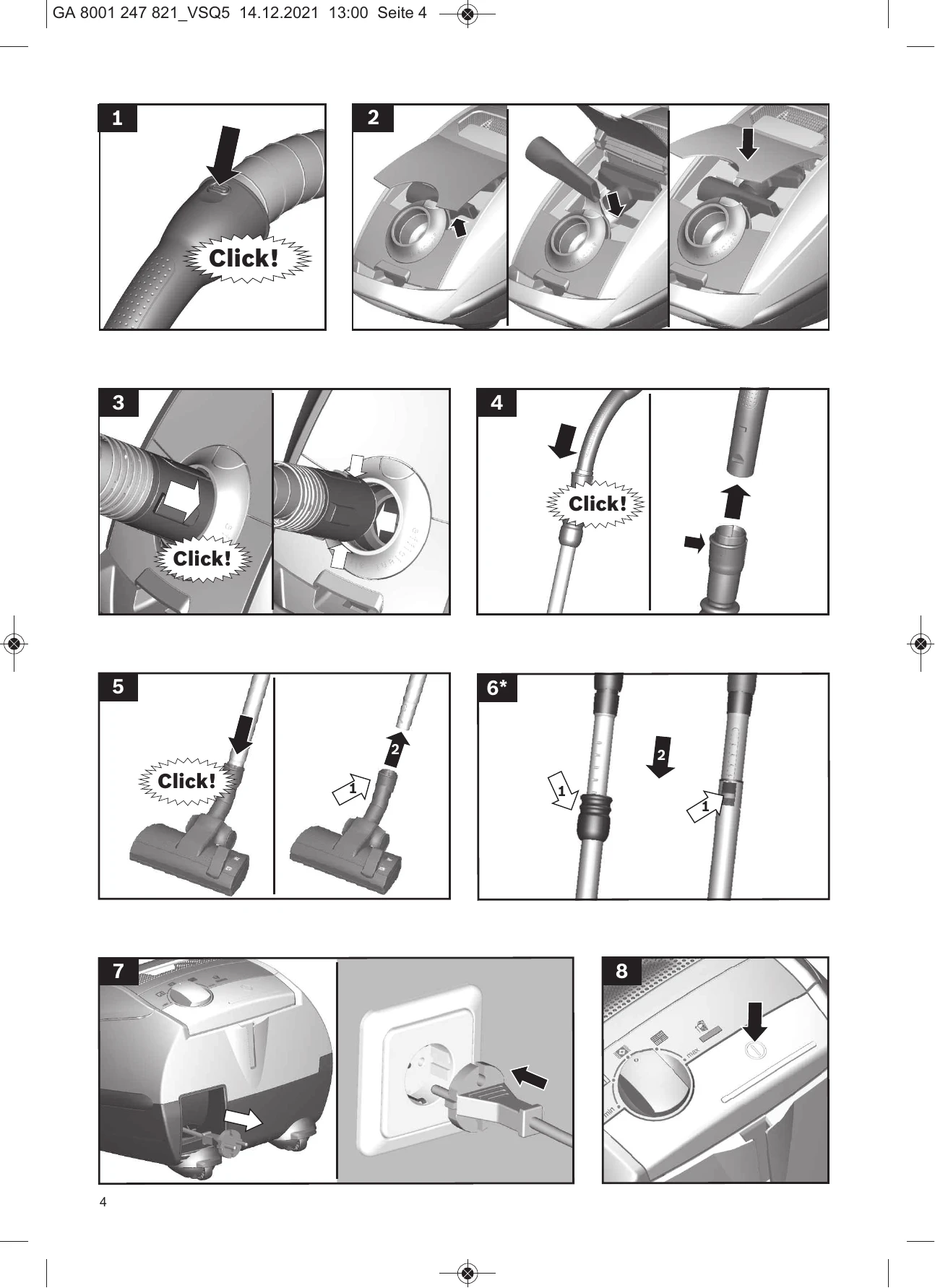
Figure 1: Push the handle onto the flexible hose and lock it in place.
Figure 2: Open the accessories compartment. Insert the crevice nozzle and upholstery nozzle in the accessories compartment in the appliance lid. Close the accessories compartment.
Figure 3: Push the flexible hose adapter into the air intake opening in the vacuum cleaner lid until it locks into place. To remove, press the two catches together and pull out the hose.
Figure 4: Push the handle into the telescopic tube until it locks in place. To release, press the locking collar and pull out the telescopic tube.
Figure 5: Push the telescopic tube into the connecting piece on the floor tool until it locks in place. To release, press the locking collar and pull out the telescopic tube.
Figure 6: Move the sliding sleeve to adjust the telescopic tube length.
Figure 8: Press the ON/OFF button to switch the vacuum cleaner on or off.
Figure 9/10: Turn the rotary control to adjust the suction level. "autoControl" offers one setting for all floors.
Figure 11: Adjust the floor tool for rugs and carpets or hard floors.
Figure 13: Attach nozzles (crevice, upholstery, hard-floor) to the suction pipe or handle as needed.
Figure 17: Pull out the mains plug. Briefly pull and release the power cord to rewind it.
Figure 18: Use the storage aid for storing or transporting the appliance. Stand upright and hook the floor tool onto the rear of the appliance.
| Problem | Possible Cause | Solution |
|---|---|---|
| Appliance does not start | Mains plug not inserted. | Insert mains plug. |
| Motor protection or exhaust filter dirty or blocked. | Clean or replace filter. | |
| Dust bag full or incorrectly inserted. | Replace dust bag or insert correctly. | |
| Appliance does not pick up dirt effectively | Suction level too low. | Increase suction level. |
| Nozzle, suction pipe or hose blocked. | Check for blockages and remove them. | |
| Dust bag is full. | Replace dust bag. | |
| Filter change indicator lights up red | Dust bag needs changing. | Change dust bag. |
| Appliance switches off automatically | Motor overheating. | Allow appliance to cool down. Check for blockages. |