Manual for OpenStage15

Manual for OpenStage15

Brand: SIEMENS

Category: Control Unit

Document Type: Manual

Language: EN
Uploaded: Nov. 21, 2025, 6:38 p.m.

Warranty Information

Warranty information and CE marking compliance are detailed, with a focus on proper disposal of electronic products.

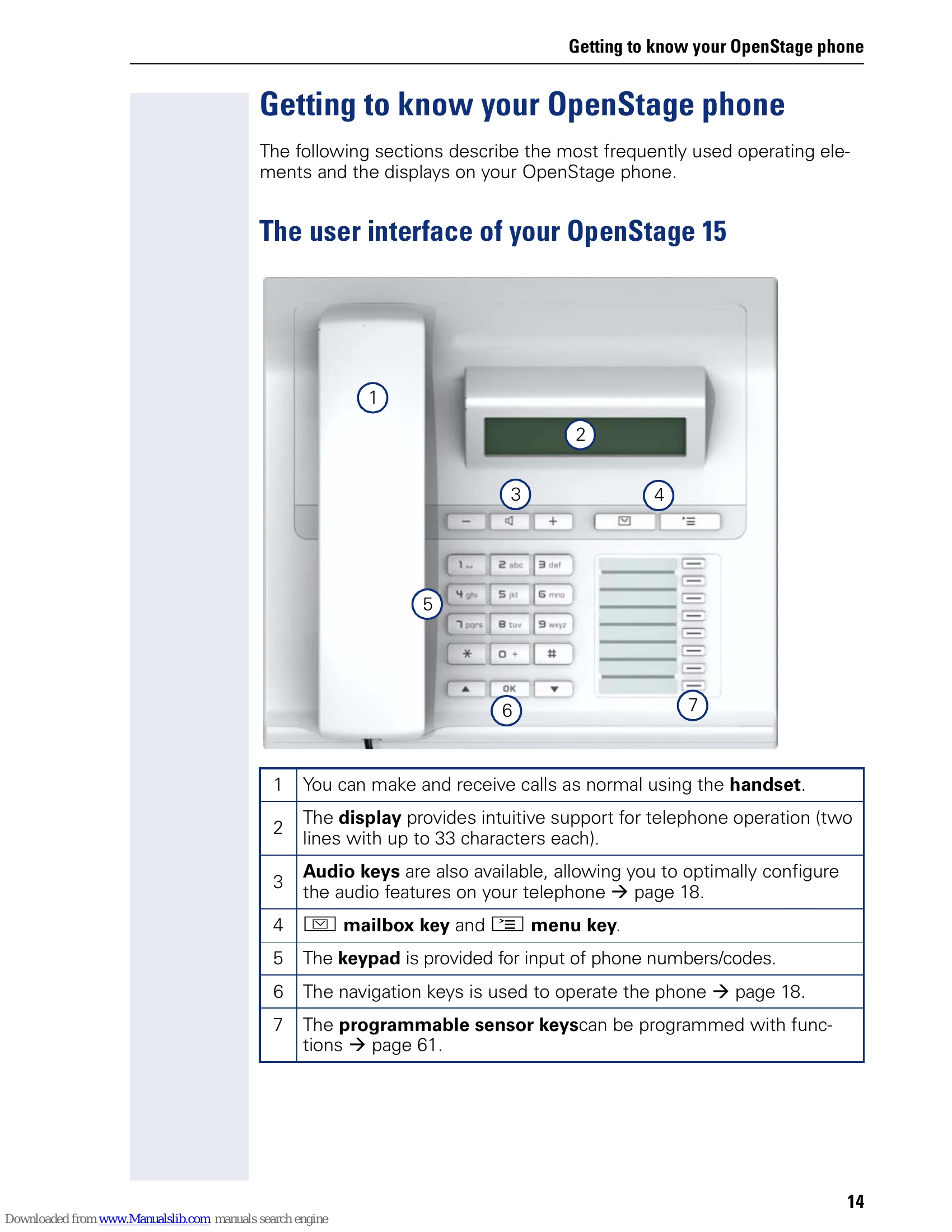
  • Making and Receiving Calls: Use the handset for normal call operations.
  • Display: Provides intuitive support with two lines of text (up to 33 characters each).
  • Audio Keys: Allow configuration of audio features.
  • Mailbox and Menu Keys: Access voicemail/missed calls or the main menu.
  • Keypad: For dialing numbers and entering codes.
  • Navigation Keys: Used to operate the phone's functions and display.
  • Programmable Sensor Keys: Can be programmed with various functions.
  • Ports: Includes power supply, PC connection, network switch, and handset connections.
  • Network Ports: Built-in 10/100 Mbps Ethernet switch allows PC connection to LAN.
  • Key Module: An optional module adding 18 programmable keys.
  • LED Display: Indicates line status (idle, incoming call, outgoing call, hold, busy, call forwarding).
  • User Menu: Allows configuration of date/time, audio settings, and user preferences.

Troubleshooting and error codes

Problem Possible Cause Solution
No function No power supply Check power supply connection.
Poor speakerphone quality Obstruction in front of microphone Keep the area in front of the microphone clear (approx. 50 cm distance).
Display illegible Incorrect viewing angle or contrast Tilt the phone for a frontal view and adjust contrast as required (page 144).
Function not available Function not configured or not supported Contact system support representative or Siemens sales partner.
Privacy Policy