Brand: SHARP
Category: Televisions
Document Type: Manual
Language: EN
Brand: SHARP
Category: Televisions
Document Type: Manual
Language: EN
Uploaded: Nov. 21, 2025, 8:23 p.m.
Design and specifications are subject to change without notice.
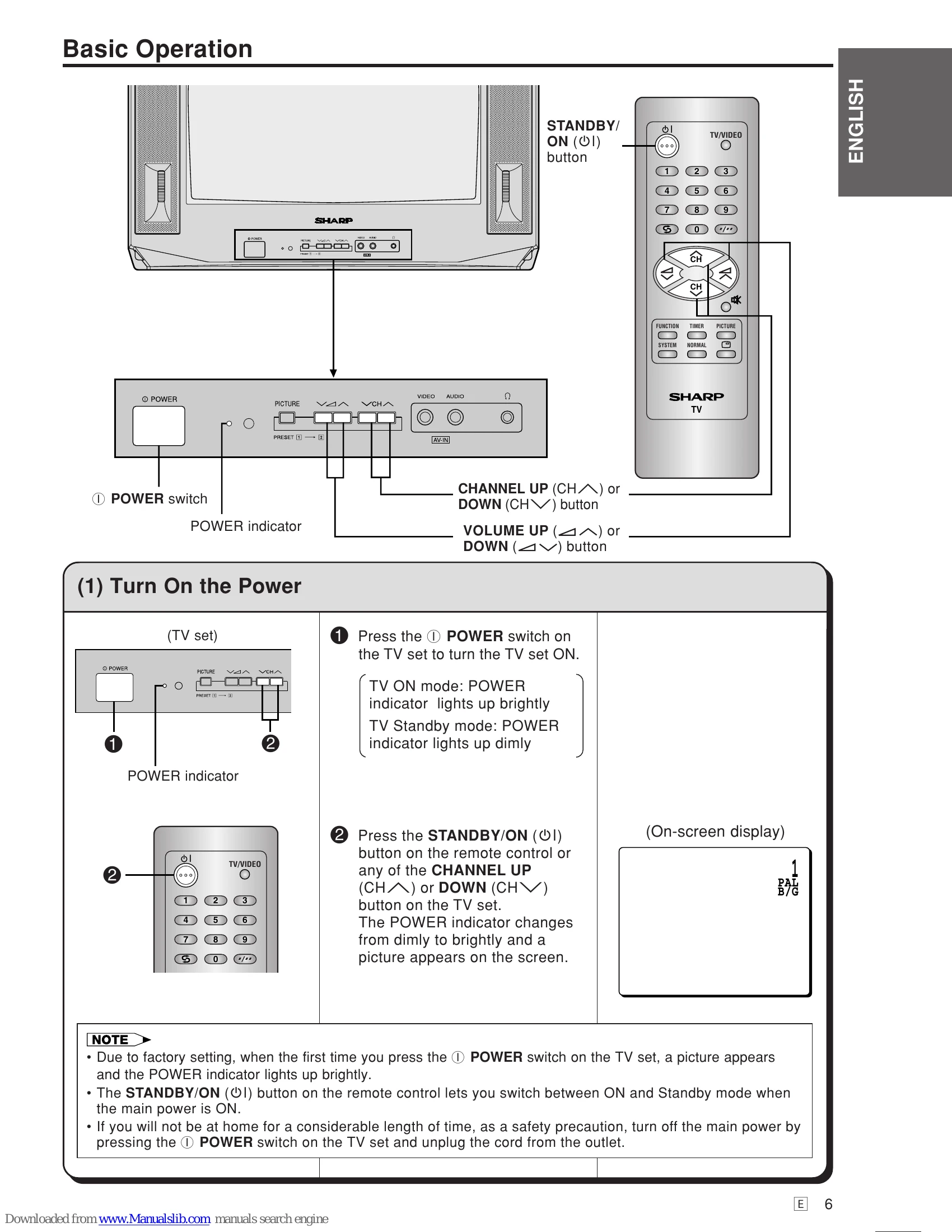
1. Turn On the Power: Press the POWER switch on the TV set. The POWER indicator lights up brightly. Then, press the STANDBY/ON button on the remote control or use the CHANNEL UP/DOWN buttons on the TV set. The POWER indicator changes from dim to bright, and a picture appears.
2. Changing the Channels: Use the CHANNEL UP/DOWN buttons on the remote control or TV set to cycle through channels sequentially. For direct channel selection, use the number buttons on the remote control. One-digit channels can be selected directly or by pressing the "-" button first. Two-digit channels require pressing the "-" button before entering the digits.
3. Adjusting the Volume: Use the VOLUME UP () or DOWN () buttons on the remote control or TV set to adjust the volume. The volume level is indicated by oval blocks.
4. OSD Language Selection: Press the FUNCTION button 5 times, use CHANNEL UP/DOWN to select the desired language, and press FUNCTION again.
| Quick Service Check List |
Problems | ||||||||||||
| Remote control does not work | Bars on screen | Picture distorted | Picture rolls vertically | No colour | Poor reception on some channels | Picture weak | Picture lines or streaks | Picture ghosting | Picture blurred | Sound OK, picture poor | Picture OK, sound poor | No picture or sound | |
| Possible Causes/Remedies | ● | ● | ● | ● | ● | ● | ● | ● | ● | ● | ● | ● | |
|---|---|---|---|---|---|---|---|---|---|---|---|---|---|
| Try a new channel to check for possible station trouble |
● | ||||||||||||
| TV not plugged in | ● | ||||||||||||
| Outlet power OFF | ● | ||||||||||||
| POWER switch of TV not ON | ● | ||||||||||||
| Antenna not connected to terminal at the rear of the TV set |
● | ● | ● | ||||||||||
| If outside antenna is used, check for broken wires |
● | ● | ● | ||||||||||
| Check for local interference | ● | ● | |||||||||||
| Turn OFF using the POWER switch, then turn ON again after a minute |
● | ||||||||||||
| Adjust COLOUR control | ● | ||||||||||||
| Check batteries in the remote control | ● | ||||||||||||
| Try fine tuning to correct | ● | ● | ● | ● | ● | ● | |||||||
| Contrast setting in picture mode might be all the way to the minus side. Press the NORMAL button on the remote control to correct |
● | ||||||||||||
| Increase the volume | ● | ● | |||||||||||