Brand: SHARP
Category: Office Equipment
Document Type: Manual
Language: EN
Brand: SHARP
Category: Office Equipment
Document Type: Manual
Language: EN
Uploaded: Nov. 21, 2025, 7 p.m.
Manual Publish Date: 1984-07-01
Warranty information not found in the provided pages.
| Page | Section | Problem | Possible Cause | Solution |
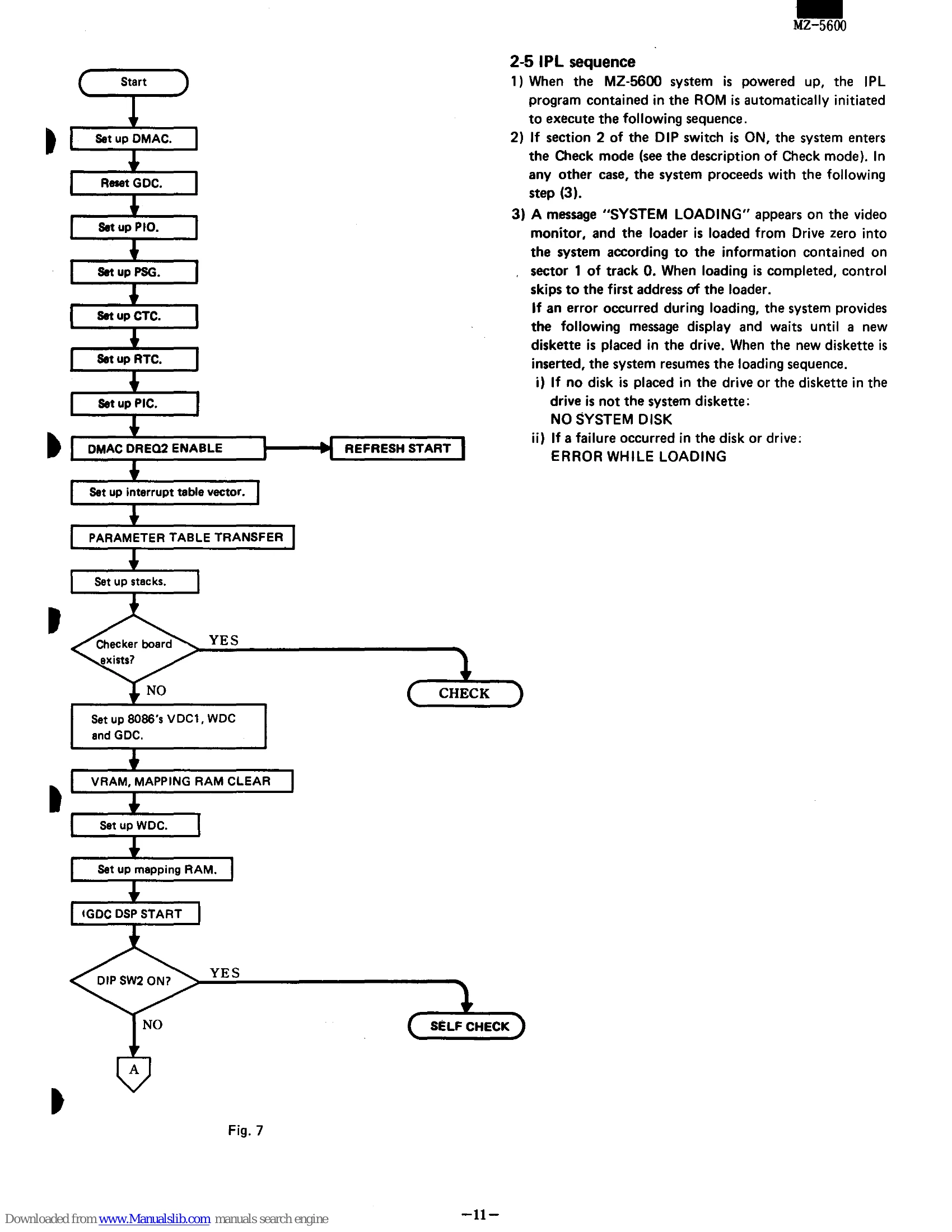
| 12 | 2-5 IPL sequence | Error during loading | No system disk in drive or disk is not system diskette | Insert a system diskette and resume loading. |
| 12 | 2-5 IPL sequence | Error during loading | Failure occurred in the disk or drive | Insert a system diskette and resume loading. |
| 13 | SYSTEM BOOT | NO SYSTEM DISK | Internal MFD not ready or no system disk | Check internal MFD and system disk. |
| 13 | SYSTEM BOOT | NO SYSTEM DISK | Hard disk interface not present | Install HD I/F. |
| 13 | SYSTEM BOOT | NO SYSTEM DISK WAITING FOR HARD DISK | Hard disk not ready | Check HD ready status. |
| 13 | SYSTEM BOOT | NO SYSTEM on MFD & HD | System not on HD | Ensure system is on HD. |