Brand: SHARP
Category: Office Equipment
Document Type: Manual
Language: EN
Brand: SHARP
Category: Office Equipment
Document Type: Manual
Language: EN
Uploaded: Nov. 21, 2025, 7:21 p.m.
No specific warranty information is provided in this document.
This manual provides instructions for cleaning the slit glass, charging cleaner wand, and removing the waste container for the SHARP MX-3050. It also details procedures for cleaning the interior of the machine to resolve issues with void areas or lines on prints and copies.
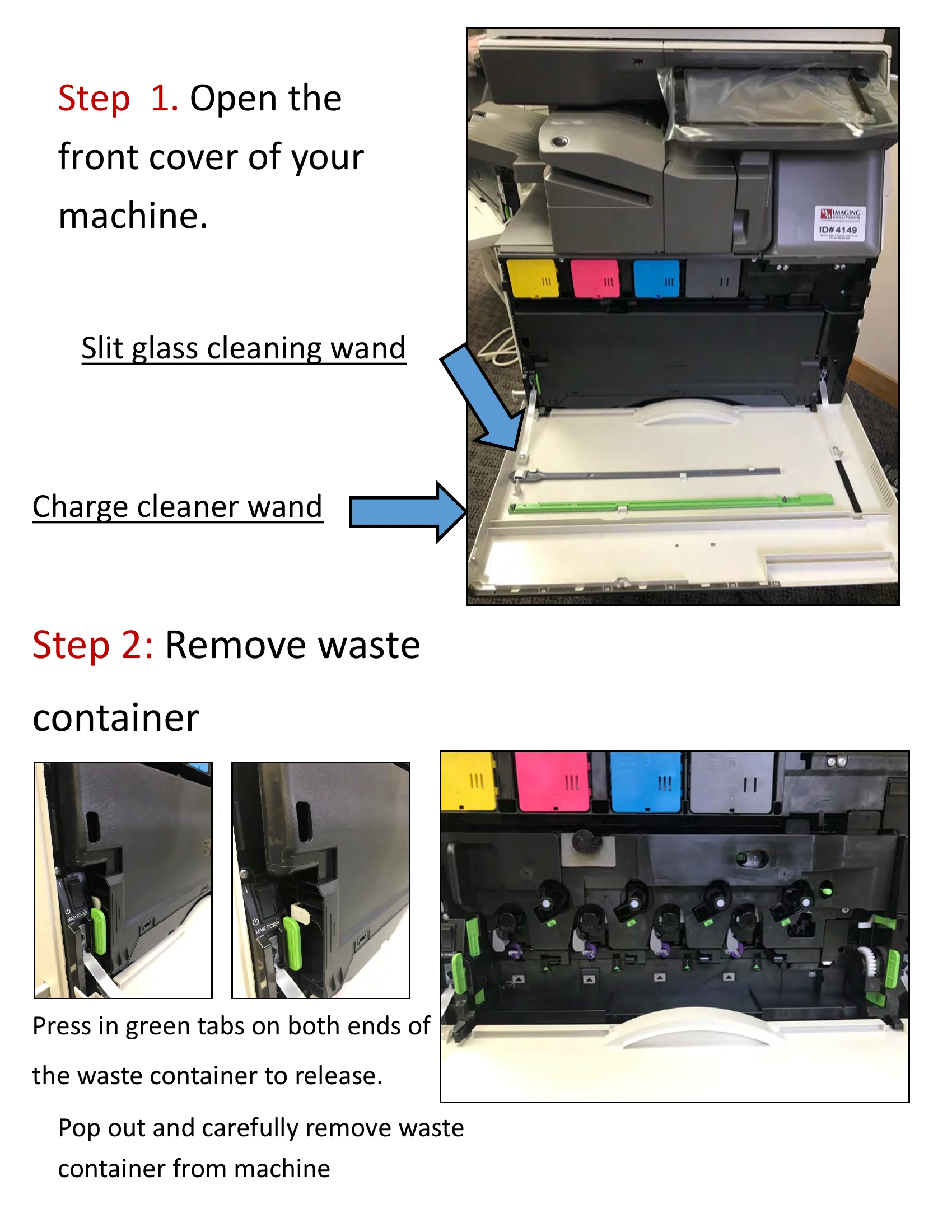
Step 1: Open the front cover of the machine. Locate and use the slit glass cleaning wand and the charge cleaner wand.
Step 2: Remove the waste container by pressing the green tabs on both ends and carefully pulling it out.
Step 3: For void areas, locate the black sticker with green triangles. Insert the gray cleaning wand, foam pad side down, into the hole above the sticker and move it back and forth.
Step 4: For lines, locate the green sticker with a black triangle. Insert the green cleaning wand, roller side up, into the hole below the green sticker and move it back and forth.
For lines on scans and copies, lift the document feeder lid and clean the copy glass and slit glass with a cloth and cleaner.