Brand: SHARP
Category: Home Appliances
Document Type: Manual
Language: EN
Brand: SHARP
Category: Home Appliances
Document Type: Manual
Language: EN
Uploaded: Nov. 21, 2025, 7:42 p.m.
Manual Publish Date: 2005-01-01
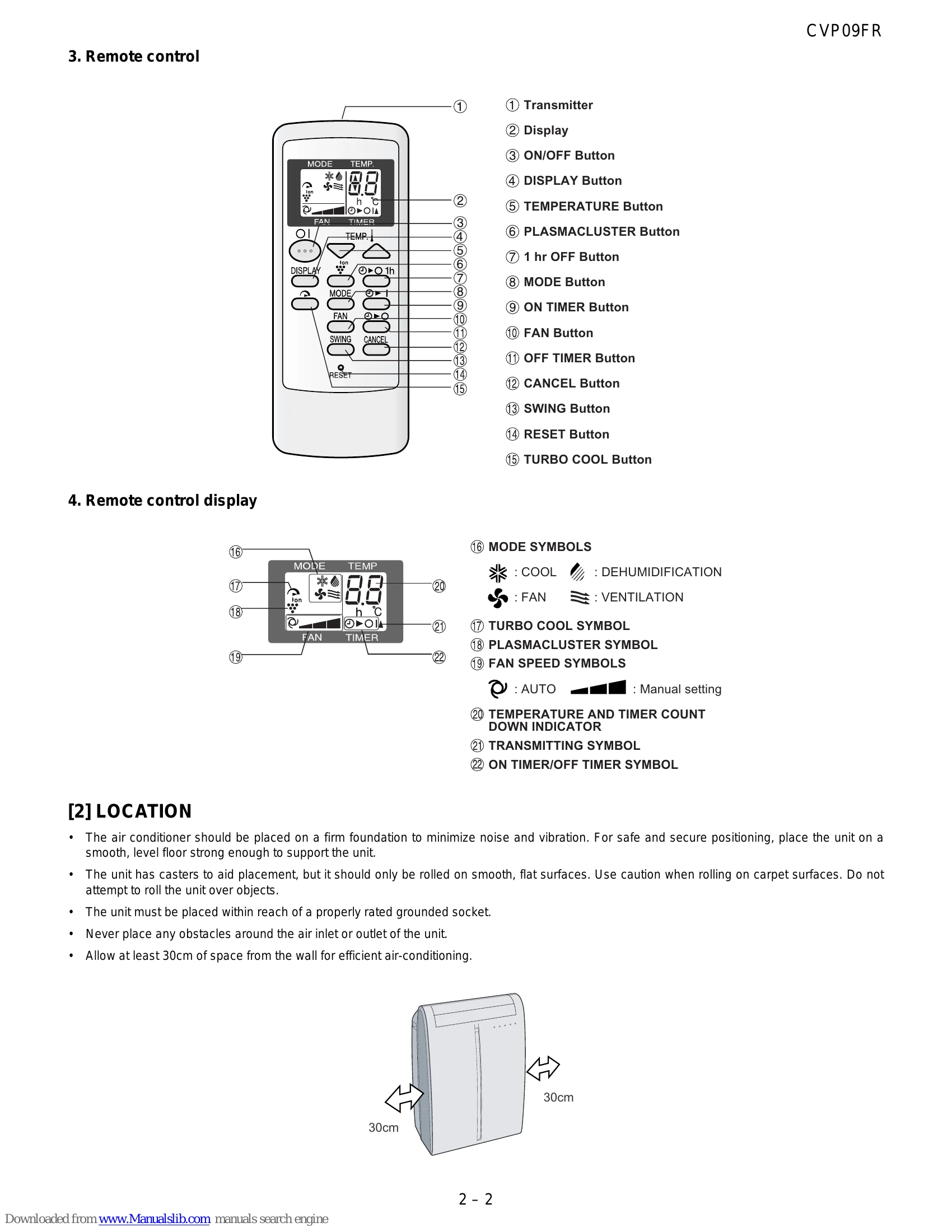
Set temperature (18°C-32°C) and fan speed. Unit starts cooling and the OPERATION lamp lights up.
Unit dehumidifies the room. Temperature cannot be set, fan speed is AUTO. Exhaust hose should be removed for better dehumidification.
Circulates air without cooling. Compressor and outdoor fan do not operate.
Ventilates air to outdoors. Compressor and indoor fan do not operate.
Extra high fan speed for 30 minutes at 15°C.
Set OFF TIMER or ON Timer for automatic unit shutoff or startup (0.5 to 12 hours). One-hour OFF Timer option is also available.
Releases positive and negative ions to reduce airborne mold.
Starts cooling operation with automatic temperature and fan speed settings when the unit is off.
| Symptom | Cause | Remedy |
|---|---|---|
| Unit does not operate. | Power cord is not plugged in. | Plug in the power cord. |
| The ON/OFF button is not pressed. | Press the ON/OFF button. | |
| Fuse is blown. | Replace the fuse. | |
| Thermostat is set too high. | Set the thermostat to a lower temperature. | |
| Cooling is weak. | Air filter is clogged. | Clean the air filter. |
| Window/door is open. | Close the window/door. | |
| Exhaust hose is not installed or is improperly installed. | Install or check the exhaust hose. | |
| Obstacles around air inlet/outlet. | Remove obstacles. | |
| Temperature setting is too high. | Set the temperature lower. | |
| Indoor fan speed is set too low. | Set the indoor fan speed higher. | |
| Unit stops operation. | Water tank is full. | Drain the water tank. |
| Overheating protection is activated. | Wait for the unit to cool down. | |
| Water leakage. | Drainage nozzle is not set to OPEN or stopcock is not removed. | Set drainage nozzle to OPEN and remove stopcock. |
| Drain hose is kinked or blocked. | Check and clear the drain hose. | |
| Unit is tilted. | Place the unit on a level surface. | |
| Remote control does not work. | Batteries are dead or improperly installed. | Replace or correctly install batteries. |
| Signal is blocked. | Ensure no obstructions between remote and unit. | |
| Remote control is too far from the unit. | Move closer to the unit. |