Manual for DV-SV90S(B)

Manual for DV-SV90S(B)

Brand: SHARP

Category: Audio

Document Type: Manual

Language: EN
Uploaded: Nov. 21, 2025, 7:51 p.m.

Warranty Information

No warranty information is provided in the extracted pages.

Basic Play

  1. Press OPERATE.
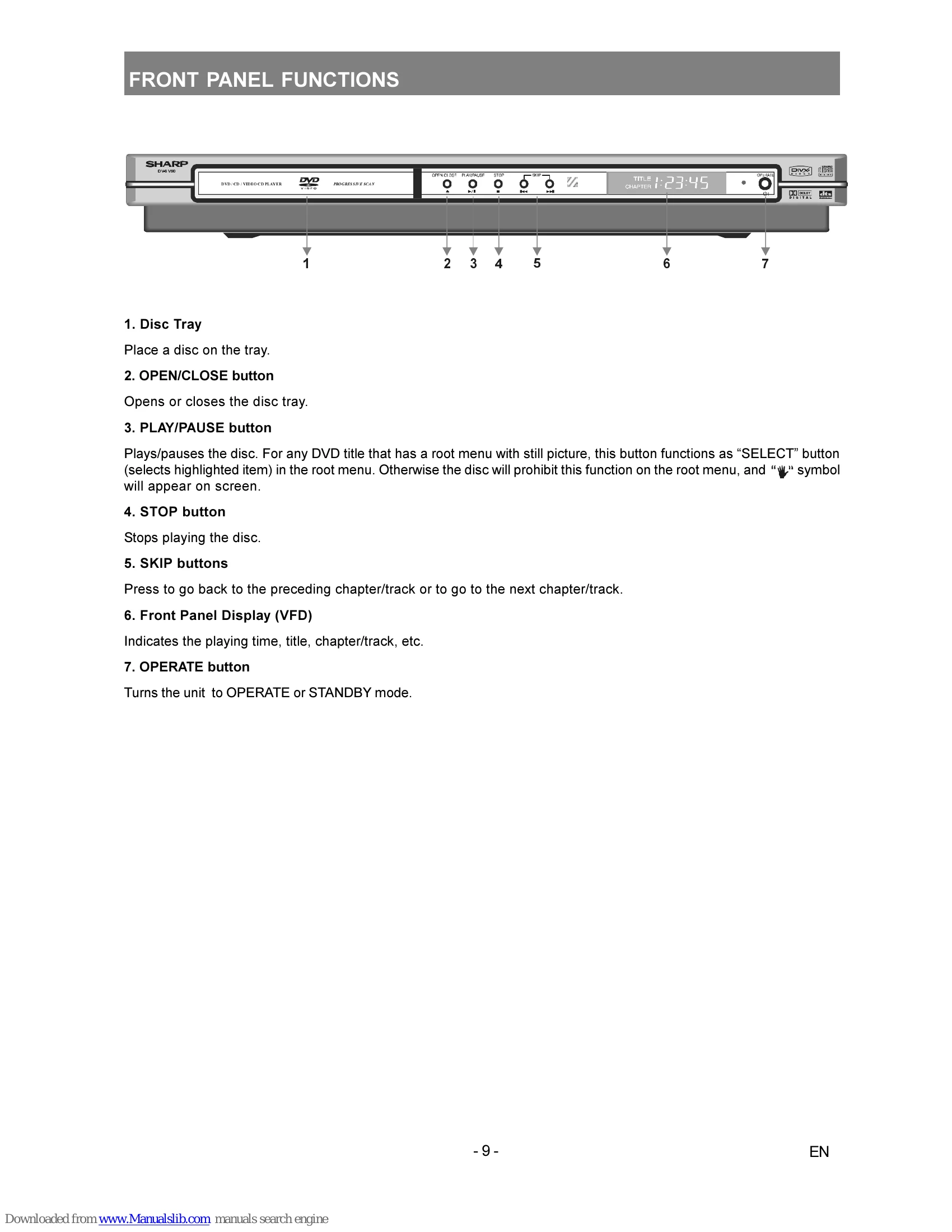
  2. Press OPEN/CLOSE (▲) to open the disc tray.
  3. Place a disc onto the tray, label side facing up.
  4. Press OPEN/CLOSE (▲) to close the disc tray.
  5. Use arrow buttons or number buttons to select title, then press SELECT.

Playback Controls

  • STOP: Press twice to stop playback permanently. Press once for RESUME function.
  • PLAY/PAUSE: Starts or pauses playback.
  • SKIP/FRAME: Moves to the next or previous chapter/track.
  • SLOW/SEARCH: Adjusts playback speed for fast forward, reverse, or slow motion.
  • A-B Repeat: Selects a section for continuous repeat playback.
  • ZOOM: Enlarges the picture.
  • SUBTITLE: Cycles through available subtitle languages.

Setup Menu

Press DISPLAY when not in playback mode to access the setup menu for changing device settings (Video, Audio, Language, Parental Control, Preferences).

Troubleshooting and error codes

Issue Solution
The picture quality is poor (DVD)
  • Make sure the DVD disc surface is not damaged. (Scratch, fingerprint etc.)
  • Clean the DVD disc and try again.
  • Ensure that the DVD disc is in the drawer with the label uppermost.
  • A damp DVD disc or condensation may effect the equipment. Wait for 1 to 2 hours in Stand-by to dry the equipment.
Disc does not play
  • No disc in the machine. Place a disc onto the tray.
  • Disc incorrectly loaded. Ensure that the DVD disc is in the drawer with the label uppermost.
  • Wrong type of disc. The machine cannot play CD-ROMS etc. Use disc in supported formats described on page 6.
  • The region code of the DVD must match the one of the player.
Wrong OSD language
  • Select the language in the set-up menu.
The language for the sound or subtitles on a DVD cannot be changed.
  • Multilingual sound and/or subtitles not recorded on the DVD.
  • Try to change the sound or subtitles using DVD's title menu. Some DVD's do not allow the user to change these settings without using the disc's menu.
Some functions (Angle, Zoom etc) do not work
  • These functions are not available on the DVD.
  • Angle can only be changed when the angle symbol is displayed.
No picture
  • Check that the player is connected to TV properly and that all connections between the DVD player and other attached equipment are secure.
  • Have you pressed the correct buttons on the remote control? Try once more.
No sound
  • Check the volume is set to an audible level.
  • Make sure you have not switched the sound off accidentally.
Distorted sound
  • Check that the appropriate listening mode setting is correct.
No response from remote control
  • Check batteries are fitted correctly.
  • Change the batteries.
Privacy Policy