Brand: SHARP
Category: Audio
Document Type: Manual
Language: EN
Brand: SHARP
Category: Audio
Document Type: Manual
Language: EN
Uploaded: Nov. 21, 2025, 7:46 p.m.
This manual does not contain explicit warranty period information.
Powering On/Off: Press the ON/STAND-BY button to turn the unit on. To set to stand-by mode, press the ON/STAND-BY button again.
Basic Operation: Use the FUNCTION button or remote control to select sources like DVD/CD, USB, TUNER, or AUX. Use the playback controls (Play, Pause, Stop) for media playback. Adjust volume using the VOLUME control.
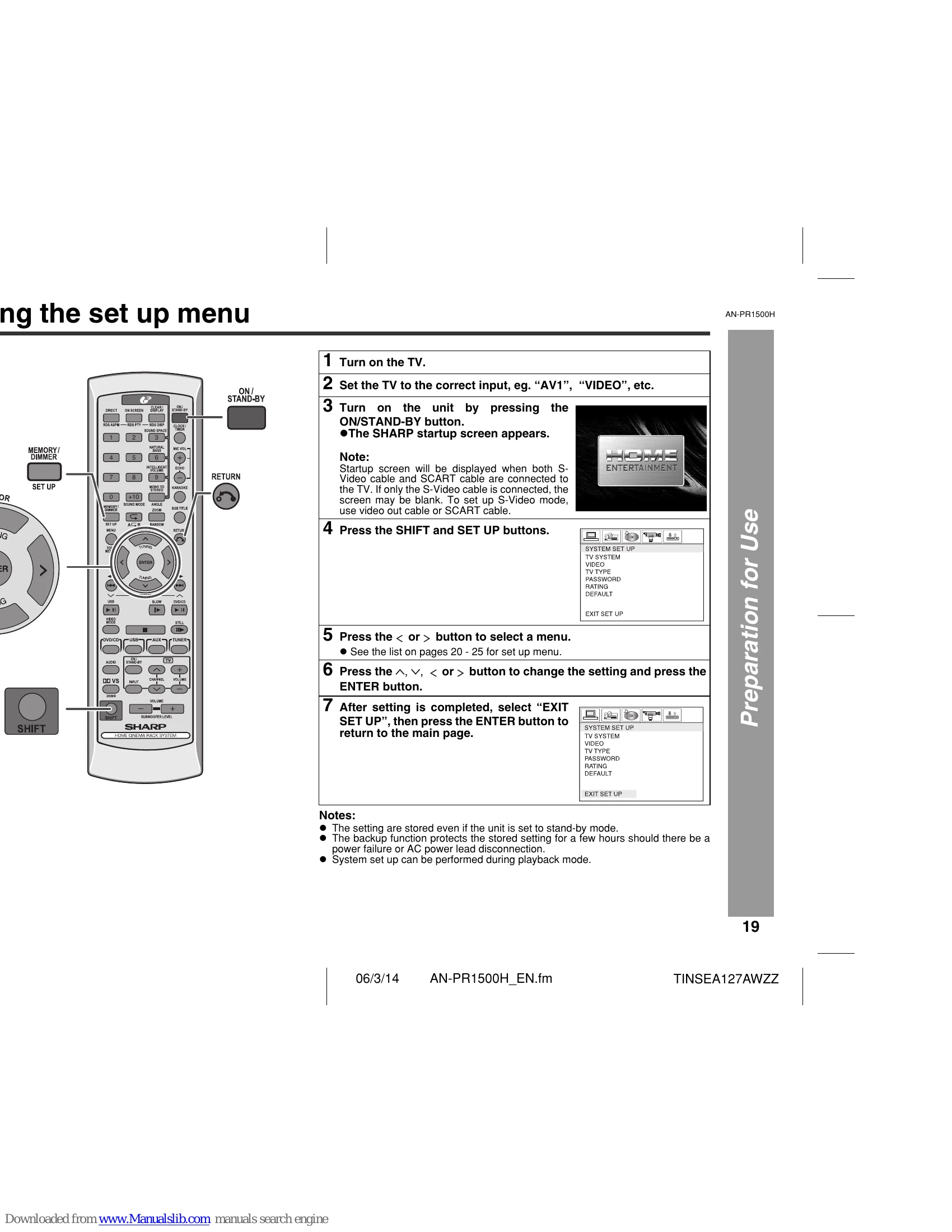
Setup Menu: Access the setup menu by pressing SHIFT and SET UP buttons on the remote. Navigate through menus to adjust TV system, video settings, audio language, and more.
Karaoke: Connect microphones to MIC 1 or MIC 2, adjust volume and echo, and select audio modes for karaoke.
Timer/Sleep: Set timers for automatic playback or sleep operation to automatically turn off the unit.
Troubleshooting: Consult the troubleshooting chart for common issues and solutions.
| General | Symptom | Possible cause |
|---|---|---|
| Unit is not turned on. | • Is the unit unplugged? • Is the volume level set to "0"? • Are the speaker wires disconnected? • Are the speaker wires connected to the wrong channels? • Move the unit away from any computers or mobile phones. |
|
| Sound is heard. | Set the unit to the power stand-by mode and then turn it back on. • If the unit still malfunctions, disconnect the unit from the mains for 30 seconds, then reconnect. |
|
| Sounds from speakers are unbalanced. | • Is the unit placed near TV with internal aerial? Use an external aerial. | |
| Noise is heard during playback. | • Is the display in the dimmer mode? | |
| When a button is pressed, the unit does not respond. | • Is the TV turned on? • Is the TV input switched on? |
|
| Interference or noise occurs on the image. | ||
| Display on the unit is dark. | ||
| Images are displayed. |
| DVD player | Symptom | Possible cause |
|---|---|---|
| Even though a disc is loaded, "No Disc" is displayed. | • Is the disc loaded upside down? • Is the disc very dirty? • Does the disc satisfy the standards? • Is the unit located near excessive vibrations? |
|
| Playback sounds are skipped. • The control buttons do not function. Music or video playback is interrupted. |
• Is condensation formed inside the unit? • Is the disc very dirty? • Does the disc satisfy the standards? • Is the unit located near excessive vibrations? |
|
| Pictures and sound are skipped. | • Is condensation formed inside the unit? • Is the disc very dirty? • Is the unit located near excessive vibrations? |
|
| The unit does not operate even if the power is on. | • Is condensation formed inside the unit? • Is a disc other than a DVD (region number at the back of the unit), audio CD, CD-R or CD-RW loaded? • Are the video and audio cables connected improperly? • Is a disc other than a DVD (region number 2 or ALL), audio CD, CD-R or CD-RW loaded? • Is the disc very dirty? • Is the disc loaded upside down? • Is the optical pick up dirty? • Is the TV input set to video (VIDEO 1, VIDEO 2, etc.)? • Is the unit turned on? |
|
| Images cannot be played back. (Sound is not heard.) |
| Symptom | Possible cause | |
|---|---|---|
| Disc detected. | • Is there any MP3/WMA file available? • Is the device properly connected? • Is it MTP device? • Does the device contain AAC files only? • Is it a copyright protected WMA file? • Is it a false MP3 file? • Is Variable Bitrate file being played back? • Is the File Name written in Chinese or Japanese characters? |
|
| Playback does not start. | ||
| Playback is noisy or sound is not displayed. | ||
| Display is blank. |
| Symptom | Possible cause | |
|---|---|---|
| Sound multiplexed disc | • Is the karaoke mode set to "L-CH", "R-CH" or "V-CANCEL"? |
| Symptom | Possible cause | |
|---|---|---|
| Remote control | Remote control does not work. | • Is the AC power lead of the unit plugged in? • Is the battery polarity correct? • Are the batteries dead? • Is the distance or angle incorrect? • Is there a strong light shining on the remote sensor? |
| Produces unusual noises. | • Is the unit placed near the TV or computer? • Is the FM aerial or AM loop aerial placed properly? Move the aerial away from the AC power lead if it is located nearby. |
| Condensation | If problem occurs |
|---|---|
| Sudden temperature changes, storage or operation in an extremely humid environment may cause condensation inside the cabinet (CD pickup, etc.) or on the transmitter on the remote control. Condensation can cause the unit to malfunction. If this happens, leave the power on with no disc in the unit until normal playback is possible (about 1 hour). Wipe off any condensation on the transmitter with a soft cloth before operating the unit. | When this product is subjected to strong external interference (mechanical shock, excessive static electricity, abnormal supply voltage due to lightning, etc.) or if it is operated incorrectly, it may malfunction. If such a problem occurs, do the following: 1 Set the unit to the stand-by mode and turn the power on again. 2 If the unit is not restored in the previous operation, unplug and plug in the unit, and then turn the power on. Note: If neither operation above restores the unit, clear all the memory by resetting it. |