Brand: SANYO
Category: Video
Document Type: Manual
Language: EN
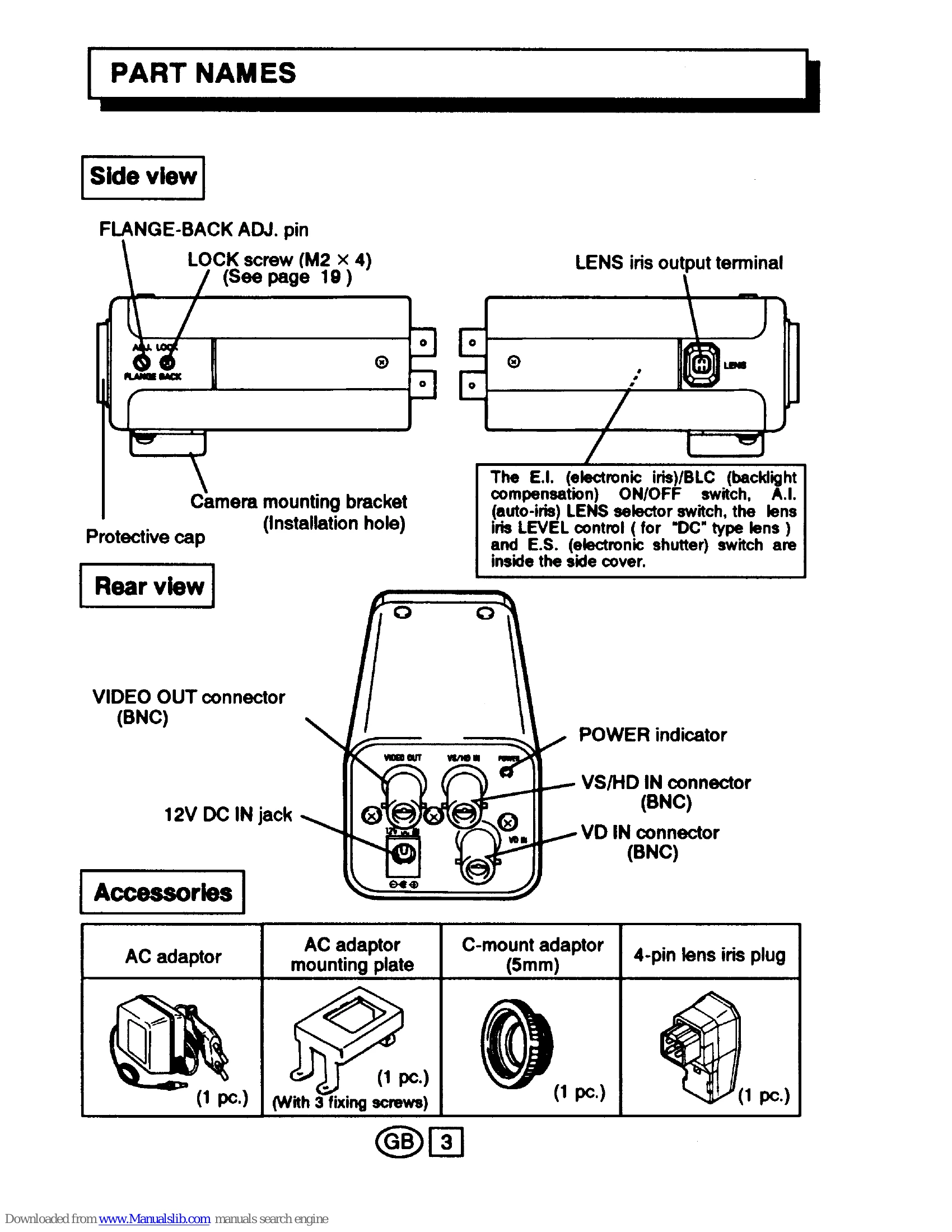
Brand: SANYO
Category: Video
Document Type: Manual
Language: EN
Uploaded: Nov. 21, 2025, 8:25 p.m.
None
1. Connect the power supply after connecting all equipment. The power indicator (red LED) will illuminate to indicate power is on. The image will appear on the monitor.
2. Adjust the lens focus and angle based on the subject and installation location.
| Problem | Where to check |
|---|---|
| No picture on the monitor screen | • Is the cable connected properly? |
| • Has the lens cap been removed? | |
| • Is the illumination sufficient? | |
| • Is the monitor on and properly adjusted? | |
| • Is the lens iris level inside the camera properly adjusted? ("DC" type lens) | |
| • Is the LEVEL control of the lens properly adjusted? (When using the "VIDEO" type auto-iris lens with AMP) | |
| • Has the A.I. LENS selector switch been set proper? (See pp. 5~6) | |
| The picture is not clear | • Are the lens and the surface of the CCD clean? |
| • Is the lens properly focused? | |
| • Has the A.I. LENS selector switch been set proper? (See pp. 5~6) |