Brand: SANYO
Category: Video
Document Type: Manual
Language: EN
Brand: SANYO
Category: Video
Document Type: Manual
Language: EN
Uploaded: Nov. 21, 2025, 9:13 p.m.
This warranty covers 90 days labor and 1 year parts for defects in materials and workmanship.
Power On/Off: Press the power button to turn the unit on. Press again to enter standby mode. For complete shutdown, unplug the AC power cord.
Disc Playback: Press the power button, insert a disc with the label facing up, then press Play. Use the remote control buttons for pause, stop, fast forward/reverse, and slow playback.
Menu Navigation: Use the arrow keys and ENTER button on the remote to navigate disc menus and setup options.
Setup Menu: Access the setup menu by pressing the SETUP button to adjust system, language, audio, and video settings.
Remote Control: Ensure there are no obstacles between the remote and the unit. Observe the operating range limits.
| Problem | Corrective action |
| No Power. | Check AC power cord connection. Unplug and wait 5-10 seconds, then plug in again. |
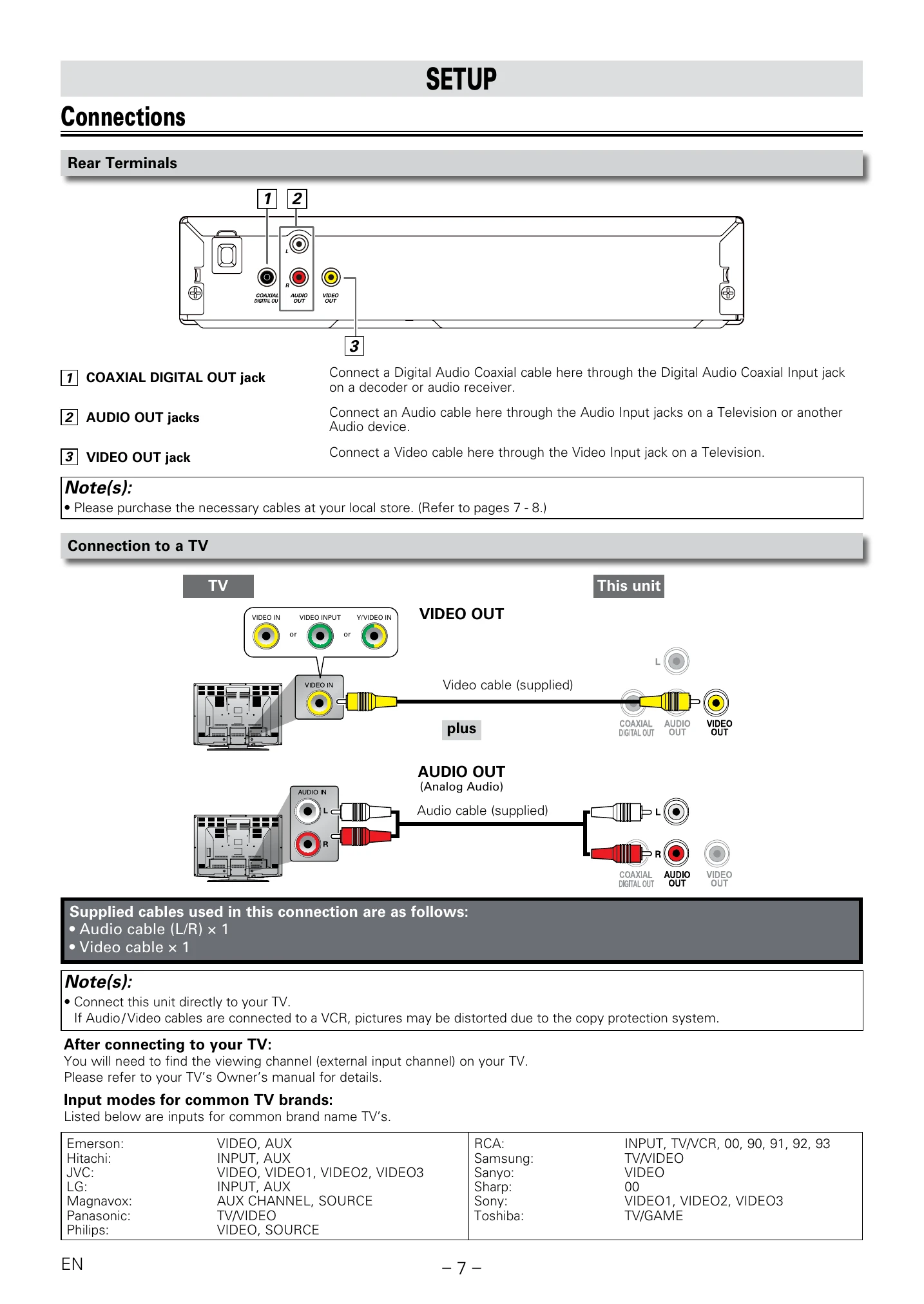
| No Sound or Picture. | Check TV is switched on. Check video connection. Check Audio/Video cable connections to the TV. |
| Distorted Picture. | Small amounts of distortion may appear and are not a malfunction. Connect the unit directly to the TV. |
| Completely Distorted Picture or Black/White Picture with DVD. | Connect this unit directly to the TV. Ensure the disc is compatible. |
| No Sound or Distorted Sound. | Adjust the volume. Check speaker connections. |
| No DTS Audio is Output. | This unit does not support DTS audio. Set to "Bitstream" in "Audio Out" Menu and connect to a DTS-compatible TV or amplifier via coaxial jack. |
| Picture Freezes Momentarily during Playback. | Clean the disc. Ensure correct insertion. Check disc compatibility. Check Parental settings. Handle discs with care. |
| Disc Cannot be Played back. | Clean the disc. Ensure correct insertion. Check disc compatibility. Check if the disc is defective. Check Parental settings. |
| No Return to Start-up Screen when Disc is Removed. | Turn off the unit and then restart. |
| The Unit does not Respond to the Remote Control. | Aim remote at the sensor. Reduce distance. Re-insert batteries correctly. Replace batteries. Test remote with a digital camera. |
| Buttons Do Not Work or the Unit Stops Responding. | Reset the unit by unplugging the AC power cord for 5-10 seconds. |
| The Unit Does Not Respond to some Operating Commands during Playback. | Operations may not be permitted by the disc. Refer to the disc instructions. |
| The Unit Cannot Read CD / DVD. | Use a cleaning CD/DVD disc to clean the lens. |
| Angle Does Not Switch. | The DVD may not contain multiple angles. |
| The Password for Rating Level has been Forgotten. | Enter the default password "4737" to clear and reset the password. |