Manual for Juno

Manual for Juno

Brand: SANYO

Category: Phone

Document Type: Manual

Language: EN
Uploaded: Nov. 21, 2025, 6:32 p.m.

Manual Publish Date: 2010-01-01

Warranty Information

A one-year limited warranty covers defects in material or workmanship, with specific exclusions.

Setting Up Your Phone

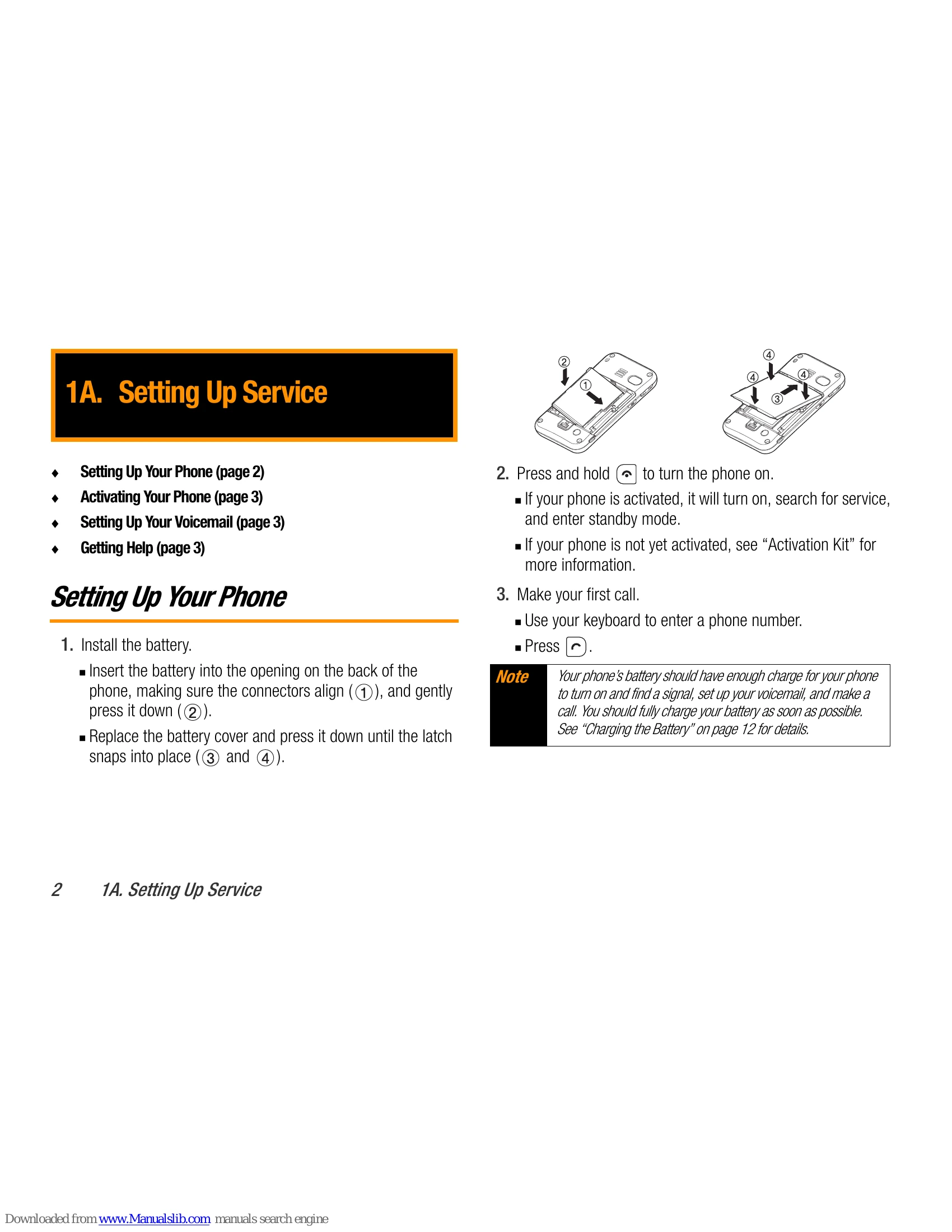
  1. Install the battery by inserting it into the back of the phone, aligning connectors, and pressing down. Replace the cover until it snaps into place.
  2. Press and hold the power button to turn the phone on. It will search for service and enter standby mode if activated.
  3. Make your first call by entering a phone number and pressing the TALK key.

Activating Your Phone

Refer to your “Activation Kit” for instructions.

Setting Up Your Voicemail

  1. From standby mode, press and hold the TALK key.
  2. Follow prompts to create a passcode, record your name announcement and greeting, and choose One-Touch Message Access.

Getting Help

Manage your account at boostmobile.com. Use short codes like #225 for usage, #233 for payments, and #611 for service plan information.

Making and Answering Calls

To make a call, ensure the phone is on, enter the number from standby mode, and press TALK. Use the BACK key to erase mistakes. To answer a call, press TALK.

Privacy Policy