Parts/Service for PLC-XL51

Parts/Service for PLC-XL51

Brand: SANYO

Category: Commercial Solutions

Document Type: Parts/Service

Language: EN
Uploaded: Nov. 21, 2025, 8:52 p.m.

Lamp Replacement:
  • Turn off projector, unplug AC cord, and allow to cool for 45 minutes.
  • Remove lamp cover screw and open cover.
  • Loosen screws securing the lamp, lift lamp out by handle.
  • Replace with new lamp, secure screws, close cover, and secure screw.
  • Connect AC cord and turn on projector.
  • Reset the lamp counter via the menu.
Filter Cleaning:
  • Turn off projector, unplug AC cord.
  • Flip projector over, unlatch and remove air filter.
  • Clean filter with a brush or blower (do not wash).
  • Reinstall filter.
  • Reset the filter counter in the Setting Menu.
Security Function Reset:
  • Disconnect AC power cord.
  • Press SELECT button, then reconnect AC power cord while still pressing SELECT until POWER indicator lights continuously.
Network Easy Setup:
  • Create PJ_Network.ini file on SD card.
  • Insert SD card into projector.
  • Turn on projector to automatically apply network settings.

Troubleshooting and error codes

Indicators and Projector ConditionTroubleshooting
No Power
  • Check AC cord connection.
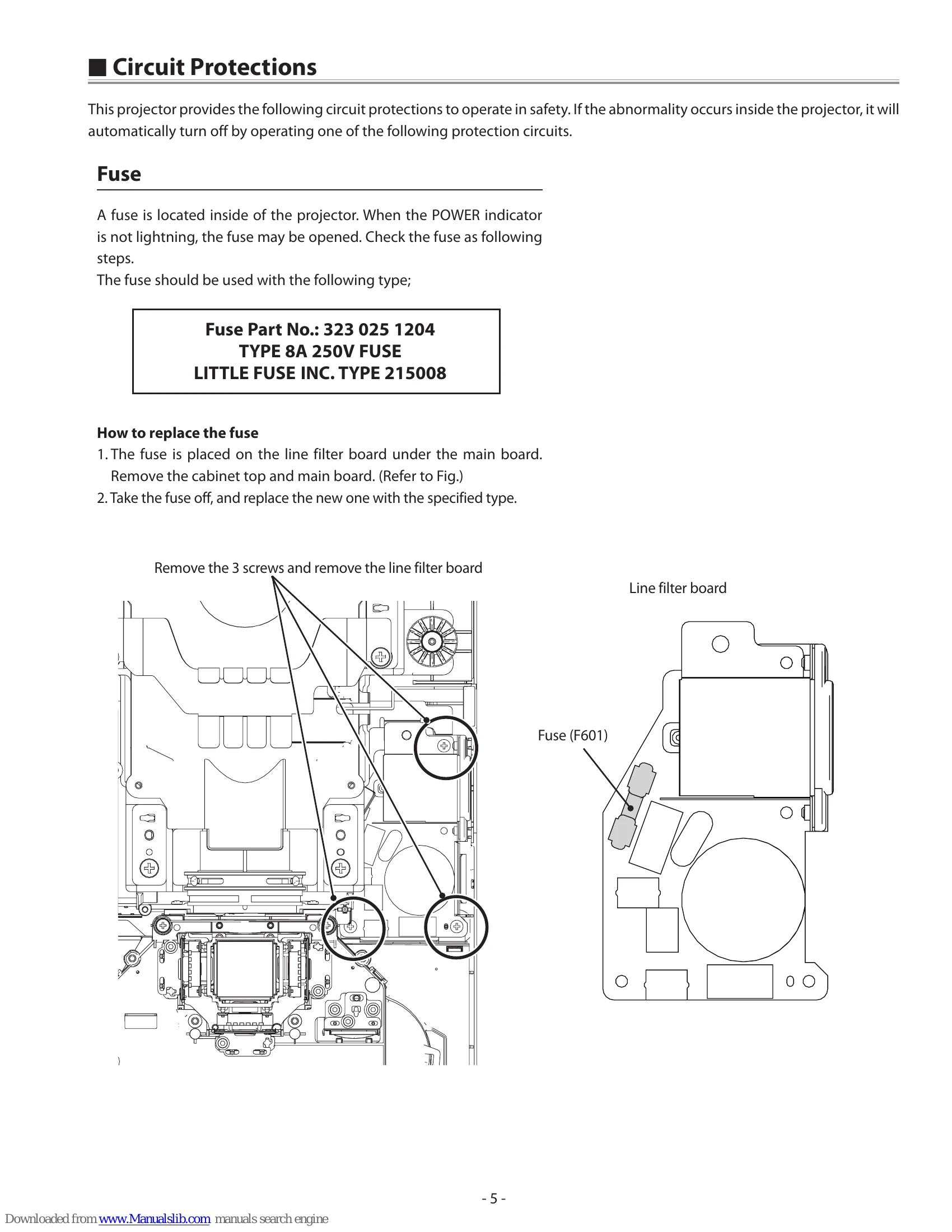
  • Check fuse (F601) on the line filter board.
  • Check the power supply circuit.
No Picture
  • Check lamp status; replace if end of life.
  • Check lamp cover switch (SW901) is closed.
  • Check projector window for obstructions.
  • Check signal cables and source.
  • Adjust focus and zoom.
No Sound
  • Check audio cable connection.
  • Check volume settings.
  • Check internal audio amp and speaker.
WARNING indicator flashing
  • Abnormal internal temperature.
  • Check air filters for dust.
  • Ensure ventilation slots are not blocked.
  • Check operating temperature.
WARNING indicator red
  • Possible defect in cooling fans or power supply circuits.
  • Unplug and reconnect AC cord, then try to turn on. If still red, service may be required.
Privacy Policy