Manual for VPC-HD2000EX

Manual for VPC-HD2000EX

Brand: SANYO

Category: Camcorder

Document Type: Manual

Language: EN
Uploaded: Nov. 21, 2025, 8:27 p.m.

How to read this manual

For first-time users, read the "SETUP" and "SIMPLE" sections, and the "QUICK GUIDE".

To use camera features, read "NORMAL" and "OPTION SETTINGS". For TV viewing, see "OTHER DEVICES AND CONNECTIONS". For computer connection, see the "Xacti Software CD INSTRUCTION MANUAL".

For additional features like editing or DVD burning, read the "Xacti Software CD INSTRUCTION MANUAL".

Answers to questions can be found in "COMMONLY ASKED QUESTIONS" (page 168) and "TROUBLESHOOTING" (page 176).

Symbols used in this manual

HINT: Points giving extended instructions or special points to pay attention to.

CAUTION: Points that require special attention.

(page xx): Refer to the page indicated for detailed information.

SHOOT, PLAY BACK AND SAVE

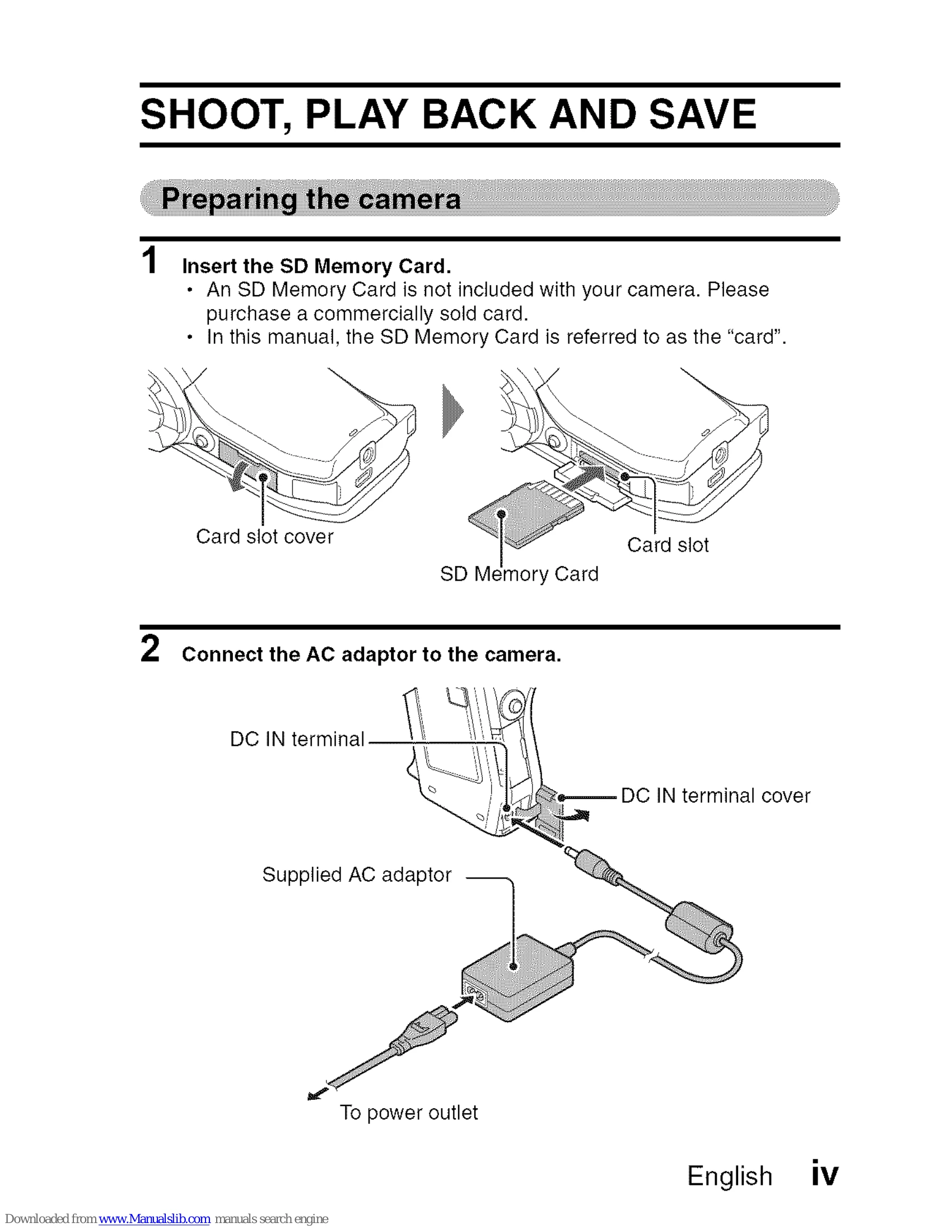
Preparing the camera

  1. Insert the SD Memory Card: Purchase a card separately.
  2. Connect the AC adaptor: Plug into the DC IN terminal and power outlet.

Shooting

  1. Set REC/PLAY switch to REC.
  2. Press ON/OFF button for 1 sec to turn on. Ignore date/time prompt if it appears.
  3. Record video: Press [] button to start, press again to stop.
  4. Take photo: Press [] button.

Playback

  1. Set REC/PLAY switch to PLAY.
  2. Select image using SET button (left, right, up, down).
  3. Press SET button to play selected image.

Burn your recorded video clips onto a DVD (Windows Vista)

  1. Install application programs from the supplied CD-ROM.
  2. Follow on-screen instructions to install Nero 8 Essentials.
  3. Click "Finish" and remove CD-ROM.

Connect your camera to a computer

  1. Use the USB interface cable to connect camera to computer.
  2. Turn on the camera.
  3. Select "COMPUTER" and press SET button.
  4. Select "CARD READER" and press SET button.
  5. Copy files from the card to computer's hard disk.
Privacy Policy