Manual for VPC-HD1AEX

Manual for VPC-HD1AEX

Brand: SANYO

Category: Camcorder

Document Type: Manual

Language: EN
Uploaded: Aug. 10, 2025, 12:14 a.m.

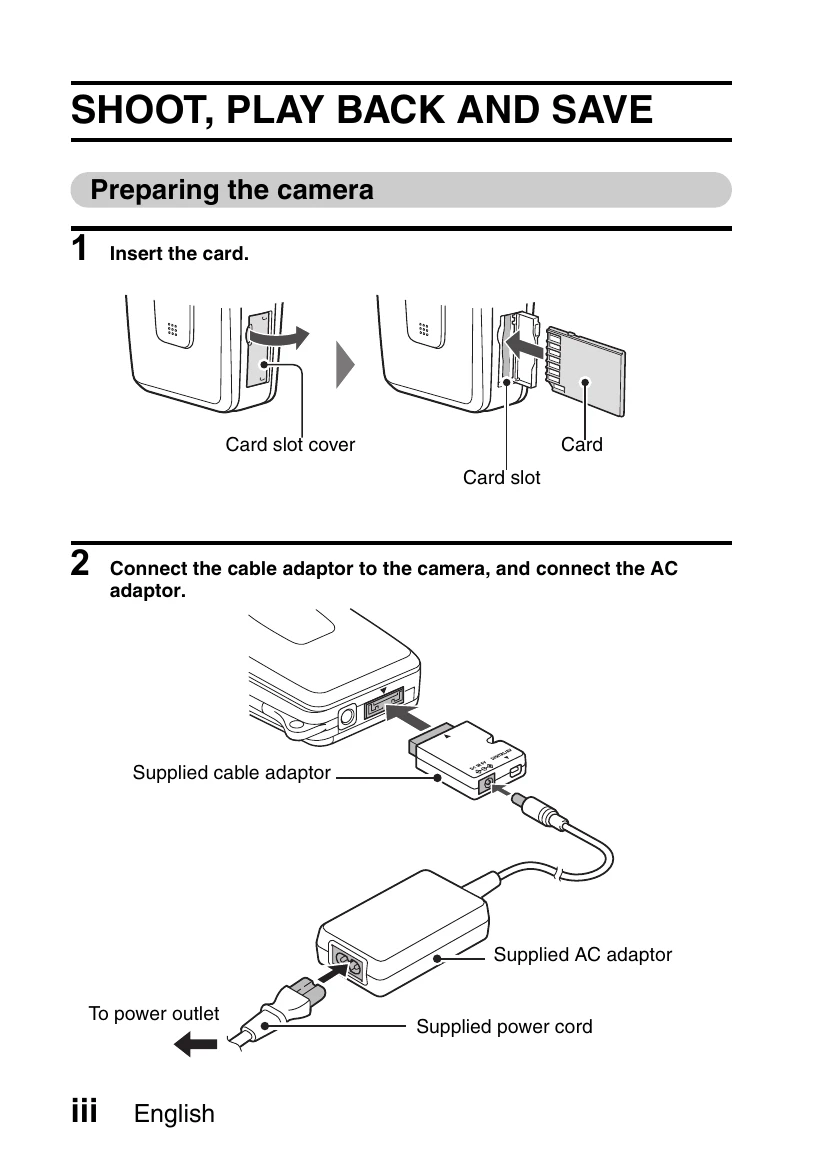
  • Preparing the camera: Insert card and connect AC adaptor.
  • Shooting Video Clips: Open monitor, turn ON, set main switch to REC, press video clip recording button.
  • Shooting Still Images: Open monitor, turn ON, set main switch to REC, press still image shooting button.
  • Playback Video Clips: Set main switch to PLAY, toggle SET button to select clip, press SET button.
  • Playback Still Images: Set main switch to PLAY, toggle SET button to view images.
  • Turning off: Press ON/OFF button for at least 1 second.
  • Burning to DVD: Use supplied CD-ROM (SANYO Software Pack) to install programs, connect camera to computer via USB, and burn clips to DVD using MovieFactory.

Troubleshooting and error codes

Column 1 Column 2 Column 3
Row 1, Cell 1 Row 1, Cell 2 Row 1, Cell 3
Row 2, Cell 1 Row 2, Cell 2 Row 2, Cell 3
Row 3, Cell 1 Row 3, Cell 2 Row 3, Cell 3
Privacy Policy