Manual for VPC-HD1

Manual for VPC-HD1

Brand: SANYO

Category: Camcorder

Document Type: Manual

Language: EN
Uploaded: Aug. 10, 2025, 12:14 a.m.

GETTING UP AND RUNNING

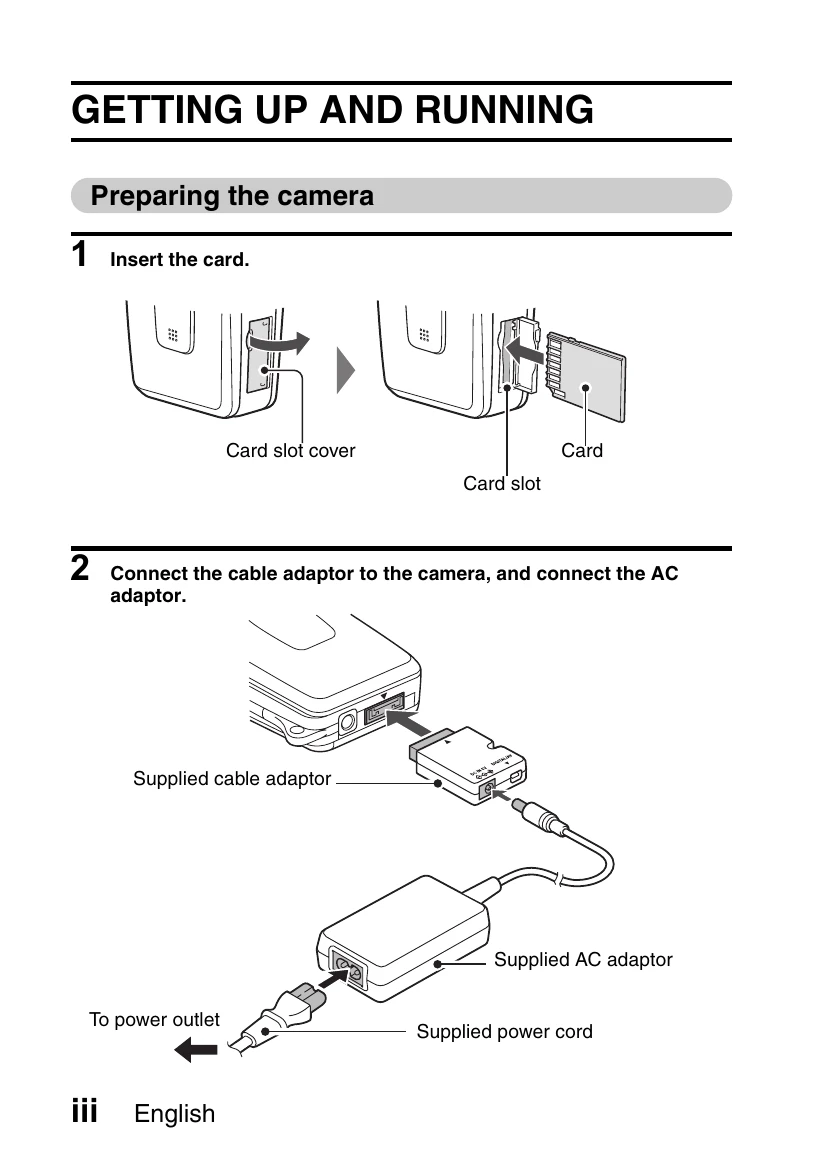
Preparing the camera

  1. Insert the card.
  2. Connect the cable adaptor to the camera, and connect the AC adaptor.

Shooting

Video clip recording

  1. Open the monitor unit, and press the ON/OFF button for at least 1 second to turn the camera on.
  2. Set the main switch to REC.
  3. Press the video clip recording button [ ].
    • Recording begins.
    • To stop recording, press the video clip recording button again.

Still image photography

  1. Open the monitor unit, and press the ON/OFF button for at least 1 second to turn the camera on.
  2. Set the main switch to REC.
  3. Press the still image shooting button [ ].
    • The image is captured.

Playback

Video clip playback

  1. Set the main switch to PLAY.
    • The display switches to the Playback Screen.
    • Toggle the SET button to the left or right to display the video clip you wish to play back.
    • Video clips are indicated by a video clip pattern along the top and bottom of the screen.
  2. Press the SET button.
    • Playback of the selected video clip begins.
    • When the main switch is moved to REC, the display changes to the Shooting Screen.

Still image playback

  1. Set the main switch to PLAY.
    • The display switches to the Playback Screen.
    • To view other images, toggle the SET button to the left or right.
    • When the main switch is moved to REC, the display changes to the Shooting Screen.

When you are finished using the camera...

Press the ON/OFF button for at least 1 second to turn the camera off.

Troubleshooting and error codes

Column 1 Column 2 Column 3 Column 4
Row 1 Data 1 Row 1 Data 2 Row 1 Data 3 Row 1 Data 4
Row 2 Data 1 Row 2 Data 2 Row 2 Data 3 Row 2 Data 4
Row 3 Data 1 Row 3 Data 2 Row 3 Data 3 Row 3 Data 4
Privacy Policy