Manual for VPC-FH1

Manual for VPC-FH1

Brand: SANYO

Category: Camcorder

Document Type: Manual

Language: EN
Uploaded: Aug. 10, 2025, 12:13 a.m.

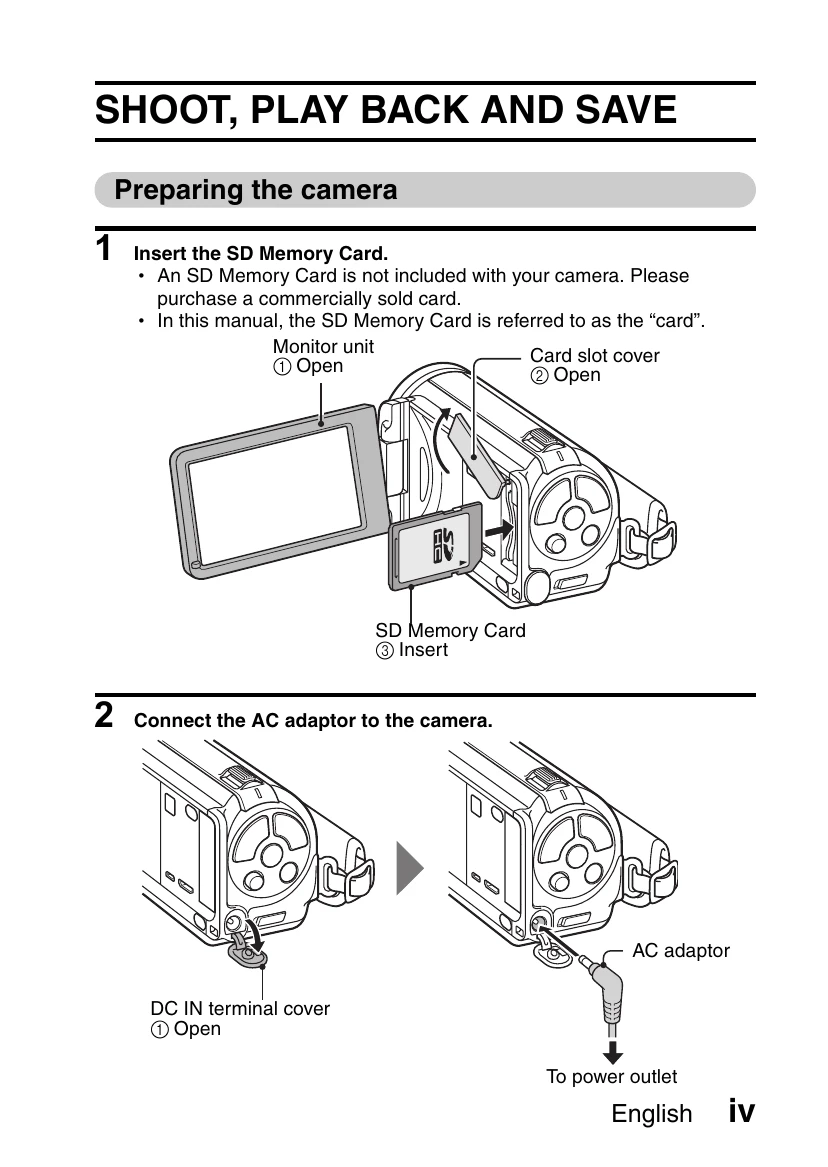
Preparing the camera:

  1. Insert the SD Memory Card.
  2. Connect the AC adapter to the camera.

Shooting:

  1. Press the ON/OFF button to turn the camera on.
  2. Press the [] button to begin recording a video clip, and press it again to end.
  3. Press the [] button to take a photo.

Playback:

  1. Press the REC/PLAY button.
  2. Select the image to play back using the SET button.
  3. Press the SET button to begin playback.

Turning off the camera: Press the ON/OFF button for at least 1 second.

Privacy Policy