Brand: SANYO
Category: Camcorder
Document Type: Manual
Language: EN
Brand: SANYO
Category: Camcorder
Document Type: Manual
Language: EN
Uploaded: Nov. 21, 2025, 9:25 p.m.
Sanyo Electric shall not be held responsible for any problems or damages resulting from improper use of the camera.
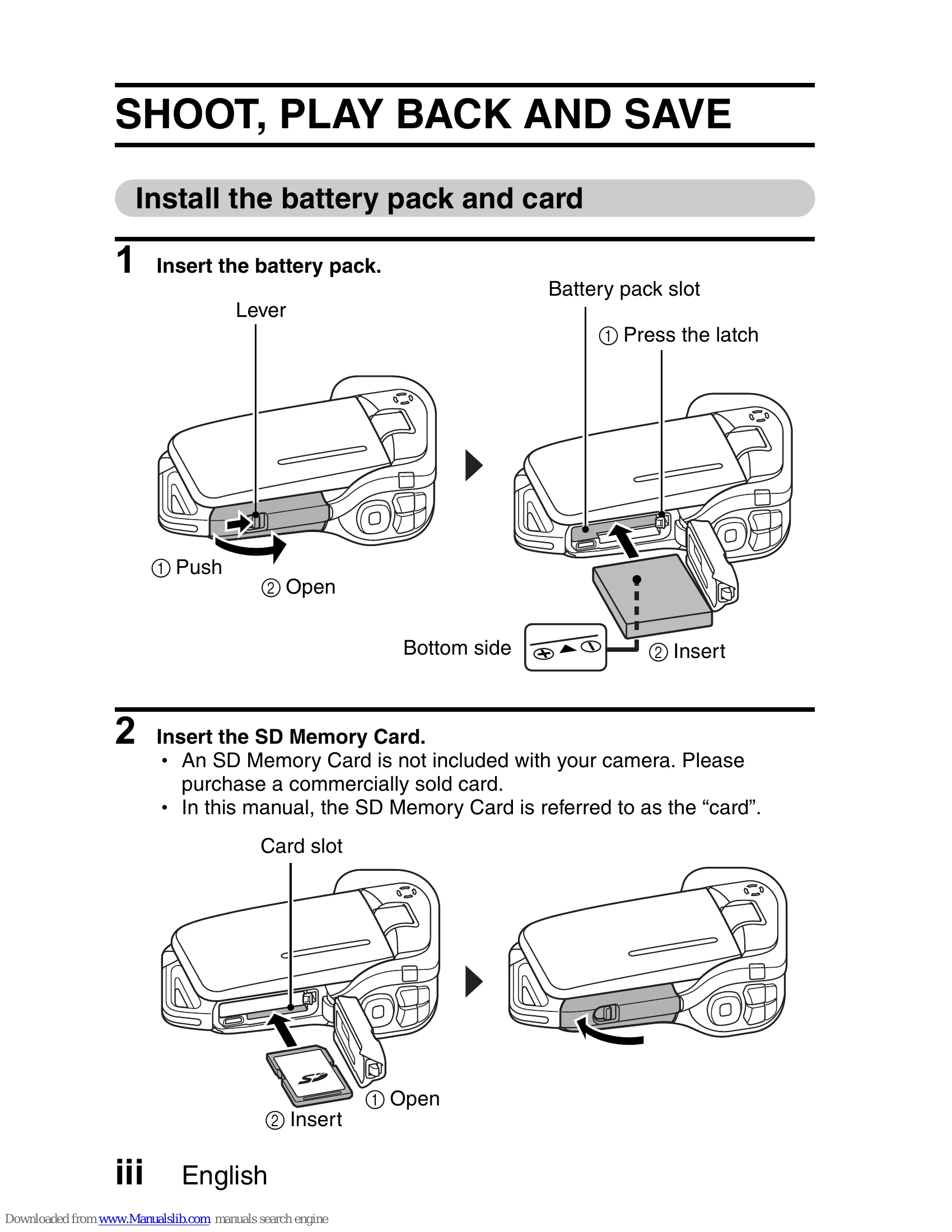
Install Battery and Card: Insert battery pack by pushing lever, opening cover, and inserting. Insert SD Memory Card by opening card slot cover and inserting the card.
Shooting: Open monitor unit, press ON/OFF for 1 sec to turn on. For video, press the record button. For still images, press the capture button.
Playback: Press REC/PLAY. Use arrow buttons to select clips/images. Press SET to play video. Press REC/PLAY to return to shooting screen.
Burning to DVD: Install software. Insert DVD-ROM. Install application. Set DVD-ROM, select program. Follow on-screen instructions. Copy data from camera to computer via USB cable.
Waterproof Use: Ensure compartment cover is sealed. Do not exceed 1.5m depth or 60 minutes. Avoid hot water and high pressure.
| HINT | CAUTION |
|---|---|
| Points giving some extended instructions or special points to pay attention to. | Points that require special attention. |