Brand: SANYO
Category: Camcorder
Document Type: Manual
Language: EN
Brand: SANYO
Category: Camcorder
Document Type: Manual
Language: EN
Uploaded: Nov. 21, 2025, 9:22 p.m.
None
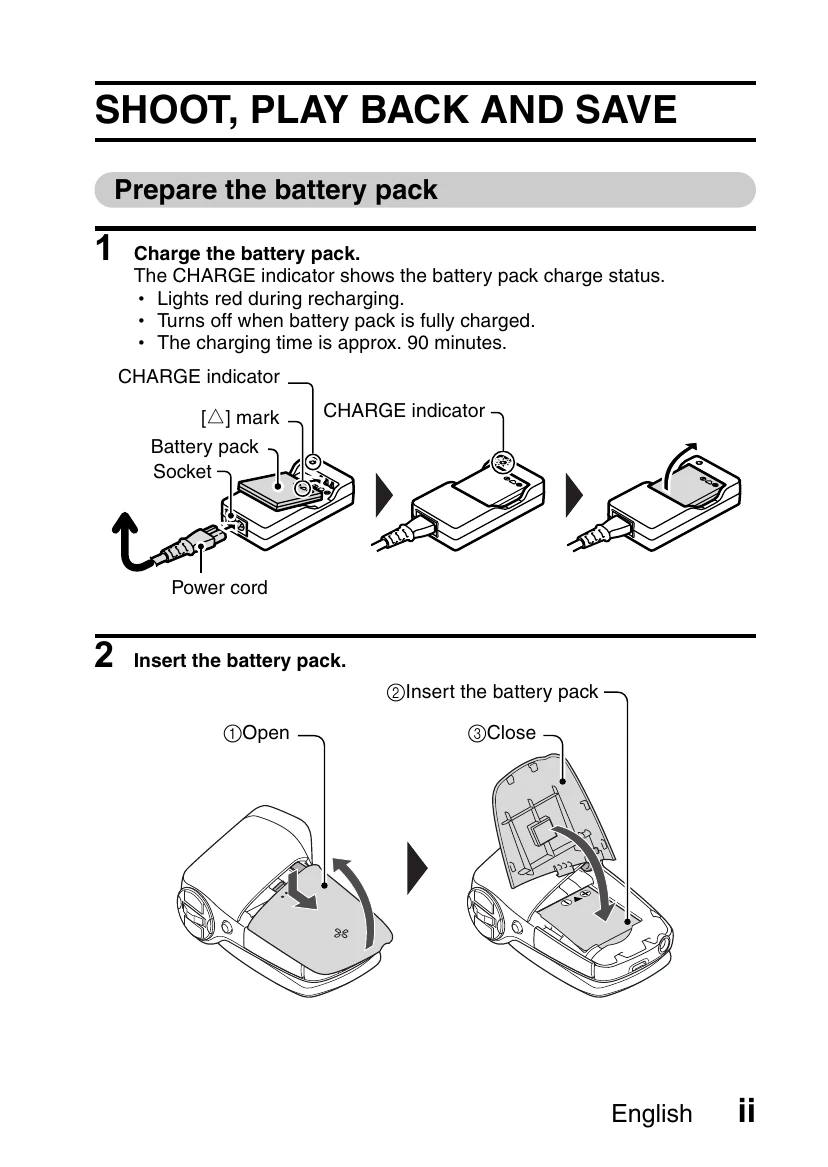
Prepare the battery pack: Charge the battery pack until the CHARGE indicator turns off (approx. 90 minutes). Insert the charged battery pack into the camera.
Shooting: Open the monitor unit and press the ON/OFF button for at least 1 second to turn the camera on. To record a video clip, press the [] button to start and press it again to end. To take a photo, press the [] button.
Playback: Press the REC/PLAY button. Toggle the SET button to the left or right to display the desired image. Press the SET button to start video clip playback.
Copy files to computer: Connect the camera to the computer using the USB interface cable. Turn on the computer and camera. Select "COMPUTER" on the camera's USB Connection Screen and press the SET button. Select "CARD READER" and press SET. The camera will be recognized as a drive. Follow on-screen prompts to copy files. To dismount, safely remove hardware from the task tray.
| Color | Multi-indicator status | Camera status |
|---|---|---|
| Green | Lit | Connected to computer or printer (USB) |
| Flashing | Power save mode activated | |
| Red | Slow | During self-timer operation |
| Flashing | Accessing internal memory/card data | |
| Orange | Lit | Connected to TV/ VIDEO (AV) |