Brand: SANYO
Category: Camcorder
Document Type: Manual
Language: EN
Brand: SANYO
Category: Camcorder
Document Type: Manual
Language: EN
Uploaded: Aug. 10, 2025, 12:14 a.m.
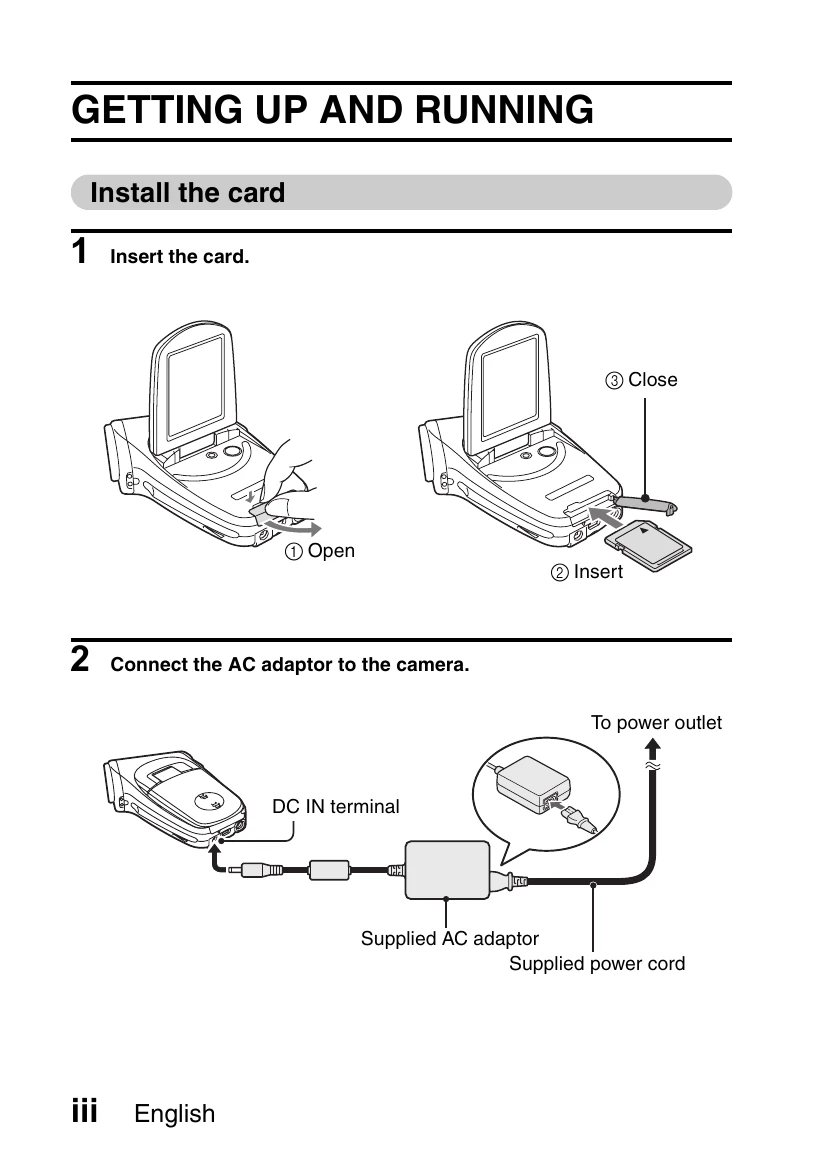
1. Insert the memory card into the slot.
2. Connect the AC adapter to the camera and then to a power outlet.
1. Open the monitor unit and press the ON/OFF button for at least 1 second.
2. Set the main switch to REC.
3. Press the video clip recording button to start recording. Press again to stop.
1. Open the monitor unit and press the ON/OFF button for at least 1 second.
2. Set the main switch to REC.
3. Press the still image shooting button to capture the image.
1. Set the main switch to PLAY.
2. Use the SET button to select and play video clips.
1. Set the main switch to PLAY.
2. Use the SET button to view still images.
Press the ON/OFF button.
| Color | Multi-indicator status | Camera status |
|---|---|---|
| Green | Lit | Connected to computer or printer (USB) |
| Flashing | Power save mode active | |
| Red | Lit | Charging |
| Flashing | Slow (overcharged or defective battery) Battery charge error | |
| Fast During self-timer photography | ||
| Orange | Lit | Connected to TV/VIDEO (AV) |