Manual for MCD-Z22L

Manual for MCD-Z22L

Brand: SANYO

Category: Audio

Document Type: Manual

Language: EN
Uploaded: Nov. 21, 2025, 7:33 p.m.

Warranty Information

The guarantee is for 12 calendar months from the date of sale for faulty material or workmanship.

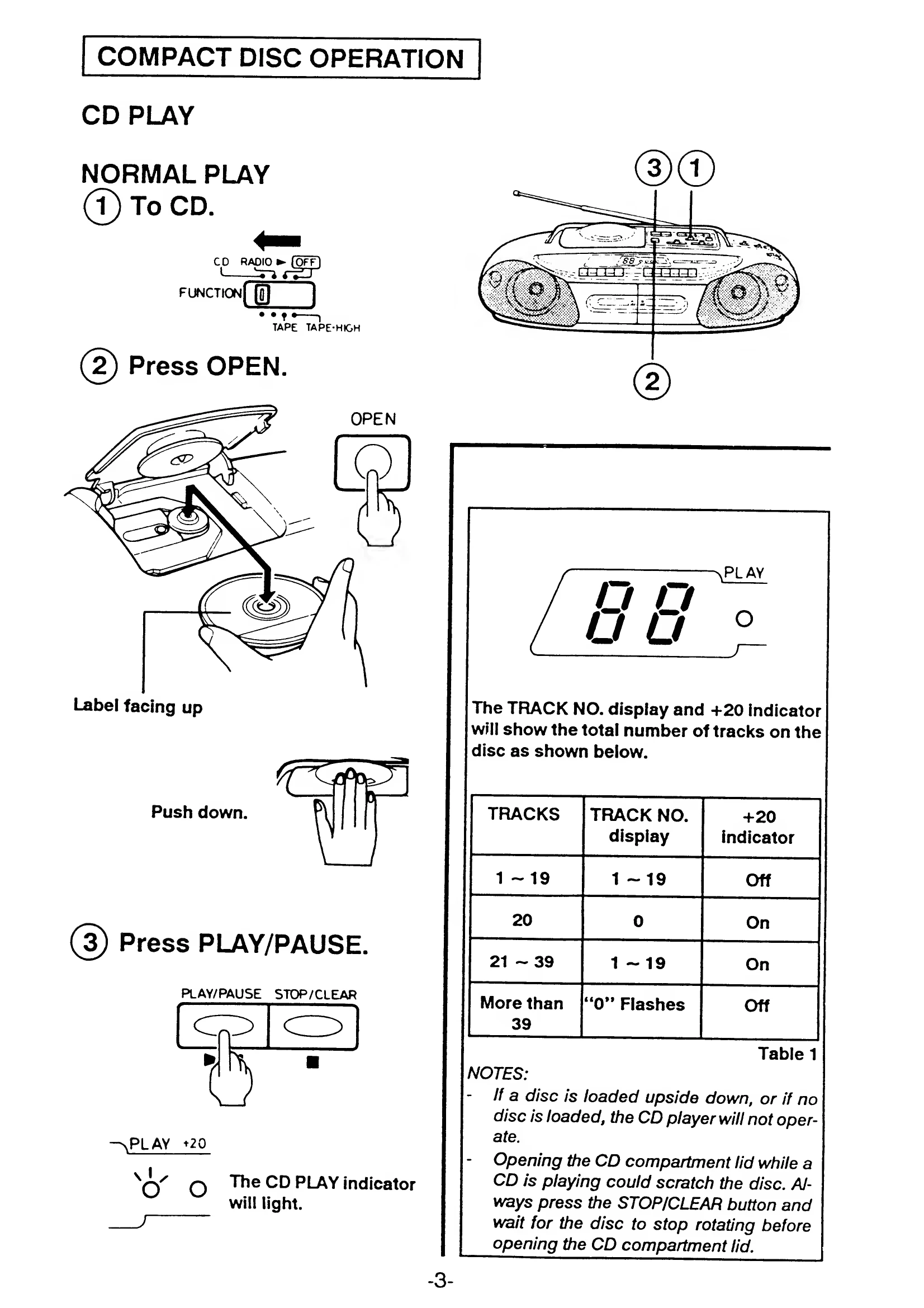
CD Play: Insert disc with label up. Press OPEN, place disc, close lid, then press PLAY/PAUSE. Use STOP/CLEAR to stop. Use SKIP/SEARCH to move between tracks. Use PLAY/PAUSE to pause and resume. BASSXPANDER adjusts bass. Use TONE and VOLUME to control sound. Programmed play allows memorizing up to 16 tracks. Repeat play can be set for single track or programmed sequence.
Radio Operation: Turn FUNCTION to RADIO. Select band (LW, MW, SW, FM). Tune using TUNING dial. Use FINE TUNING for SW. Switch FM MODE to STEREO or MONO.
Cassette Tape Operation: Turn FUNCTION to TAPE. Press STOP/EJECT, insert cassette, then press PLAY. Use STOP/EJECT to pause or eject. Use FFWD and REW to fast forward or rewind. Full automatic stop at tape end. Continuous playback uses both decks. Recording to Deck B from Radio or CD is possible using REC button.
Dubbing: Set FUNCTION to TAPE or TAPE-HIGH. Insert prerecorded tape in Deck A and tape for recording in Deck B. For synchro dubbing, press PAUSE on Deck B, then REC and PLAY on Deck A.

Troubleshooting and error codes

Problem No power - AC mains lead not connected.
- Batteries exhausted.
- Connect AC mains lead securely.
- Replace batteries.
Problem CD does not play - Disc inserted upside down.
- No disc inserted.
- Disc is dirty or scratched.
- CD compartment lid not closed properly.
- Insert disc with label up.
- Insert a disc.
- Clean or replace disc.
- Close lid securely.
Problem No sound or distorted sound - Volume set to minimum.
- Function not set correctly.
- Tape heads dirty.
- Tape is damaged.
- Adjust VOLUME.
- Select correct function (CD, RADIO, TAPE).
- Clean tape heads.
- Use a different tape.
Privacy Policy