Brand: SANYO
Category: Audio
Document Type: Manual
Language: EN
Brand: SANYO
Category: Audio
Document Type: Manual
Language: EN
Uploaded: Nov. 21, 2025, 9:10 p.m.
Sanyo Europe Ltd. guarantees the equipment against faulty material or workmanship for 12 calendar months from the date of sale.
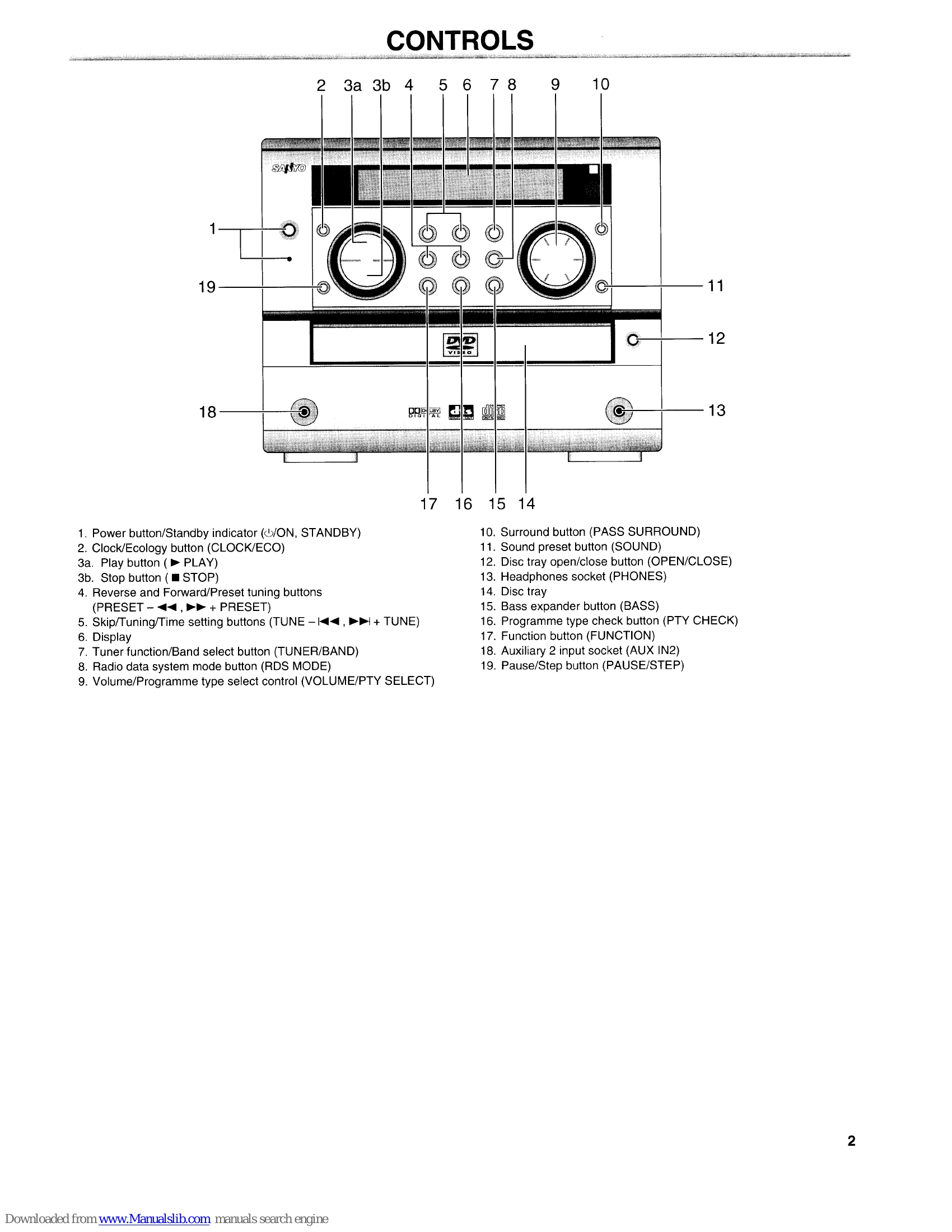
Press the /ON button. The unit will turn on and the "HELLO" message will appear. To turn off, press the /ON button again, and "GOOD-BYE" will appear.
Press the FUNCTION button to cycle through inputs like DVD/CD, TUNER, AUX IN1, AUX IN2.
Use the VOLUME control on the unit or the remote control (+/- buttons) to adjust the volume level.
Press the TUNER/BAND button to select FM or AM. Use the TUNE buttons for manual tuning or the PRESET buttons to select saved stations. Automatic tuning and presetting are also available.
Press OPEN/CLOSE to open the disc tray, place a disc with the label facing up, then press OPEN/CLOSE again to close. Press the PLAY button to start playback. Use PAUSE/STEP to pause and resume.
| SYMPTOM | POSSIBLE CAUSE | CORRECTIVE ACTION |
|---|---|---|
| No picture. | The wrong function is selected. | Select the correct function. |
| The TV is not set to receive signal from the unit. | Select the correct input function on the TV. | |
| No sound. | The wrong function is selected. | Select the correct function. |
| Volume control is set to minimum. | Turn up the volume. | |
| The playback picture is poor. | An unplayable disc is loaded. | Load a playable disc. (Check the disc logo, type, colour system and regional code.) |
| " " appears on the TV screen. | The selected function does not operate on the disc now. | The feature or action cannot be completed at this time because: The feature is not available at the moment. The DVD software restricts it. The DVD software does not support the feature (e.g., angles). |
| The DVD/CD player does not start play. | No disc is loaded. | Load a disc. |
| An unplayable disc is loaded. | Load a playable disc. (Check the disc logo, type, colour system and regional code.) | |
| The disc is loaded with the label side down. | Load the disc on the disc tray correctly. | |
| The disc is dirty. | Clean the disc or replace it. | |
| "PARENTAL" is set. | Cancel the parental lock function or change the rating level. Reset it after play. | |
| The operation or display is not normal. | The memory must be reset. | 1. Disconnect the mains lead. 2. Press the RESET button (bottom of the unit) for at least 30 seconds. 3. Reconnect the mains lead. 4. Resume operation. |
| The remote control does not work properly. | The batteries in the remote control are weak, or installed incorrectly. | Check the battery polarity (+ or -). Replace the batteries. |
| The remote control is not aimed at the remote sensor window. | Aim the remote control at the remote sensor window. |