Manual for SM-R177

Manual for SM-R177

Brand: SAMSUNG

Category: Other

Document Type: Manual

Language: EN
Uploaded: Nov. 21, 2025, 8:29 p.m.

Manual Publish Date: 2021-08-01

Warranty Information

Refer to the manual for warranty information related to your Samsung Galaxy Buds2.

Basics

  • Read me first: Ensure safe and proper use. Descriptions may vary by region or software.
  • Precautions: Avoid excessive loud sounds, prolonged skin contact, and use in dry environments. Do not use while driving.
  • Device Layout: Familiarize yourself with the earbud (ear tip, speaker, touch sensor, microphone) and charging case (charger port, wireless coil, indicator lights).
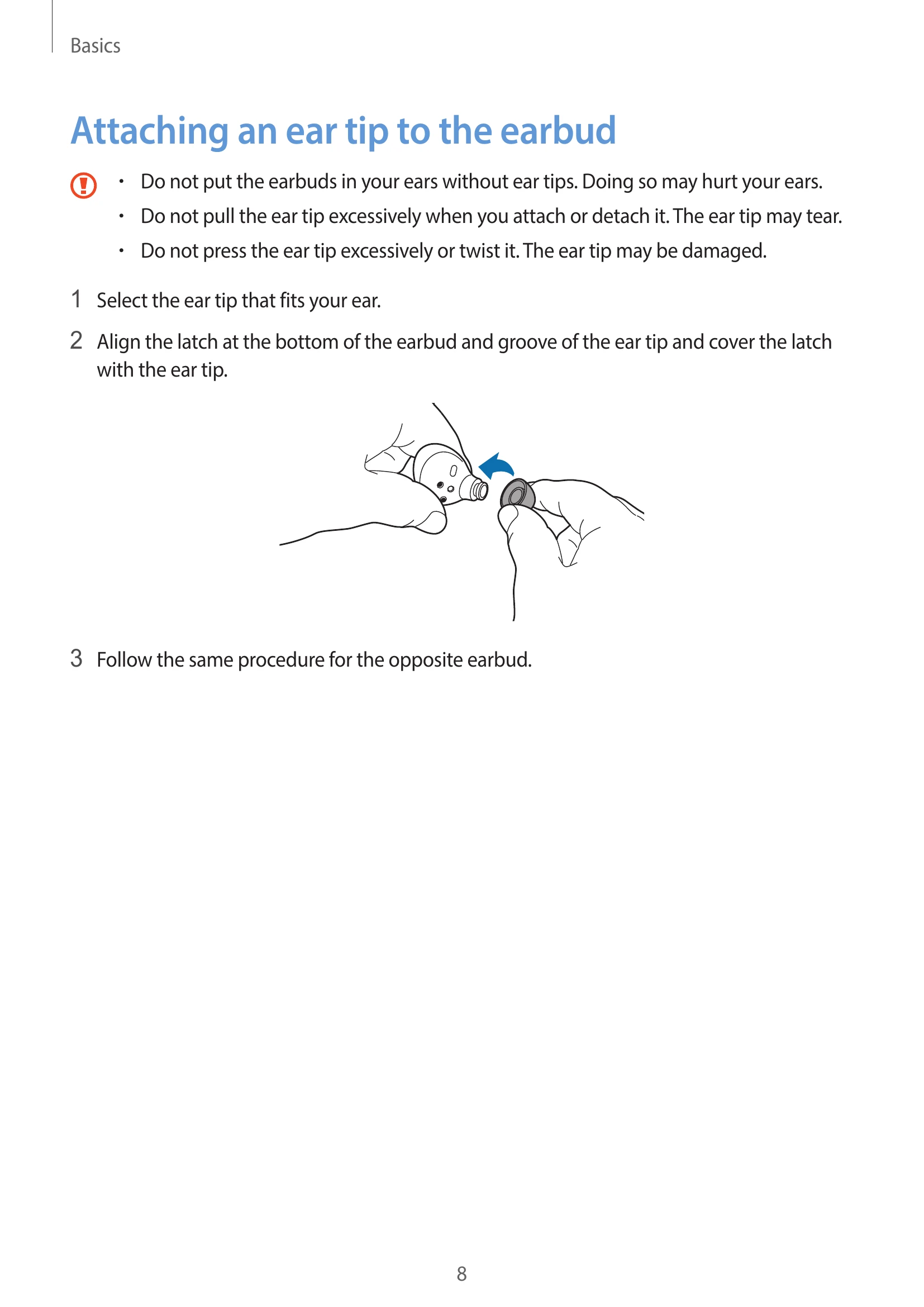
  • Attaching Ear Tip: Select the correct ear tip and align it with the earbud latch.
  • Charging: Use wired or wireless charging with Samsung-approved accessories. Fully charge before first use.
  • Battery Indicators: Understand the color codes for earbud and charging case battery status.

Using the Earbuds

  • Connecting: Install the Galaxy Wearable app. Connect to a mobile device via Bluetooth, with specific steps for Samsung and non-Samsung devices.
  • Wearing: Adjust earbuds for a comfortable fit. Be aware of magnets and their effects on medical devices.
  • Functions: Learn about touch controls (play/pause, next/previous track), noise controls (ANC, ambient sound), Bixby, equalizer, and call features.

Galaxy Wearable App

  • Status & Customizing: View battery status, customize settings like noise controls, touch controls, equalizer, and read notifications aloud.
  • Connections: Switch between mobile devices, manage connections, and reconnect temporarily disconnected earbuds.
  • Earbud Fit Test: Ensure optimal sound and noise canceling by testing the fit.
  • Labs & Reset: Access features like Gaming mode and reset earbuds settings.
  • Accessibility: Configure settings for active noise canceling with one earbud and left/right sound balance.
  • Software Update: Update earbuds' software via FOTA.
  • About Earbuds: View legal, software, and battery information.
  • Find My Earbuds: Locate misplaced earbuds using the SmartThings Find feature.
  • Tips & User Manual: Access quick tips and the full user manual.

Appendix

  • Troubleshooting: Solutions for earbuds not working, Bluetooth connection issues, battery charging problems, and audio quality issues.
  • Management: Basic maintenance, cleaning of microphone, speaker, air duct, and charging contacts.
  • Restarting & Coupling: Restart earbuds if unresponsive. Couple a new earbud with an existing one.

Troubleshooting and error codes

Issue Solution
Your earbuds do not work
  • Charge the battery completely.
  • Ensure the earbud's touch-sensitive sensor makes contact with your ear. Remove and reinsert earbuds.
  • If touch feature is unresponsive, insert earbuds into the charging case (not discharged), close case, and remove after 7+ seconds.
Bluetooth device cannot locate your earbuds
  • Close and open charging case to enter Bluetooth pairing mode.
  • Ensure earbuds and device are within the 10m connection range, with no obstacles.
A Bluetooth connection is not established or your earbuds and the mobile device are disconnected
  • Ensure no obstacles between devices.
  • Ensure the latest version of the Galaxy Wearable app is installed.
  • Ensure earbuds and Bluetooth device are within the 10m connection range.
  • Restart the mobile device and relaunch the Galaxy Wearable app.
  • If only a single earbud is connected, restart the earbuds.
The battery does not charge properly (For Samsung-approved chargers)
  • Ensure charging contacts of earbuds and case are in contact.
  • Ensure the charger is properly connected to the charging case.
  • Wipe dirty charging contacts with a dry cloth and try charging again.
The charging time and the battery life is different between the earbuds
  • Charging time may differ between earbuds even if started simultaneously.
  • Charging time and remaining battery may differ due to different inner components.
The battery depletes faster than when first purchased
  • Cold/hot temperatures can reduce charge.
  • Battery is consumable and useful charge shortens over time.
  • Store earbuds in charged case when not in use to prevent drain.
You cannot hear others speaking Adjust the volume on the connected mobile device.
Sound echoes during a call Adjust volume on the connected mobile device or move to another area.
Sound is emitted from the connected mobile device, not the earbuds, during a call
  • Check if earbuds are worn properly.
  • Remove and reinsert the earbuds.
Audio quality is poor
  • Ensure earbuds are away from electromagnetic waves.
  • Ensure earbuds and Bluetooth device are within 10m range.
  • Adjust the connected device's volume.
Your earbuds sound comes slower than the screen when playing videos and games This is a known limitation when connected to a mobile device.
The noise controls mode does not work well
  • Wear both earbuds and activate ANC. Check activation in Galaxy Wearable app.
  • Check and clean microphone holes for foreign materials.
  • Ensure the latest software version is installed.
Your Galaxy Buds2 are hot to the touch This is normal for extended use. If overheating persists, contact a Samsung Service Center.
A small gap appears around the outside of the Galaxy Buds2 This is a necessary manufacturing feature; minor rocking/vibration may occur and the gap may expand slightly over time due to friction.
Privacy Policy