Manual for SCX-3405

Manual for SCX-3405

Brand: SAMSUNG

Category: Other

Document Type: Manual

Language: EN
Uploaded: Nov. 21, 2025, 8:46 p.m.

BASIC

This guide provides information concerning installation, basic operation and troubleshooting on windows.

ADVANCED

This guide provides information about installation, advanced configuration, operation and troubleshooting on various OS environments.

Some features may not be available depending on models or countries.

Troubleshooting and error codes

Issue Possible Solutions
The machine does not print.
  • Open the print queue list and remove the document from the list (see "Canceling a print job" on page 54).
  • Remove the driver and install it again (see "Installing the driver locally" on page 30).
  • Select your machine as your default machine in your Windows (see "Setting your machine as a default machine" on page 228).
A paper jam has occurred.
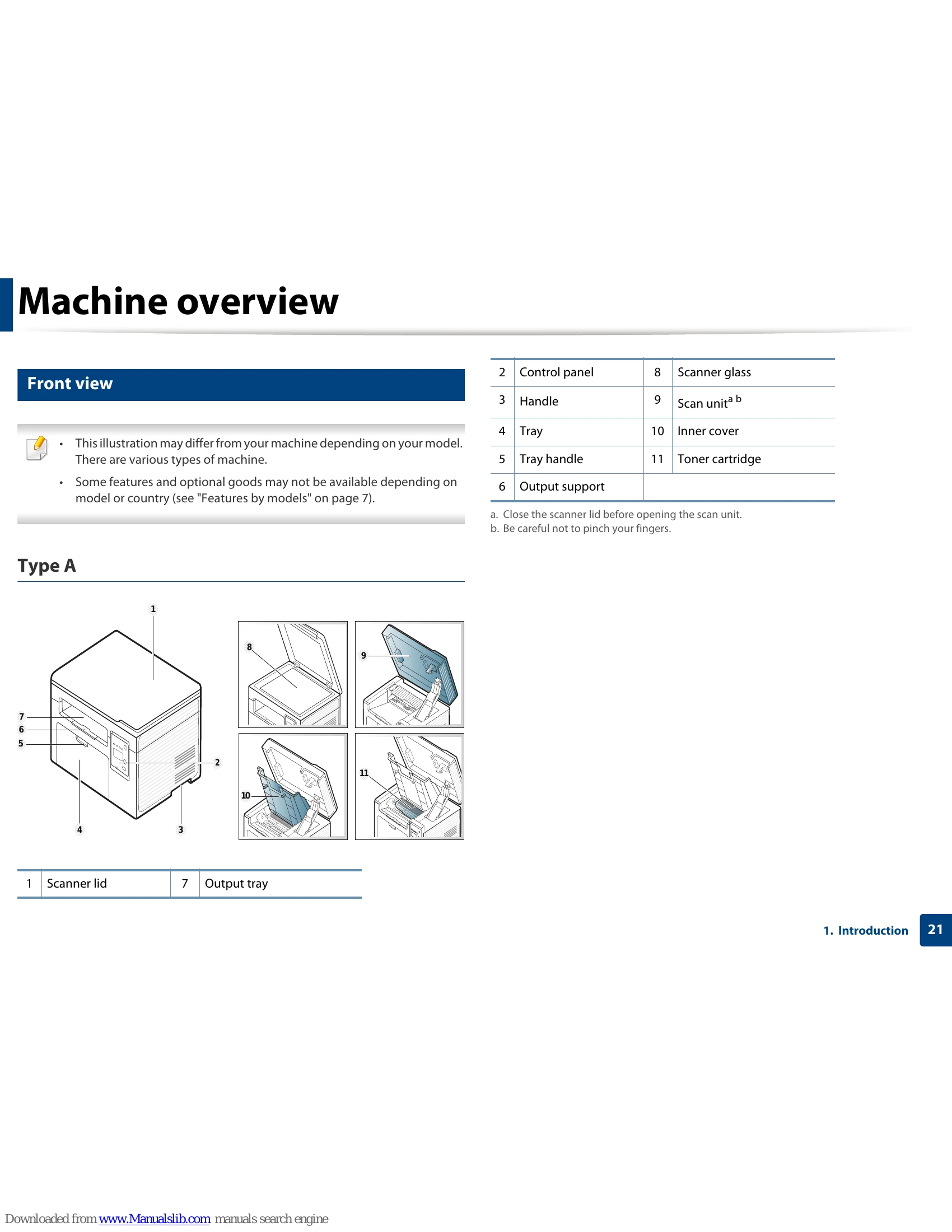
  • Open and close the scan unit (see "Front view" on page 21).
  • Check the instructions on removing jammed paper in this manual and troubleshoot accordingly (see "Clearing paper jams" on page 95).
Printouts are blurry.
  • The toner level might be low or uneven. Shake the toner cartridge (see "Redistributing toner" on page 75).
  • Try a different print resolution setting (see "Opening printing preferences" on page 55).
  • Replace the toner cartridge (see "Replacing the toner cartridge" on page 77).
The status LED flashes or remains constantly on.
  • Turn the product off and on again.
  • Check the meanings of LED indications in this manual and troubleshoot accordingly (see "Understanding the status LED" on page 99).
Where can I purchase accessories or supplies?
  • Inquire at a Samsung distributor or your retailer.
  • Visit www.samsung.com/supplies. Select your country/region to view product service information.
Where can I download the machine's driver?
  • You can get help, support application, machine drivers, manuals, and order information from the Samsung website, www.samsung.com > find your product > Support or Downloads.
Privacy Policy